

More attachments don’t automatically make a stronger application. Managing attachments for job applications starts with following the posting’s instructions: submit the requested documents, keep your CV separate unless the employer asks you to combine files, and use PDF for online CV submissions to preserve the layout. File type and size limits vary by application system, so follow the requirements shown for each posting.
It’s easy to lose track of versions or attach documents that don’t support a particular role. A clear, tailored file set helps you submit the right information confidently and makes each application easier to manage.
Learn which file types and size limits to look for, how restrictions can differ for applicants and recruiters, and how to name, organize, and select documents for each position. You’ll also learn when to keep certificates and other supporting documents separate, and when a posting calls for combining them with your CV. Use these steps to build a reliable process that keeps each application focused, accurate, and ready to submit.
Key Takeaways
- Check each application form’s accepted formats and file-size limits before preparing your attachments.
- Account for the different constraints applicants may face when uploading files and recruiters may face when handling them.
- Name and describe each document clearly so its purpose is easy to recognize.
- Build a focused file set for each posting, keeping relevant materials and application notes organized together.
Supported file types and size limits
A file type is the format used to save a document, such as PDF. For online applications, submit your CV as a PDF to preserve its fonts, spacing, and layout. You can also save a cover letter as a PDF when the form accepts it. Check the formats listed beside each upload field, since an application system may accept only selected file types.
An applicant upload limit is the maximum file size or number of files a form accepts from a candidate. The form usually displays its size limit or an error if a file is too large. Check the limit before uploading, then reduce the file size or use another accepted format if needed. Don’t assume the CV and cover letter must be combined: upload them separately when the form provides separate fields.
A recruiter attachment limit is the restriction on files hiring staff can upload or handle in their recruitment system. Recruiter-side rules can differ from applicant upload rules, so being able to submit a file doesn’t tell you what recruiters can upload. For example, a recruiter’s system may have separate fields for interview notes and candidate documents. These settings depend on the system in use.
An attachment limit caps how many files an application can include. Treat each requested item, such as a CV, cover letter, or certificate, as a separate attachment unless the posting instructs you to combine documents. Merge qualifications with your CV only when requested. Otherwise, keep supporting documents separate and leave out unrequested files.
To attach a CV and cover letter online, select each file in the matching upload field, then check the filenames before submitting. For an email application, attach the requested documents individually, use clear filenames, and follow the posting’s instructions for the recipient and subject line. Don’t switch to email if the posting requires an online form.
Privacy risk means exposing personal information to an unintended recipient or including details the application doesn’t need. Before attaching a file, open it, review its contents, and confirm the recipient or portal. Remove unrelated personal details, and avoid sending sensitive records unless the posting specifically requests them.
File-type restrictions for applicants and recruiters
File-type restrictions are the formats and upload conditions set by an application system. Applicants and recruiters may face different requirements, so follow the instructions for your role.
Accessible and ATS-Friendly Attachments
An accessible, ATS-friendly attachment is a document that people and hiring software can read clearly. For online applications, submit your CV as a PDF to preserve its fonts, spacing, and layout.
Use selectable text rather than a scanned page when preparing the PDF. Keep section headings clear and use a straightforward reading order, such as contact details, experience, and education. These choices help people and systems process the content more easily.
Before uploading, open the file and check that you can select its text. Make sure the layout is readable on screen and no content is cut off. Follow the portal’s accepted-format instructions, even if your PDF opens correctly on your device.
For recruiters, file restrictions depend on the recruitment system and its upload fields. A format accepted for a candidate’s CV may not meet the requirements for recruiter-added documents. Keep applicant and recruiter instructions distinct; don’t assume that formats accepted for one role apply to the other.
Handling Rejected Attachments
A rejected attachment is a file the application portal won’t accept. First, read the error message and compare your document’s format and size, along with the portal’s file-count limit.
If the portal rejects a CV, save it as a PDF and try again if PDF is accepted. If it rejects a PDF, use a format listed by the portal instead. Reduce the file size if it exceeds the displayed limit, while keeping the text readable.
Check the filename for unusual characters, then select the correct document again. Confirm that each file appears in the intended field before continuing. Don’t email attachments as a workaround if the posting directs applicants to an online portal.
If the portal still rejects the file, follow its support or application instructions. Keep the error message and affected filename handy when reporting the issue. This gives the support team a clear starting point without sending duplicate or unrelated documents.
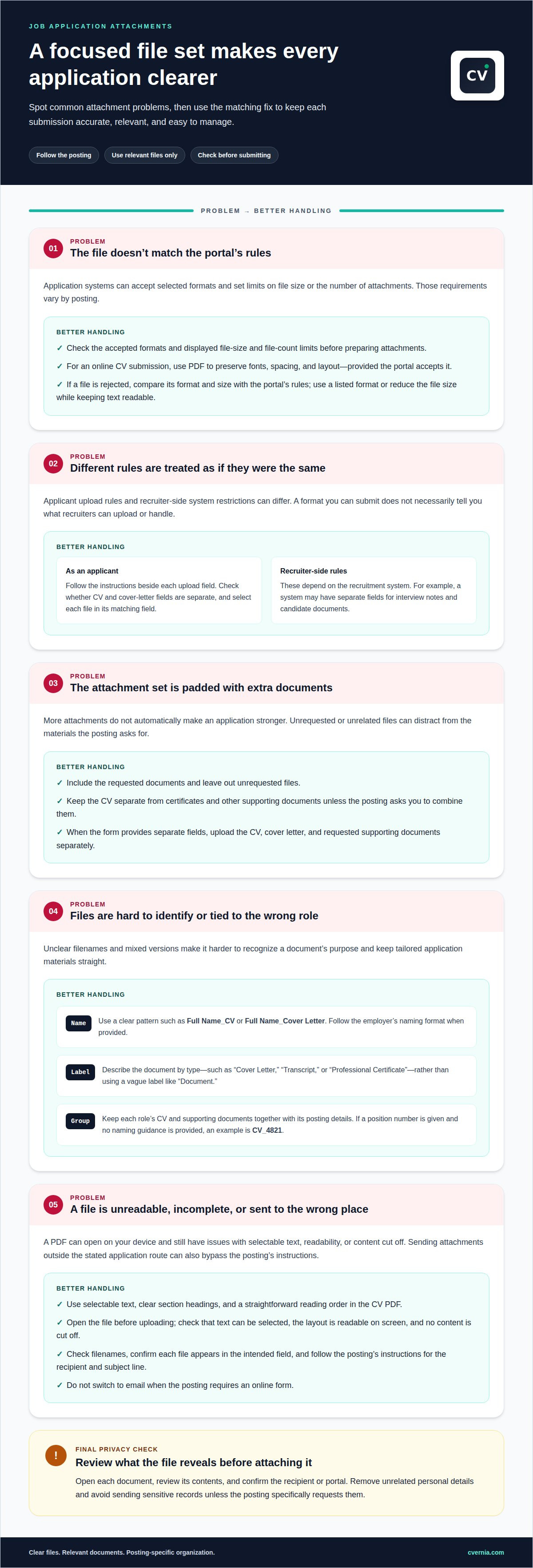
Organizing job application documents by posting
A posting-specific document set contains files selected for one job opening. Start by saving the posting’s title, employer, and position number with your application records. Keep each role’s CV and supporting documents together so you can distinguish tailored versions later. For example, store a financial analyst application separately from materials for an unrelated role.
Use filenames that identify both the applicant and the document. A clear pattern is “Full Name_CV” or “Full Name_Cover Letter.” If the employer provides a naming format, follow it. When the posting gives no naming guidance and includes a position number, use the document type followed by that number. For example, “CV_4821” makes the file’s purpose and posting easier to recognize.
Identify each attachment by its document type. In an application form’s description field, label a file “Cover Letter,” “Transcript,” or “Professional Certificate,” rather than using a vague label such as “Document.” Clear labels help distinguish files when a posting requests several supporting items. Keep the CV as one file, separate from certificates and other documents, unless the posting asks you to combine them.
Should you combine application documents into one PDF or upload separate files? Upload the CV, cover letter, certificates, and other requested documents separately when the form provides individual fields. Merge documents only when the posting specifically requires a combined file, such as qualifications attached with the CV.
- Posting record: Save the employer, role title, and position number together.
- CV: Keep it separate unless the employer requests a combined document.
- Supporting files: Label each by type, such as “Transcript” or “Certificate.”
- Final selection: Match each filename and attachment description to the specific posting.
Before submitting, compare the selected filenames with the posting’s document requirements. Remove files intended for another employer or role. This final check keeps each application focused, clearly labeled, and aligned with the opening’s instructions.
Selecting relevant files for each position
A relevant application file directly supports a requirement in the job posting. Read the posting first, then list the required documents before choosing attachments. Look for explicit requests for a CV, cover letter, qualifications, transcripts, or work samples. Match each file to a stated requirement instead of attaching every document you have prepared.
The posting determines whether qualifications belong in your submission. If it requests certificates or other qualifications, include the requested proof. If it doesn’t, submit only your CV and bring certificates to the interview as proof. This keeps your application focused while leaving you ready to present supporting records when relevant.
Keep the CV as one file, separate from certificates and other documents. Combine qualifications with your CV only when the posting asks you to. For example, if an application requests a CV and a certificate, submit them as separate files unless its instructions call for one combined document. Follow the form’s fields and file instructions.
A role-specific CV emphasizes experience and skills that match the position. For a project management role, highlight relevant project work; for an analyst role, foreground applicable analysis experience. Keep the information accurate, and don’t add credentials or experience you don’t have. A cover letter should address the role rather than repeat a generic message.
Use this selection check before submitting:
- Match each attachment to a document requested in the posting.
- Include qualifications when the employer asks for them.
- Leave unrequested certificates out of the application package.
- Keep the CV separate unless the posting requests a combined file.
- Confirm each file belongs to this specific position.
For a final review, compare the files in the upload form with the posting’s document list. Remove unrelated records, such as a certificate for a different field. A focused set makes it easier to see how each attachment supports your application.
CVernia: Interview Notes & Attachment Management
CVernia helps you keep application attachments and interview notes connected to your job search. Its Interview Notes & Attachment Management features support a more organized record of documents and interview details, while the Application Tracking Dashboard helps you follow your applications. Use these tools when separate files, role-specific versions, and interview notes are becoming difficult to manage across postings.
CVernia’s Career Application Management Platform also includes CV Compatibility & ATS Analysis, helping you review how your CV aligns with a job description. Keep each application’s materials organized, and return to relevant notes as you prepare for next steps. If you’d like support managing your application records, contact CVernia to learn more about its platform.
Make Every Application Ready for Its Next Step
A clear attachment system can simplify more than one submission. It helps keep each application’s materials aligned as your search develops, making it easier to revisit a role, refine your approach, and prepare for what comes next. Treat managing attachments for job applications as part of a consistent, role-focused application process.
To bring your application materials together, use CVernia’s Career Application Management Platform for tailored CV and cover letter creation, plus CV Compatibility & ATS Analysis. These tools help you prepare materials that reflect your target role and review their alignment with a job description.
Contact CVernia for application help and take your next step with greater clarity. Your experience deserves a focused presentation, and you can shape each application with care and confidence.
Frequently Asked Questions
What documents should I attach to a job application?
Attach the documents the posting requests, usually a CV and, when requested, a cover letter. Add transcripts, certificates, or awards when the employer asks for qualifications or supporting proof. If a role requests a portfolio or questionnaire, include it in its designated field. If the posting asks only for a CV, leave out unrelated records that distract from your experience.
How should I name and organize job application attachments?
Organize files in a separate folder for each employer and role, then keep submitted versions together. Use names that distinguish the document and role, such as “Jordan Lee_Product Analyst_CV.” Store a brief note beside the files recording which version you sent and any requested follow-up. This makes it easier to retrieve the right materials if the employer contacts you later.
What file formats and size limits do employers accept for application attachments?
Employers set accepted formats and maximum file sizes through each application portal, so there’s no single limit for every opening. Read the upload field’s instructions and follow its listed formats and limits. CVernia accepts PDF, DOC, and DOCX uploads. A recruiter’s system may have separate file controls, so applicant upload rules don’t define recruiter limits.
How do I tailor attachments for each job application?
Tailor attachments by matching each requested item to evidence relevant to the role. For example, connect a project-management requirement with a CV bullet describing a real project, and include a certificate only if requested. Leave out material that supports a different career path. Keep every claim accurate, and use the cover letter to explain why your experience fits the opening.


