

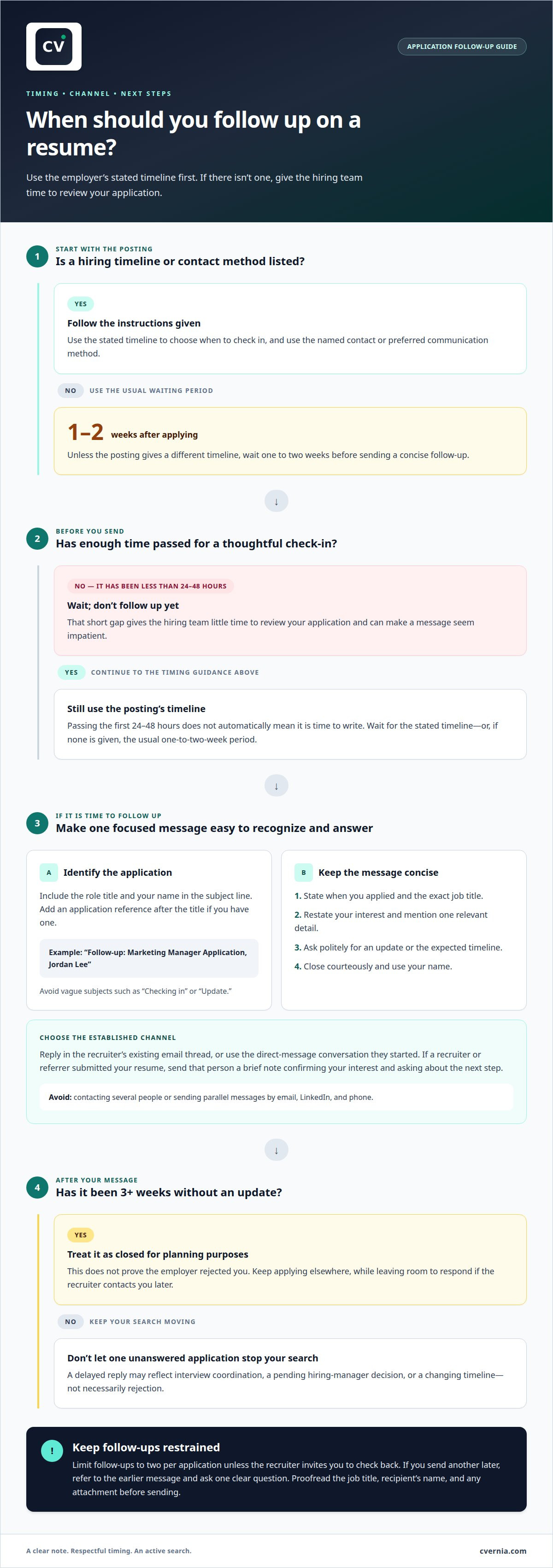
Waiting can be the more professional move. In most cases, follow up one to two weeks after applying; knowing when to follow up after submitting a resume starts with giving the hiring team time to review it. If the job posting gives a hiring timeline, use that to guide your timing.
It’s natural to want a quick response, especially when a role feels like a strong fit. A thoughtful follow-up can reinforce your interest, but contacting the hiring team too soon or too often may undermine the impression you want to make.
Learn when to follow up after submitting a resume, how to write a clear subject line, and what to include in a concise, professional message. You’ll also learn why recruiters may not respond and which common mistakes to avoid, so you can stay organized and keep moving while you wait.
Key Takeaways
- Match your follow-up timing to the job posting and the pace of the search rather than using the same schedule for every role.
- Make your subject line easy to recognize by connecting it clearly to the position and your application.
- A delayed or missing reply may reflect the hiring process, so keep your message professional and continue managing your search.
- Avoid repeated or rushed messages; a focused follow-up and organized application tracking help you stay prepared.
1. How do you write a strong subject line for a follow-up email?
Make your subject line specific enough for a recruiter to identify your application quickly. Include the role title and your name, such as “Follow-up: Marketing Manager Application, Jordan Lee.” If you have an application reference, add it after the title. Avoid vague subjects like “Checking in” or “Update,” which don’t identify the position.
Unless the posting gives a different timeline, send a concise email after the usual one-to-two-week waiting period. Open with the date you applied and the exact job title. Then restate your interest, mention one relevant detail, and politely ask whether there’s an update. For example: “I remain interested in the Marketing Manager role, particularly its focus on customer research. I’d appreciate any update you can share about the hiring timeline.”
Should you follow up after a referral or recruiter submits your resume? Yes. Send that person a brief message to confirm your interest and ask about the next step. Mention the role and thank them for sharing your application, without asking them to pressure the hiring team.
Use the channel already established: reply to the recruiter’s email thread, or send a direct message if they contacted you there. Keep a LinkedIn message as brief as an email and clearly identify the role. Avoid contacting several people through email, messaging, and phone at once.
A simple structure keeps your email professional: “Hello Sarah, I’m following up on my application for Marketing Manager, submitted on October 12. I’m still interested because of the company's recent expansion into international markets. Could you share any update on the process or expected timeline? Thank you, Jordan Lee.” Be sure to customize these example details for your specific situation and keep the tone courteous.
If you email a recruiter, you can attach the resume and cover letter you submitted with your original application through CVernia or another portal. Use clear filenames, such as “Jordan-Lee-Resume,” and don’t add new materials unless requested. A focused subject line, brief context, and direct question make your follow-up easy to understand and answer.
2. Why might a recruiter not respond to your follow-up?
A quiet inbox doesn’t always mean rejection. A recruiter may be coordinating interviews, waiting for a hiring manager’s decision, or reviewing applications before sharing updates. An internal discussion, for example, can delay a reply even after your message reaches the right person. The hiring process may also change, leaving recruiters without a firm timeline to share.
Your message may also miss its intended audience. A company portal application may be handled by a recruiting team rather than the person named in the job posting. A general inbox or automated, no-reply address may not accept responses. If a recruiter or hiring-team member sends you an update, use that conversation to ask for feedback. A no-reply address isn’t a useful place to ask a question.
After 3+ weeks without an update, treat the opportunity as closed for planning purposes and continue applying elsewhere. This doesn’t prove the employer has rejected you, but it prevents one unanswered application from stopping your search. Keep your next steps moving while leaving room to respond if the recruiter contacts you later.
Start with the job posting to find the right recruiter. Look for a named contact or application instructions, then use the company’s careers page to identify its recruiting team. If a recruiter has already contacted you on LinkedIn or by email, reply in that existing thread. A relevant contact is more useful than sending the same message to several employees.
Before following up again, review the original posting and your application confirmation for a stated timeline or contact method. Check that your message went to a monitored address and that the role is still open. If the recruiter gives you a timeline, follow it. If not, record the date of your message and focus on other applications. This keeps your search active without treating silence as a definite answer.
3. Follow-up mistakes to avoid
Don’t follow up within 24 to 48 hours of submitting your resume. That short gap gives the hiring team little time to review your application and can make your message seem impatient. For example, if you applied Monday, avoid sending a “Have you reviewed my resume?” email on Tuesday. Give the process time to move before asking for an update.
Read the job posting before choosing when to follow up. If it says applicants will hear back after a stated period, respect that timeline rather than sending a message early. If interviews begin after applications close, the closing date gives you a useful reference point. Follow any named contact or preferred communication method instead of guessing which channel to use.
Avoid sending parallel messages by email, LinkedIn, and phone in the same week. Using several channels can make one polite check-in feel like several demands. Choose the existing conversation, such as the recruiter’s email thread, and keep your message consistent. Don’t contact several employees about the same application when the posting already names a recruiter.
Limit follow-ups to two per application unless the recruiter invites you to check back. Repeating “Just checking in” without new context adds little value. Make your first note concise and relevant; if you send another later, refer to the earlier message and ask one clear question. For example: “I’m following up on my application for the analyst role. Is there an updated timeline for next steps?”
Proofread before sending. A wrong job title, misspelled recruiter name, or outdated attachment can undermine an otherwise professional note. Confirm that the subject line identifies the right position and that you’re writing to the intended recipient. Don’t add a new resume version or unrelated documents unless requested. A focused message, respectful timing, and restrained contact show your interest without creating extra work for the hiring team.
4. Timing for different roles and searches
Choose your follow-up date based on the hiring pace, not one fixed rule. For a posting marked “immediate,” or when a recruiter describes a fast process, follow up after 5-7 business days. That gives the team time to review applications while keeping your interest visible. If the posting names a specific timeline, use it as your guide instead.
Standard corporate roles usually call for a longer pause. Follow up after 10-14 days, since an earlier message may be lost among application and interview activity. Some corporate postings describe a hiring process lasting 6-8 weeks. That longer schedule means a quiet inbox during the early stages doesn’t necessarily indicate a decision. Keep the stated process in mind when planning your next message.
Senior and executive searches often follow a different pace from general corporate hiring. Confidential or retained searches may take weeks to produce a shortlist, so a recruiter may have little concrete information to share early on. Follow any timeline the recruiter gives you. If there isn’t one, allow more time for the shortlist process before checking in.
Use the strongest available signal to set your timing: first, the job posting’s stated schedule; next, the recruiter’s description of the process; then, the role’s likely pace. For example, an “immediate” opening points toward 5-7 business days, while a standard corporate posting points toward 10-14 days. A senior confidential search deserves more patience when shortlisting is still underway.
Record your application date, the posting’s timeline, and your planned follow-up date in one place. That simple step helps you distinguish a genuinely overdue reply from a process still within its stated window. If you’re preparing applications for several roles, refine your resume and cover letter for each opportunity while keeping each search timeline distinct.
CVernia
CVernia helps you organize applications and follow-ups with its career management platform. Use the Application Tracking Dashboard to record when you applied, note the role’s hiring timeline, and plan your next step without losing track of other opportunities. CV Compatibility & ATS Analysis helps you assess how your CV aligns with a job description before applying. Interview Preparation & Guidance supports your preparation if the process moves forward.
Use CVernia when managing several applications makes it harder to remember which recruiter you contacted or when to follow up. The dashboard lets you keep a clear record and act consistently while continuing your search. Start organizing your applications with CVernia.
Make your next application count
Knowing when to follow up after submitting a resume is one part of a deliberate job search. Make each application purposeful: choose roles that fit your experience, tailor your materials to each opportunity, and track your progress. A thoughtful follow-up works best when it supports a clear, well-prepared application.
CVernia helps you create tailored CVs and cover letters and assess CV compatibility with job descriptions through ATS analysis. Use these tools to strengthen your application materials and bring more clarity to your search. Then keep moving forward, whether you’re waiting for a response or preparing to apply for another role.
Contact CVernia for application support and take a confident next step in your job search.
Frequently Asked Questions
How Should You Follow Up on a Job Application Professionally?
Follow up through the channel the recruiter has already used, and make one clear request. If your application confirmation includes a reference number, include it so the recruiter can locate your file. Keep a copy of your message in your application notes. Knowing when to follow up after submitting a resume also means respecting the posting’s timeline rather than treating every role alike.
How do you write a strong subject line for a follow-up email?
Identify the role and make the purpose of your message clear. For example, “Application follow-up: Data Analyst, Morgan Chen” gives the recipient useful context before opening the email. If the posting includes a job ID, add it to distinguish similar openings. Avoid urgency labels and vague subjects, which can obscure the role and make your message harder to sort.
How long should you wait before following up?
For a fast process or an “immediate” opening, follow up after 5-7 business days. A standard corporate application generally calls for 10-14 days. The posting’s own schedule should guide your decision if it gives one. For a senior or confidential search, allow for the shortlist process, which may take weeks. After 3+ weeks without an update, continue applying elsewhere.
Should you call a recruiter to follow up on your application?
Call only if the job posting invites phone contact or the recruiter has already spoken with you by phone. Otherwise, use the channel established during the application process. A call can interrupt a recruiter’s work and may not provide enough context to identify your application. If you do call, briefly state your name, the role, and your reason, then leave one concise message.
What does a strong follow-up email template look like?
Keep your message brief: include a greeting, identify the role, restate your interest, and ask one courteous question. For example: “Hello [Name], I’m checking in about the [Role] position. I’m especially interested in [specific aspect of the role]. Could you share whether there’s an update on next steps? Thank you for your time, [Name].” Replace each bracket with accurate details, and remove anything that doesn’t help identify your application or request an update.
What should you avoid when following up?
Avoid messaging within 24 to 48 hours of applying, contacting the recruiter through email, LinkedIn, and phone during the same week, or sending more than two follow-ups without an invitation to check back. Don’t ignore a timeline in the posting or send an emotional message demanding a decision. Before sending, confirm the recipient, role title, and tone so a simple follow-up stays professional.


