

A list of job links isn’t enough to keep a search on track. A central hub for all job applications connects each opportunity to its tailored CV, cover letter, status, next action, and interview notes. That way, important details don’t disappear across spreadsheets, inboxes, and job-board accounts.
If you’ve ever wondered which document version you sent or when you planned to follow up, you’re not alone. Managing applications can feel like a second job, especially when every role has different requirements and next steps. A repeatable workflow brings the details together without turning your search into a pile of untailored applications.
This article explains how to track opportunities, link role-specific documents and interview notes, and keep follow-ups visible. You’ll also learn what to look for in a digital workspace, including how CVernia connects application tracking with tailored CVs and cover letters, ATS compatibility analysis, attachments, and version management. The goal is a clearer search, with every application grounded in your real experience.
Key Takeaways
- Build each application record around one role, connecting its details, status, next step, and related materials.
- Label tailored CVs and cover letters by opportunity so you can identify the right versions quickly.
- Choose a tracking method that fits your search: a spreadsheet can work for a small number of applications, while a central hub for all job applications can connect more parts of the process.
- Use a repeatable workflow to record opportunities, update stages, and keep follow-ups visible.
- Look for a connected workspace that brings application tracking, notes, attachments, tailored documents, and ATS analysis together.
What does a central hub for all job applications actually do?
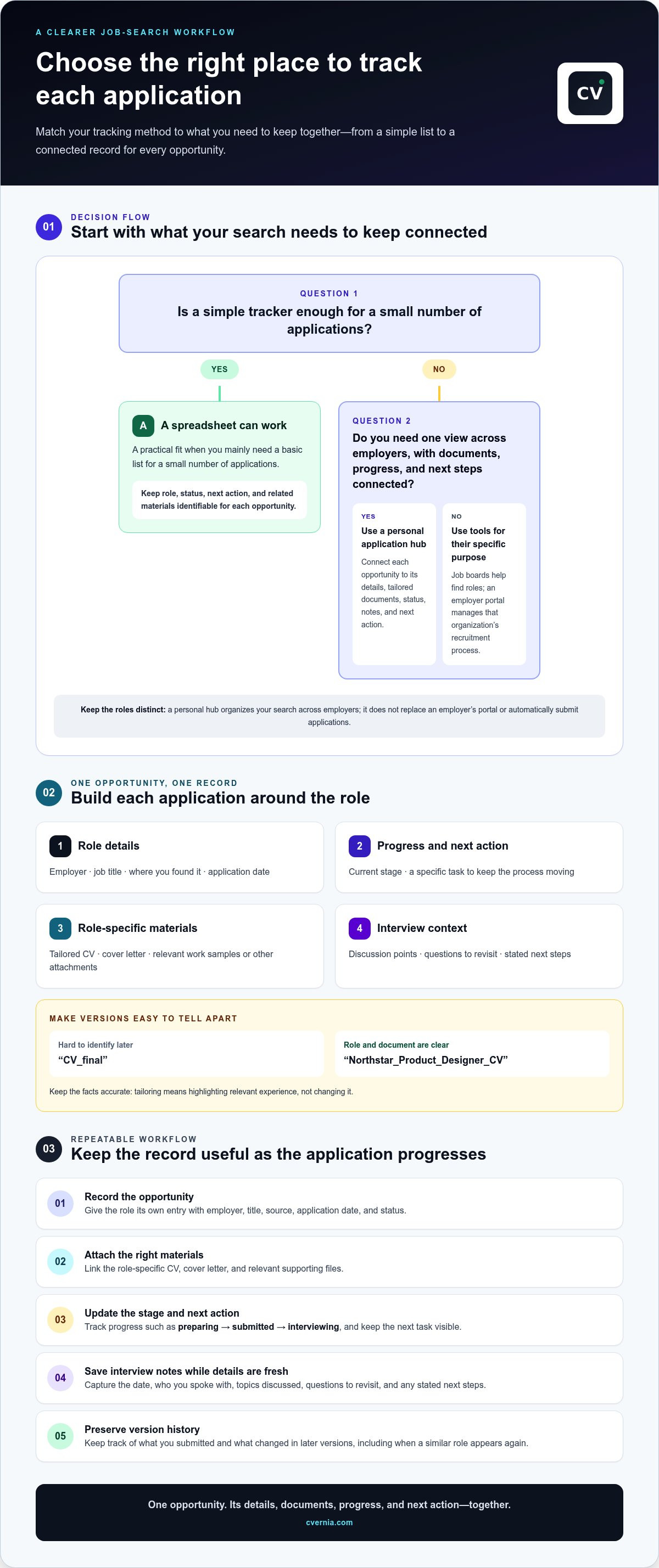
A personal application hub is a workspace that connects each job opportunity to its details, documents, progress, and next action. Put simply: a job board helps you find roles; an application hub helps you manage what you do with them. A central hub for all job applications lets you see where each opportunity stands without relying on memory or searching through separate accounts.
Application details often end up scattered across saved listings, email threads, downloaded files, and employer portals. You might remember applying but not which CV you sent, or miss a follow-up because its reminder is buried in your inbox. A clear record helps prevent these mix-ups and supports a more considered search. It can’t guarantee an interview or hiring outcome.
Which parts of a job search belong in one workspace?
Give each opportunity its own record. Start with the essentials, then add anything you’ll need for the next step. For example, a product designer applying to two companies can keep each role’s requirements and document versions separate, even if both applications draw on related experience.
- Role details: job title, employer, and application date.
- Progress: current stage, such as preparing, submitted, or interviewing.
- Next action: a specific task, such as preparing questions or following up.
- Related materials: the role-specific CV, cover letter, attachments, and interview notes.
Use file names or labels that identify the role and document type. “CV_final” is hard to distinguish later; “Northstar_Product_Designer_CV” is more useful. A hub keeps information connected, while your judgment guides what to apply for, how to tailor your materials truthfully, and what to do next.
How is a personal hub different from an employer hiring portal?
An employer hiring portal belongs to one organization’s recruitment process. It may let candidates search that employer’s openings, save roles, or check application status. For example, Children’s Health’s Hiring Hub serves people exploring opportunities and applications with Children’s Health. It isn’t designed to manage a candidate’s complete search across unrelated employers.
A personal workspace brings opportunities from multiple employers into one view, whether you found them on a job board, an employer site, or another source. Job boards focus on discovering vacancies; public workforce-service centers connect people with regional career resources, support, or training. Neither necessarily serves as your private record of every application and its materials.
Employer systems also have their own approach to application management. An Applicant Tracking System (ATS) helps an organization handle recruitment records. Your personal hub is the candidate-side counterpart: a place to organize your application journey without replacing the employer’s portal or automatically submitting applications. Each tool has a different purpose.
What should a central job application hub keep connected?
Think of each application record as the anchor for everything related to one opportunity. Connect the role’s details to the materials you submitted, the conversations that follow, and any action still on your list. This saves you from piecing together context from old email threads or files with unclear names.
A useful record doesn’t need every detail about a company. Focus on information that helps you make the next decision or continue the application accurately. Your central hub for all job applications should make it easy to identify which role a document or note belongs to and where the process stands.
Keep each application and its documents tied to the role
Use a consistent record for each opportunity: employer, position, where you found it, application date, and current status. Then connect the materials prepared for that role. This helps prevent a CV tailored for one position from being mistaken for the version sent elsewhere, and makes it easier to revisit your choices when preparing an application.
- Role record: employer, job title, source, date applied, and status.
- Document versions: the role-specific CV and cover letter, clearly named or labeled.
- Supporting files: relevant work samples or other attachments associated with the application.
Tailoring means highlighting relevant, accurate experience, not changing the facts. When shaping a cover letter around a role’s requirements, a tailored cover letter guide can help you focus the message. You can also use an ATS resume checker guide to understand document compatibility as you prepare your materials.
Preserve interview context and reapplication history
As an application progresses, add interview notes while details are fresh. Record the date, who you spoke with, topics discussed, questions to revisit, and any stated next steps. Attach useful materials, such as a presentation brief or role description, so you can refresh your memory without searching through multiple folders.
- Interview notes: discussion points, questions, and follow-up actions.
- Attachments: files or role information that help explain the conversation.
- Version history: which materials you submitted and what changed in later versions.
Version management helps distinguish a revised CV from an earlier submission, particularly if a similar role appears again. Reapplication detection can prompt you to review that history and decide whether your current materials still fit. Treat it as a reminder to assess the opportunity, not as an instruction or automatic application. A workspace such as CVernia’s application management workspace can keep documents, notes, and application records connected as your search progresses.
Central hub vs. spreadsheet vs. job-board accounts: which approach fits?
Choose a system based on how much of your search you want to see together and how much upkeep you’re willing to do. A spreadsheet is flexible; job-board accounts retain activity within their own platforms; a dedicated application-management platform can connect records and workflow details across opportunities. The right option depends on your needs and habits.
Compare the trade-offs before settling on a method:
| Approach | Visibility and organization | Effort and fit |
|---|---|---|
| Spreadsheet | One overview of the roles you enter. Document links and notes need to be added and maintained. | Flexible and straightforward for a small, simple search. Updates are manual. |
| Job-board accounts | Can retain saved roles and application details on that specific platform. Information may remain separated across accounts. | Convenient for using a particular job board, but less suited to a cross-employer overview. |
| Dedicated platform | Designed to connect application records with related documents, notes, and progress. | Useful when keeping these details together matters more than maintaining separate records manually. |
When is a spreadsheet enough for tracking applications?
A spreadsheet can be a practical starting point if you’re following a small number of straightforward applications and want to choose your own columns. Add a row for each role, with its status, next action, and links to relevant files. Because you’ll update those fields manually, review whether links, notes, and stages are staying current as your search grows.
When does a dedicated application-management platform make sense?
Consider a dedicated platform if you want application records, document versions, and interview notes connected rather than maintained in separate places. It helps manage a search, not discover every vacancy: job boards help you find roles, while the platform organizes the opportunities you choose to pursue. Applications aren’t submitted automatically; you remain in control of each tailored, truthful submission.
For a cross-employer search, a central hub for all job applications can provide a clearer view than individual job-board accounts alone. CVernia’s application-management platform brings tracking together with tailored documents, attachments, and interview notes, helping you maintain context as an application progresses. Choose a system you can keep up to date and that fits the way you search. Explore CVernia’s application-management platform as one way to connect these parts of your workflow.
How to organize every job application in a central hub
A useful workflow starts before you submit and continues after each response. Create one record per opportunity and update it whenever something changes. This makes a central hub for all job applications an active search tool, not just a place to store links. Keep entries concise enough to maintain and specific enough to help you pick up where you left off.
Set up an application record before sending materials
Create the record as soon as you decide to pursue a role. Save the original posting or its reference, then connect the materials you plan to send. Add a clear next action so the record helps you move forward, not just log what you’ve done.
- Record the opportunity: Add the employer, position, job-posting link or reference, and where you found it.
- Note the timing: Enter the application deadline and date submitted. If there’s no stated deadline, leave that field blank rather than guessing.
- Identify your documents: Attach or label the role-specific CV and cover letter. Use names that distinguish them from other versions.
- Set the stage: Mark the application as preparing, submitted, or another status that makes sense for your process.
- Choose a next action: Write a concrete task, such as reviewing the application status or preparing for a scheduled interview.
For example, “follow up” is less useful than “review the employer’s stated timeline on Friday.” Base next steps on information you have, and update them if circumstances change. This helps you act deliberately without treating a particular response or outcome as guaranteed.
Update the record after each hiring interaction
Return to the entry after submitting materials, receiving a message, or completing an interview. Change the status, note what happened, and record the next task. A short, timely update is easier to use than reconstructing an interaction from memory later.
- After submitting: Confirm the date and the CV and cover letter versions sent.
- After a response: Note the contact, key information, and any requested action or stated timeline.
- After an interview: Add concise notes on discussion topics, questions, and follow-up details while they’re fresh.
Keep notes factual and easy to scan. For more detail on recording interview stages and conversations, use this job interview tracker guide as a reference for what to capture.
Before considering a similar opening, review the earlier record: check the materials you submitted, interview notes, and any changes to the role. That history helps you decide whether to adapt your application. Reapplication detection and version management can support this review, but the choice to apply and the materials to use remain yours.
CVernia’s application-management workspace brings application tracking, documents, and interview notes together.
How CVernia brings the application journey into one workspace
CVernia is a career-application workspace that connects the moving parts of a job search across employers. It brings tracking, documents, and interview preparation together around each opportunity. When you return to an application, you can review the role, the materials you prepared, and what happened next.
Connect tracking, tailored documents, and interview preparation
An application record can sit alongside relevant notes and attachments, keeping supporting information connected to the opportunity it describes. If an employer invites you to interview, for example, you can refer back to the role-specific materials and your notes as you prepare. The workspace supports your process; it doesn’t replace an employer portal or job board.
CVernia’s tools support tailored CV and cover-letter creation, helping you adapt your materials to a role using your genuine experience. Its ATS compatibility analysis helps you review how a CV aligns with compatibility considerations. Use the analysis as guidance for reviewing a document, not as a promise that an employer’s system will select it or that you’ll receive an interview.
- Application tracking: Keep an organized view of opportunities and their progress.
- Notes and attachments: Associate interview context and relevant files with the application.
- Tailored documents: Prepare CVs and cover letters for specific roles while keeping your claims accurate.
- ATS analysis: Review CV compatibility as one part of preparing an application.
Together, these tools make a central hub for all job applications a connected record of your decisions and activity. You remain responsible for reviewing each document, choosing what to submit, and updating your application as it progresses.
Use reapplication tools while keeping every claim truthful
If you encounter a role or employer again, smart reapplication detection and version management can help you find earlier application materials and distinguish them from updated versions. Use that history as a starting point: check what you submitted, consider whether the new opportunity calls for different emphasis, and revise only where your real background supports it.
Reapplication detection is a prompt to review, not an automatic application. Keep every CV and cover letter grounded in your actual skills, qualifications, and experience. Tools can support organization and customization, but they shouldn’t add untrue claims or make decisions on your behalf.
Start with one active application: connect its record to the documents and notes you need, then update it as the process moves forward. Bring your application process into one workspace with CVernia.
Make your next application easier to pick up
You don’t need a complete system overhaul to get started. Choose one active opportunity and decide what you’ll want to remember when you return to it. A central hub for all job applications is most useful when it fits your routine and helps you make thoughtful, truthful decisions at each stage.
As your needs grow, CVernia offers a connected workspace with application tracking, interview notes and attachments, tailored CV and cover-letter tools, and ATS compatibility analysis. Smart reapplication detection and version management can also help you review earlier materials before deciding what to update. These tools support your process, while your experience and judgment remain at the center of every application.
Take a manageable first step and see whether a dedicated workspace suits the way you search. Explore CVernia’s career application platform and build a clearer routine for your next opportunity, one organized application at a time.
Frequently Asked Questions
What is a central hub for all job applications?
A central hub for all job applications is a personal system for organizing opportunities and their related information together. It helps you see what needs attention without reconstructing your search from memory. For example, a quick review might show which roles need a response, which are waiting on an employer, and which require interview preparation. It supports organization, but it doesn’t determine which roles suit you.
Can I manage applications from different job boards in one place?
Yes. You can record opportunities from different job boards and employer career pages in a personal tracker, even if those sites don’t share information with it. Save the posting link or reference when adding a role so you can return to the original description. Treat each entry as a record you maintain, not proof that application details are automatically syncing between platforms.
Is a spreadsheet enough to track job applications?
A spreadsheet can be enough for a small search if you can keep it current. Add columns for role, employer, deadline, status, next task, and document links, then use filters to view applications needing attention. If updates start falling behind or you keep opening files to identify the right CV, consider a more connected workspace.
What should I track for each job application?
Track details that help you take an accurate next step: employer, position, source, application date, stage, deadline, and next action. You might also record the date of a hiring contact and your response, so the conversation has context. Keep the entry brief and record the final outcome when known. This gives you a useful record without turning tracking into a diary.
Can a job application hub apply for jobs automatically?
A job application hub organizes your search; that doesn’t mean it submits applications. Review the role, check that your materials accurately reflect your experience, and submit through the employer’s or job board’s process. CVernia supports tracking and application preparation, while you decide what to pursue and what to send. A tracker doesn’t necessarily connect to another site or submit anything.
How do I keep track of which CV I sent to each employer?
Save the submitted CV with a clear label that includes the employer or role, then note that version in your application record after sending it. A naming pattern such as “Employer_Role_CV_v1” helps distinguish it from later revisions. Keep the original submission unchanged; if you update the document, save a new version so you can review exactly what you sent.
What is the difference between an employer hiring hub and a personal application hub?
An employer hiring hub follows one organization’s recruitment process, while a personal application hub helps you manage your search across employers. Use the employer portal to complete a requested step or check a status, then note that update and any next task in your personal system. Each record serves a different purpose and may show different details.


