

What if a low score from an ATS scanner points to a resume detail worth reviewing, rather than a verdict on your chances? It’s understandable to feel unsure when a scan flags missing keywords or unclear sections, especially when your experience is a strong match for the role.
Use the result as a diagnostic, not a hiring prediction. This guide shows you how to compare your resume with a specific job description, interpret scanner feedback, and prioritize accurate, relevant changes. You’ll learn how to improve alignment without stuffing in keywords or claiming skills and experience you don’t have.
We’ll walk through a practical process: prepare your resume and job description, review the scan for fixable gaps, make targeted edits, and check the revised version. You’ll also see how ATS analysis can fit into a more organized application routine. CVernia brings document analysis, role-specific tailoring, and application version management together, helping you make deliberate revisions while keeping each application clear and truthful.
Key Takeaways
- An ATS scanner can surface role-alignment and document-readability issues, but its feedback can’t predict an employer’s hiring decision.
- Compare the current job description with the exact resume version you plan to submit, then save a tailored copy for that role.
- Sort scan feedback into content alignment, clarity, and readability so you can focus first on relevant, fixable gaps.
- Use job-description language only when it truthfully reflects your experience, and make your sections, dates, and descriptions easy to follow.
- Connect analysis with tailored CV preparation and version management to keep application revisions organized and deliberate.
What an ATS scanner checks, and what its result cannot tell you
An ATS scanner compares resume content with a specific job description. It can help you spot details worth reviewing, such as relevant experience that is difficult to find, terminology that differs from the posting, or text that a tool may struggle to read. Treat its feedback as a prompt to inspect your document, not as a verdict on your application.
A scan can assess only the information its tool is designed to check. It can’t reveal every employer’s applicant tracking system settings, how a recruiter will use them, or what other applicants have submitted. An employer’s system may process information differently from a resume scanner, and hiring decisions involve more than document matching.
A resume scanner gives you feedback about your document; an employer’s applicant tracking system is part of that employer’s recruitment process. A third-party tool’s result isn’t evidence that an employer has rejected or selected you, and it can’t predict your likelihood of getting an interview. For background on the broader technology, see the Applicant Tracking System Wikipedia overview.
What does an ATS scanner compare?
When you provide a job description, the scanner reviews your resume text alongside the role’s stated requirements. It may flag relevant skills, role terminology, or experience that appears absent or is hard to locate. For example, if a posting asks for “project coordination” and your resume describes organizing project schedules, check whether the connection is clear without changing what you actually did.
Results vary by tool, and employer systems can differ in how they process documents. Use the comparison to identify possible gaps, then check each finding against the full job description and your own experience.
Why an ATS score is not a hiring prediction
A score reflects the checks used by a particular tool. It isn’t a universal threshold employers use to decide who moves forward. A lower score may point to missing role language or a section that needs clarification, but it doesn’t establish that your application will be rejected. A high score can’t guarantee selection either.
Recruiters may consider context, evidence of results, and overall fit, factors a score may not fully capture. Review findings related to genuine job requirements first. For a fuller explanation of how screening systems fit into hiring, explore How Applicant Tracking Systems Work: A 2026 Guide to CV Compatibility. A scan is most useful when it helps you make a precise, truthful revision and return to your application with clearer documents.
How to scan your resume against a job description in five steps
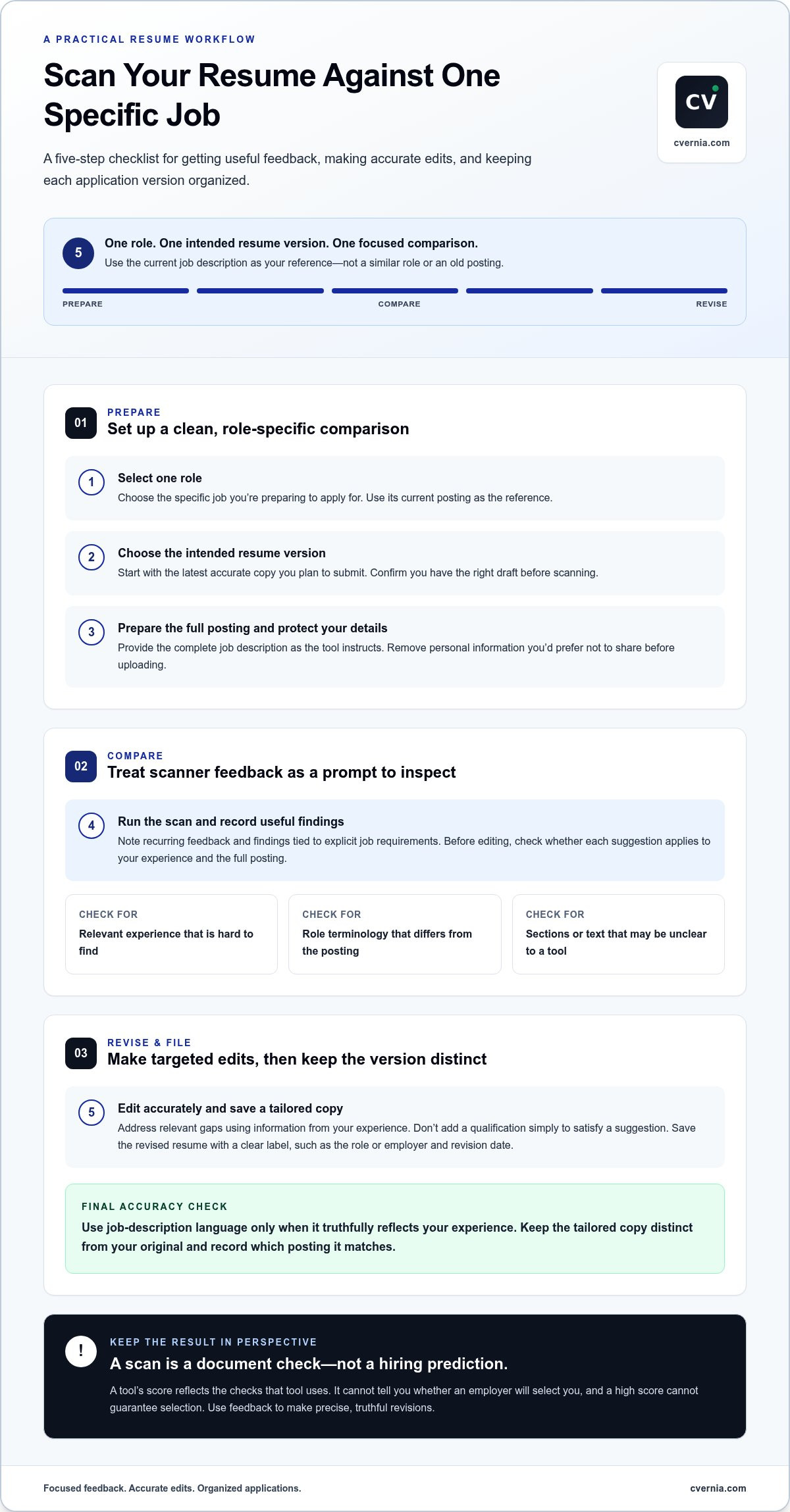
Get more useful feedback by scanning one resume against one specific role. A general scan can point out broad issues, but it won’t show how clearly your experience connects to a particular employer’s requirements. These steps help you focus the comparison, protect your information, and keep each application version organized.
Prepare the right resume and job description
Start with the latest accurate resume that’s relevant to the role, then find the complete, current job description. A general skills list won’t provide the same context for comparing responsibilities and qualifications. Before uploading anything, remove personal details you don’t want to share with the scanning tool.
- Select one role. Choose the specific job you’re preparing to apply for. Use its current posting as your reference, not a similar role or a description saved from an earlier application.
- Choose your intended resume version. Pick the latest accurate copy you plan to submit. If you have several drafts, confirm you’re scanning the right one so the feedback applies to the document you’ll actually revise.
- Prepare the job description and protect your details. Copy or provide the full posting according to the tool’s instructions. Review your resume for personal information you’d prefer not to share, and remove it before submitting the document.
- Run the scan and record useful findings. Submit the resume and role information as directed. Note recurring feedback and findings tied to explicit job requirements. Keep suggestions separate from your own judgment until you’ve checked whether each one applies.
- Make targeted edits and save a tailored version. Address relevant gaps using accurate information from your experience. Save the revised resume with a clear label, such as the role or employer and revision date, so you can distinguish it from your general version.
Run the scan, review feedback, and save a version
Review the output before editing. If a required skill appears to be missing, first check whether your resume describes relevant experience using different wording. If the scanner flags a section, verify that the information is clear and complete. Don’t add a qualification simply to satisfy a suggestion. For a broader overview of choosing and using a tool, the article ATS Resume Checker Guide 2026: Choosing the Right Tool to Beat the Bot offers a useful next read.
After revising, keep the tailored copy distinct from your original and record which posting it matches. This helps you avoid submitting a version prepared for another role and makes it easier to track changes. CVernia connects job-description comparisons with tailored CV preparation and version management, helping you keep role-specific revisions organized. Explore CVernia’s CV and application tools as part of a deliberate application workflow.
How to interpret ATS scanner results without chasing a perfect score
An ATS scanner may return a score, suggested keywords, or notes about how your resume is organized. Treat each item as a lead to investigate, not an instruction to follow automatically. The goal is to make relevant qualifications easier to recognize, not to maximize a number at the cost of accuracy or readability.
Sort the feedback into three groups: content alignment, clarity, and document readability. Then compare each item with the job description and your experience. A suggested term may be useful if it accurately describes work you’ve done. If it doesn’t, leave it out. Unsupported keywords can make a resume less credible and harder to read.
Which scanner findings deserve attention first?
Start with a relevant qualification the posting requests and you genuinely have. Check whether your resume gives clear evidence of it, such as a responsibility, project, or result. Next, see whether important experience is easy to locate and understand. Consider stylistic suggestions last. They’re optional unless they improve clarity or make a relevant detail more visible.
| Useful signal | Possible interpretation | Sensible next action |
|---|---|---|
| A relevant skill is flagged as missing | Your resume may use different wording, or may not show that qualification clearly. | Check the posting and your experience. If accurate, describe the skill in context. |
| A role or achievement is hard to identify | The detail may be vague, buried, or missing a clear label. | Rewrite for clarity, using a specific responsibility or result you can support. |
| A formatting or readability issue appears | The tool may have difficulty interpreting part of the document. | Inspect the affected section and simplify its presentation if that helps readers too. |
| A stylistic change is suggested | The scanner may prefer a different phrasing or presentation. | Adopt it only if it improves relevance or clarity without changing the facts. |
What should you do with a low or high score?
Don’t treat either result as a hiring forecast. Scores can vary between scanners because each tool applies its own criteria, and a score doesn’t establish a universal employer threshold. A low number may point to a fixable issue; a high one doesn’t confirm that your resume will advance.
Review the findings behind the number. Ask whether each one connects to a genuine requirement, whether your evidence is clear, and whether a proposed edit remains truthful. Ignore changes made solely to inflate the score. For a focused explanation of score feedback, see Understanding Your ATS Score: What the Numbers Mean.
Use the scan to guide a careful decision, then reassess the revised resume as a whole. It should still sound like you, present your experience accurately, and make your strongest relevant evidence easy to find. A clear, well-supported application is a better outcome than a perfect-looking score.
How to improve ATS compatibility while keeping your resume truthful
Use scanner feedback to make relevant experience easier to recognize, not to reshape your history around a score. Compare each suggestion with the job description and your own evidence. If the posting uses a term that accurately describes work you’ve done, reflect that language naturally in a skills section or experience bullet. If it doesn’t fit, leave it out.
Include a keyword only when you can support it with truthful evidence. Repeating terms without context, claiming skills you don’t have, or adding credentials you haven’t earned can weaken your application. Responsible tailoring makes a real match clearer; it doesn’t manufacture one.
Turn relevant experience into clearer evidence
Show the connection between a requirement and your experience with a specific, accurate example. If you’ve coordinated project timelines, say what you coordinated and what the work supported. Don’t claim a result or add a metric unless you can verify it. Choose direct action verbs, then keep each description concise enough for a person to scan easily.
Make the document straightforward to follow. Use clear section labels, such as “Work Experience” and “Education,” and keep date styles consistent. A simple, orderly layout may help both readers and tools interpret information, but no single format guarantees that every system will parse a resume the same way. Prioritize clarity over supposed universal formatting rules.
Make a revision checklist before rescanning
Before using an ATS scanner again, review each edit against the role and your background. Check for factual accuracy, consistent details, and readability. Rescan after meaningful revisions, then compare the feedback to see whether relevant information is clearer. Don’t keep changing a sound resume just to push a score higher.
- Confirm every added skill or role term reflects experience you can explain with a real example.
- Check headings and dates for consistency, and make sure contact details are correct.
- Review the saved file to ensure its content matches the version you intend to submit.
- Keep useful edits, and reject suggestions that introduce unsupported claims or make the resume harder to read.
For instance, if a posting asks for “customer relationship management” and you’ve maintained client records and follow-ups, consider whether your existing description makes that work clear. Use the phrase only if it accurately represents your responsibilities. A keyword alone is not evidence; a concise account of what you did gives the reader meaningful context.
CVernia’s tailored CV and ATS analysis tools connect job-description feedback with role-specific document preparation. Save each version clearly so your final application reflects the right experience for the right role.
Use CVernia ATS analysis to connect resume feedback with your application
Once you’ve assessed scan feedback and made careful revisions, connect that work to the rest of your application process. CVernia brings ATS analysis, tailored CV preparation, and application tracking together, so role-specific document work can sit alongside the versions you manage for different opportunities.
Compare the job, assess the feedback, revise truthfully, and save the version tailored to that role. This cycle turns scanner results into a deliberate application workflow instead of a score-chasing exercise.
Move from scan feedback to a tailored application
CVernia ATS analysis compares application documents with a job description, helping you review how your CV aligns with that role. Use the feedback to decide which relevant experience or skills need clearer wording, then tailor the CV to make accurate evidence easier to find. The analysis informs your edits; it doesn’t make the decision for you.
You remain responsible for every claim. Review suggested language carefully, and keep only details that reflect your actual background. If you’re preparing a cover letter too, tailor it to the same opportunity and keep its claims consistent with your CV. It supports the application, but it doesn’t replace resume analysis.
That review matters. A scanner may identify wording to consider, but only you can confirm whether a suggested phrase accurately describes your responsibilities, skills, and achievements. Keep the final document clear and credible for the person reading it, not just aligned with a tool’s feedback.
Keep role-specific versions and next steps together
As you tailor documents for different openings, clear version management helps prevent mix-ups. Pair each application with the CV version prepared for it, and use application tracking to keep your job-search activity organized. A record makes it easier to revisit what you submitted and continue from the right version.
- Record the role and employer so you can identify the opportunity later.
- Note which CV version you submitted and keep related application materials together.
- Add relevant follow-up notes as your application progresses.
For example, if two roles have similar titles but emphasize different experience, retain a distinct CV version for each. That way, you can review the right document if you return to an application, prepare for a conversation, or update your materials for a related opening. Tailored cover letters and organized application records can support the process while keeping your CV revisions easy to trace.
CVernia combines ATS analysis with tailored CV and cover-letter preparation, application tracking, and version management in a career application management platform. Explore CVernia’s career application management platform to bring role-specific document preparation and application organization into one workflow.
Make your next application a deliberate step forward
Your next application doesn’t need to be perfect before you move forward. Aim for a clear, accurate account of why your experience fits the role, and let an ATS scanner serve as one checkpoint in your preparation, not the final judge of your potential.
Choose a role that interests you, set aside focused time to prepare, and make decisions you can stand behind. Each thoughtful application can help you build a more intentional search process, even when the outcome is outside your control. Progress comes from presenting your experience clearly and continuing to take the next step.
Explore CVernia’s career application management platform to prepare your next role-specific application.
Frequently Asked Questions
Can an ATS scanner tell me whether a company will reject my resume?
No. An ATS scanner evaluates the document using its own criteria; it can’t see an employer’s full hiring process or predict a recruiter’s decision. A flag might point to wording that deserves a closer look, but it isn’t proof of rejection. For example, a role may value a specialized project that the tool can’t assess well. Use the scan to review your resume, then decide whether to submit based on the role and your qualifications.
Is a higher ATS score always better?
Not necessarily. A score can rise after adding terms without making your application a stronger or more accurate account of your experience. Check what changed: did you clarify a relevant responsibility, or simply repeat a keyword? Keep an edit if it helps a reader understand your fit. If a suggestion pushes you to claim a skill you can’t discuss confidently in an interview, leave it out.
Can I scan my resume without a job description?
Yes. A scan without a posting can still help you notice general issues, such as unclear wording or information that’s difficult to locate. It won’t show how your experience connects to a particular opening, though. For example, a general resume review can’t tell you whether your budgeting experience is visible for a role that specifically emphasizes budget management. Use the actual posting when preparing a targeted application.
Should I scan my resume as a PDF or Word document?
Follow the scanner’s file instructions and choose a version with readable text. The file extension alone doesn’t guarantee that a particular tool or employer system will process it as intended. As a quick check, open the file and confirm that text can be selected and copied in the right order. If the scanner accepts multiple formats, use the one you plan to submit, then inspect the scanned content for missing or jumbled details.
What happens if an ATS scanner does not recognize part of my resume?
First, inspect the affected section in the original file. Confirm that its text is present, readable, and grouped under a heading that describes the content. If a job title or date appears missing, check whether it’s displayed in a text box, header, or another layout element the scanner may handle differently. Keep the original copy, make only edits that preserve accuracy, and don’t assume one scan reflects every employer’s system.
How often should I scan my resume?
Scan when preparing a resume for a specific opening or after making meaningful changes, such as adding relevant experience or restructuring a section. Repeated scans without edits may produce little new insight. After reviewing feedback, save the application copy with a label that distinguishes it from your general resume, such as the role title and date. This gives you a clear record of which document you used if you revisit the opportunity.


