

A previous application doesn’t have to mean reusing the same CV or giving up on an employer. It can be a prompt to make a more considered next move. Smart Reapplication Detection helps you spot potentially related submissions, especially when job titles or document versions are difficult to keep straight. Detection is only the starting point: review the details before deciding what to do.
It’s easy to lose track of where you applied, which CV you sent, and whether a new opening is genuinely different from an earlier one. Reusing materials without checking them can leave out important updates. Changing details just to make an application look different can misrepresent your experience. A focused, truthful revision is a better approach.
In this guide, you’ll learn how to identify a relevant previous application, decide whether a new role merits a fresh submission, and make targeted improvements to your CV and cover letter. You’ll also find practical ways to organize your application history and document versions, so your decisions are based on what has changed, not guesswork. Smart reapplication detection and version management can help you review the past and prepare your next application with clarity.
Key Takeaways
- Smart Reapplication Detection can help you spot a relevant past submission, but you decide whether to reapply.
- Compare the opening, its requirements, your application status, and any genuine changes in your qualifications before deciding what to do next.
- Revise with a clear purpose: make your application more relevant without changing your story.
- Keep application records and document versions organized so you can make informed choices about future roles.
- CVernia’s application tools can help you review previous submissions and prepare role-specific updates.
Smart Reapplication Detection: What It Means for Your Job Search
Smart Reapplication Detection helps you recognize that a new opportunity may be connected to an application you’ve already submitted. It brings relevant application history into view so you can check what happened and decide what to do next. Treat a detected match as a prompt to review, not a verdict on whether you should reapply.
This is a job-seeker tool for managing your own application history. It isn’t the same as an employer’s hiring system, and it doesn’t mean every employer can see your past applications. An Applicant Tracking System (ATS) is software used to support recruitment processes. This guide focuses on how you can organize and review your own records, rather than making assumptions about what an employer’s system detects or displays.
What counts as a reapplication?
A reapplication is a new submission related to an earlier application at the same organization. The clearest example is applying again for the same opening after an earlier submission or hiring process has ended. But applying to the same employer again doesn’t automatically make the submission a reapplication in the practical sense. The new role may have different responsibilities and requirements.
Compare the details, not just the title. Two “Project Coordinator” roles might sit in different teams, require different experience, or involve different work. A changed title, on the other hand, doesn’t necessarily mean the position is substantially different. Compare the job descriptions, team, location, reference number if available, and the status of your earlier application. A possible match is a reason to investigate, not proof that the openings are identical.
Why recognizing an earlier application can help
A clear application record can show which CV and cover letter you sent, what information you highlighted, and when you applied. That context is useful when considering another opportunity at the same organization. Without it, you may have to reconstruct your last submission, overlook a relevant update, or reuse a document tailored to a different role.
Keep enough detail to make each record useful. Note the employer, role title, application date, status, and the names or copies of the documents you used. When a new opening appears, compare your notes with its job description before deciding whether to apply or revise your materials. This simple habit can reduce accidental repetition and make your next steps easier to plan.
Recognizing an earlier application isn’t a strategy on its own. A previous record doesn’t mean you should automatically submit again or avoid the employer. Use it to understand what has changed, then choose a deliberate next step: prepare a role-specific application, wait for a more suitable opening, or move on.
How Smart Reapplication Detection Fits into an Application Workflow
Use Smart Reapplication Detection as a checkpoint, not an instruction to submit or withdraw an application. A useful workflow pairs a possible match with your own review: confirm the earlier record, compare the opportunities, then decide what action makes sense. The feature can bring your application history into focus; you verify the details and make the decision.
From possible match to useful context
Start with the record, not an assumption. Check the employer, role, application date, and recorded status. Then compare the current job description with the earlier opportunity. Similar titles can describe different teams or scopes, while a renamed position may still closely resemble a role you applied for before.
If the details are incomplete or the connection is uncertain, pause for a manual review. Look for distinguishing information, such as the department, location, or listed responsibilities. Don’t treat a resemblance as proof of duplication. First establish whether the earlier application is relevant context, then use it to guide your next step.
What the detection feature can and cannot tell you
CVernia’s smart reapplication detection and version management help you identify reapplications and improve previous application versions. They support an organized review of your own submissions. They don’t decide whether you should reapply, predict an employer’s response, or reveal a company’s internal hiring records. A platform can help you manage your application history, but you decide how that history applies to a new opportunity.
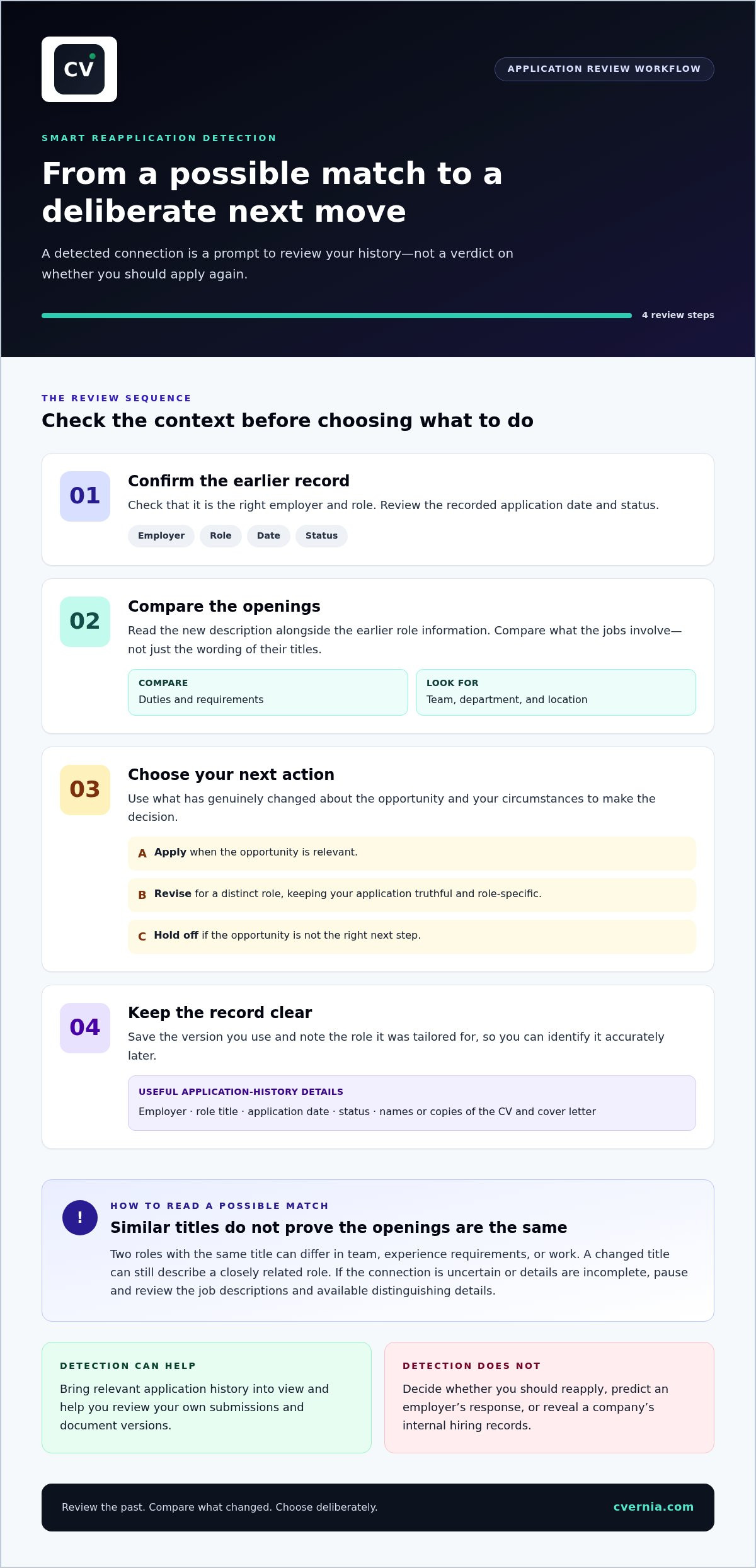
Once you’ve reviewed a possible match, follow this sequence:
- Confirm the record. Check that you have the right employer and earlier role, then review the recorded date and status.
- Compare the openings. Read the new description alongside the earlier role information. Compare duties and requirements, not just job-title wording.
- Choose your next action. Decide whether to apply, revise your materials for a distinct role, or hold off. Base the choice on the opportunity and your circumstances.
- Keep the record clear. Save the version you use and note the role it was tailored for, so you can identify it accurately later.
This process is separate from checking CV compatibility. To learn how a CV can be assessed for alignment with automated screening systems, read this ATS resume checker guide. That’s a different question from whether you’ve applied to a related role before.
CVernia’s application management tools bring application tracking and document version management into one workflow, helping you keep past submissions organized as you prepare your next move.
Should You Reapply? Compare the Role with Your Previous Application
Decide by comparing the opportunity with your circumstances, rather than applying a blanket rule. There’s no universal waiting period or reapplication rule across employers. Review the role, the status of your earlier application, the time passed, and whether you can now make a genuine, relevant case.
| Situation | What to compare | Practical next step |
|---|---|---|
| Same opening | Whether your earlier application is still active, its recorded outcome, and whether your relevant experience or evidence has changed. | Pause before submitting again. Check the application status and consider whether you have a meaningful update to share. |
| Materially revised opening | Changes to responsibilities, required experience, seniority, or other role details, along with any new qualifications or relevant accomplishments you can accurately describe. | Compare the revised requirements with your experience, then prepare updated, role-specific materials if they fit. |
| Different role at the same employer | The new position’s duties and requirements against your previous application and the evidence you can offer for this role. | Assess it as a distinct opportunity, using your earlier application record as context. |
When a new application may be meaningfully different
A fresh comparison is worthwhile when the substance of the role has changed. For example, a revised opening may call for experience in a different function, greater responsibility, or a more senior level. A separate requisition can indicate a distinct opportunity, but it doesn’t settle the question by itself. Read the duties and requirements. A different title alone doesn’t prove the position is new, just as a familiar title doesn’t prove it’s the same job.
Consider your own evidence, too. Since applying, you may have completed relevant work, gained a qualification, or developed experience that directly matches a requirement. Include only changes that are true and pertinent. If neither the role nor your evidence has materially changed, consider what a new submission would add.
When to pause and review before applying again
For the same opening, check whether your previous application is still active or has a recorded outcome before submitting again. Consider how much time has passed, but don’t treat elapsed time as a universal threshold. The employer’s process and the role’s status matter, and your records may not show every update.
Before proceeding, ask whether you can make a truthful, role-specific case. Can you show how your experience aligns with the opening’s requirements? Would revised materials make that connection clearer, rather than simply repeat your earlier application? If not, pause and reassess. A structured job search management system can help you organize application dates, statuses, and document versions for these decisions.
Use Smart Reapplication Detection as a cue to run this comparison, not as a substitute for it. Your choice should reflect the role’s actual requirements, your application history, and the experience you can honestly demonstrate.
How to Improve a Previous Application Without Changing Your Story
A previous application is a useful starting point, not a script to copy or a reason to rewrite your career history. Begin with the new role’s requirements and the exact CV you submitted before. Make changes only when they improve relevance, clarity, or accuracy. A stronger revision makes relevant evidence clearer without inventing qualifications.
- Read the new job description first. Identify the main responsibilities and required experience. Note which requirements match your background, and distinguish required qualifications from preferred ones.
- Compare the requirements with your earlier CV. Look for experience that supports the role but was unclear, underemphasized, or missing from the previous version. For each possible edit, identify a real example, skill, or responsibility you can substantiate.
- Strengthen the evidence. Replace broad claims with specific descriptions of work you actually did. If you coordinated a project, for example, describe your responsibilities and contribution accurately. Don’t imply you led the work if you supported it, or add results you can’t verify.
- Improve wording and structure. Put relevant experience where it’s easy to find, use clear language, and remove details that distract from this role. Use job-description terminology only when it accurately describes your work.
- Review the revised document. Check dates, titles, qualifications, and claims. Confirm that each change is relevant to the opening and that the final version still represents your experience honestly.
Compare role requirements with your earlier CV
Use the job description as a review guide, not a list of phrases to insert. If it asks for stakeholder communication, for instance, identify a real project where you shared updates or coordinated input. If you can’t point to relevant evidence, don’t claim the skill just to mirror the posting. For document compatibility fundamentals, see this ATS-friendly resume guide.
Create a distinct, accurate version for the new application
Update the sections that make your CV more useful for this opportunity. Keep the earlier version so you can see what changed and which document belongs to each submission. Tailor a cover letter when it adds truthful context, such as why a particular responsibility fits your experience. Avoid repeating the CV without a clear purpose.
Smart Reapplication Detection and version management support a careful review of earlier application materials. You decide which edits accurately reflect your experience. Use CVernia’s application tools to organize submissions and manage tailored document versions.
Use CVernia to Organize Reapplications and Manage Better Versions
After comparing a role with your application history and identifying truthful improvements, keep each decision and document easy to track. CVernia brings application management, smart reapplication detection, and version management into your job-search toolkit. These features help you review previous application versions in an organized way, while you stay in control of what to change and where to apply.
Keep application history and document versions connected
An application record is most useful when it shows not only where you applied, but which materials you used. CVernia’s application tracking dashboard helps you organize submissions, while version management helps you keep role-specific CVs and cover letters distinct. When you revisit an application, you can see which version went with it and why it differed from another.
Smart Reapplication Detection can help identify a relevant earlier submission for review. Treat it as a prompt to look at your own record, not a conclusion about whether to apply. Compare the opportunity with the materials you previously prepared, then make any edits deliberately. The tools support organization and document improvement; they don’t make the application decision or submit applications automatically.
CVernia’s tailored CV and cover-letter tools help you prepare materials for a particular opportunity. Interview notes and attachment management help keep related preparation materials organized alongside your job-search activity. Together, these resources help you maintain a clear record from application materials through interview preparation, while keeping each document connected to the opportunity it represents.
Turn a possible reapplication into a confident next step
Before submitting, confirm which role you’re considering, review the relevant application history, and check that every claim in your documents is supported by your experience. If your evidence fits the opening, make focused changes that improve clarity and relevance. If it doesn’t, don’t force a match. An organized record helps you make a considered choice, while your experience and judgment guide the content.
CVernia is a career application management platform that helps you organize submissions, manage document versions, and prepare tailored application materials. It supports your job search, but it doesn’t provide job placement or promise an interview or offer. Keep your next move grounded in accurate information and a clear understanding of the opportunity.
Ready to organize your application history and document versions? Explore CVernia's career application platform.
Make Your Next Application a Deliberate Step
Your next application doesn’t need to look completely different from the last one. It needs to reflect the role you’re pursuing and the experience you can genuinely support. Treat Smart Reapplication Detection as a chance to pause, check your records, and choose a clear next step, whether that means refining your materials or applying to a distinct opportunity.
Keep your career story consistent while making its most relevant details easier to see. CVernia’s application tools support this process with reapplication review, version management, and tailored CV and cover-letter tools, all centered on truthful representation rather than invented qualifications. The goal is a more intentional application, not a promised hiring outcome.
Take the next step with an organized approach to your job search. Explore CVernia's career application platform and prepare your next application with greater clarity and confidence.
Frequently Asked Questions
What is Smart Reapplication Detection?
Smart Reapplication Detection brings a potentially related past application to your attention while you manage your job search. If you’re preparing to apply for a role at an employer you’ve applied to before, the feature can help you revisit your earlier materials. Use that context to review your next move; it doesn’t make the decision for you.
Does reapplying for a job automatically hurt your chances?
No, a repeat application isn’t automatically disqualifying. The effect depends on the employer’s process and the circumstances, so don’t assume applying twice will help or harm you. Check whether the original application is still active and whether the posting gives instructions about multiple submissions. If you have no meaningful update or new evidence to present, consider whether applying again adds useful information.
How long should you wait before reapplying for the same job?
There’s no universal waiting period that applies to every employer or vacancy. Follow any timing guidance in the job posting or application correspondence, and check your records for the earlier submission’s status. If the opening is still active and your circumstances haven’t changed, another submission may not add much. If the role has reopened or your relevant experience has grown, reassess the opportunity and your materials.
Can you use the same CV when applying to a different role at the same company?
You can use the same core CV as a starting point, but review it against the new role before submitting. A customer-support position and an account-management role, for example, may call for different parts of the same experience. Adjust the emphasis and wording to make relevant evidence easy to find, and keep every detail accurate. Save a distinct copy so you can identify which version went with each application.
Can an ATS detect that you have applied to the same company before?
Some employer application systems may retain candidate or application records, but systems and employer processes differ. Don’t assume every employer will recognize a previous submission or treat a new application as a duplicate. Keep your own accurate history instead. Record the employer, role, date, and outcome so you can answer consistently if your earlier application comes up in a later conversation.
How can you improve a job application after being rejected?
Start by reviewing the role and the exact materials you submitted. If the employer provided feedback, use it to guide relevant edits. If not, don’t assume you know why the application was unsuccessful. Check whether your CV clearly demonstrates the required experience, clarify any vague wording, and add only genuine new qualifications or accomplishments. A project completed since applying, for example, may offer fresh, relevant evidence.
Does Smart Reapplication Detection automatically submit a job application?
No. Smart Reapplication Detection helps you review potentially relevant application history and improve previous versions; it doesn’t automatically apply for jobs. You decide whether a role fits, check your documents, and submit the application through the relevant process. Before sending, confirm that your CV and any cover letter are accurate and tailored to the opening.


