

You’ve submitted a promising application, but the follow-up date is buried in your calendar, the tailored CV is somewhere in your files, and the role details are lost in an email thread. An Application Tracking Dashboard brings those pieces together, so each opportunity has a clear status, its supporting documents, and a next action.
If keeping track of applications feels like a second job, you’re not alone. A simple list may work at first, but it becomes harder to stay prepared when deadlines, follow-ups, and interview notes are scattered. The goal isn’t just to record where you applied. It’s to make each opportunity easier to manage.
In this guide, you’ll learn what an application tracking dashboard should organize, which features to consider, and how to build a practical routine around it. You’ll also see how role-specific CVs and cover letters, interview notes, attachments, and truthful document revisions can help you prepare for each next step.
Key Takeaways
- An Application Tracking Dashboard brings application status, role details, materials, notes, and next actions into a clearer view.
- Choose features that support your actual job-search routine, and keep records current as each application progresses.
- A spreadsheet can suit a smaller or simpler search. A dedicated dashboard may help when you need more role context and document organization.
- Start with a few essential fields, then build a consistent habit of recording applications and reviewing what needs attention.
- Keep tailored CVs and cover letters, interview notes, and attachments connected to each role so you can prepare and make informed revisions.
What Is an Application Tracking Dashboard, and Why Do Job Seekers Need One?
A role’s deadline sits in one email, the CV you sent is saved under a generic file name, and interview notes are tucked into a phone memo. When details are spread across your inbox, files, and notes, it’s easy to lose track of what you applied for or what needs attention next.
An Application Tracking Dashboard gives you one organized view of your job search. It connects each opportunity with its progress, key dates, role-specific materials, notes, and next action. Instead of piecing together an application’s history from several places, you can see where things stand and what you planned to do.
That visibility can help you remember planned follow-ups and prepare for upcoming conversations. It won’t determine an employer’s decision or guarantee a response, but it can make your own process more consistent and easier to manage.
What Information Belongs in a Job Application Dashboard?
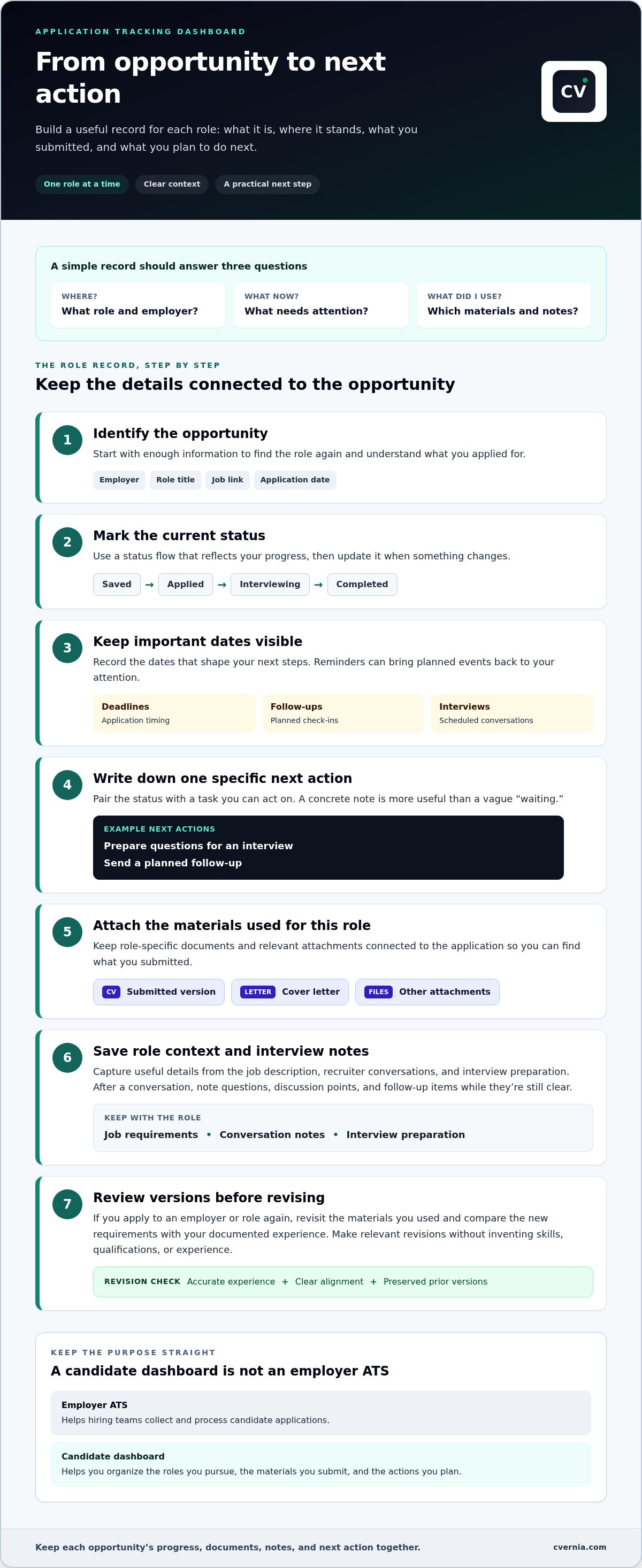
Start with enough detail to identify each opportunity and decide what to do next. Record the employer, role title, job link, application date, and current status, such as “submitted,” “interviewing,” or “closed.” Then add the details that help you act on time:
- Dates: Application deadlines, planned follow-ups, and interview dates.
- Next action: A specific task, such as preparing questions or sending a follow-up.
- Role materials: The CV, cover letter, and other attachments you used for that position.
- Notes: Relevant details from the job description, recruiter conversations, or interview preparation.
Keep the record connected to the role. That way, you can find what you submitted and review your notes without searching through unrelated files.
How Is a Candidate Dashboard Different From an ATS?
An employer’s Applicant Tracking System (ATS) helps hiring teams collect and process candidate applications. A job-seeker dashboard serves the applicant: it organizes the roles they pursue, the materials they submit, and the actions they plan to take. The tools relate to the same hiring process, but they serve different users and purposes.
In short: an ATS helps an employer manage incoming applicants; a candidate dashboard helps you manage your own applications. Keep that distinction in mind when choosing what to track. Your personal records should help you manage your search, not mimic an employer’s screening system.
Which Application Tracking Dashboard Features Make a Real Difference?
The most useful features support the tasks you repeat throughout a job search: checking an application’s status, preparing for the next step, and finding the right materials quickly. An Application Tracking Dashboard should make those tasks easier, not bury them under settings you rarely use.
Application Status, Reminders, and Next Actions
Choose a status flow that reflects your progress, such as saved, applied, interviewing, and completed. Pair each status with a specific next action. “Follow up with the recruiter on Tuesday” gives you a practical task; “waiting” doesn’t tell you what to do.
Reminders can bring planned follow-ups, application deadlines, and interview dates back to your attention. They’re most useful when your records stay current. After a recruiter contacts you or an interview is scheduled, update the status and next action so the dashboard reflects what’s happening now.
Document Versions, Interview Notes, and Attachments
Link each role to the CV and cover letter you submitted, along with any relevant attachments. This preserves the context behind the application. If you’re invited to interview, you can revisit the role requirements and the materials you sent instead of trying to remember which version you used.
Capture interview notes soon after a conversation, while questions, discussion points, and follow-up items are still clear. Version management also lets you review previous documents and make deliberate revisions for future roles, rather than overwriting a useful record.
Reapplication Detection and Truthful Improvements
Recognizing that you’ve applied to an employer or role before can prompt a useful review: What materials did you use? What has changed since then? Compare the new role’s requirements with your documented experience, then make relevant edits that reflect your real skills and accomplishments. Improve clarity and alignment without inventing qualifications or experience.
Use this checklist to assess whether a dashboard fits your workflow:
- Progress: Can you update application status and record a clear next action?
- Timing: Can you keep deadlines, planned follow-ups, and interview dates visible?
- Role context: Can you connect each opportunity to its documents, attachments, and notes?
- Revisions: Can you revisit previous application versions when preparing a new one?
Prioritize features that help you take action and keep accurate records. CVernia brings application progress together with tailored documents, interview notes, attachments, and version management. Explore CVernia’s application management platform.
Spreadsheet or Application Tracking Dashboard: Which Fits Your Job Search?
You don’t need specialized software just because you’re job hunting. The right method is the one you’ll keep updated. A spreadsheet can be clear and flexible for a straightforward search. A purpose-built Application Tracking Dashboard can add structure when role details, documents, and next steps become harder to manage together.
| What to compare | Spreadsheet | Dedicated dashboard |
|---|---|---|
| Setup effort | Quick to start with basic columns, though you’ll organize the layout yourself. | May require learning a new workflow, with application-focused fields and views. |
| Flexibility | Easy to customize columns and status labels for your process. | Offers a more structured workflow, which may be less open-ended. |
| Role context | Can record role details, but notes may need separate tabs or files. | Can bring application progress and related context into a centralized view. |
| Documents | Can store file names or links, while attachments and versions are managed elsewhere. | May connect role records with documents, notes, and versions. |
When Is a Spreadsheet Enough for Application Tracking?
A spreadsheet is practical if your application list is small and you mainly need to track employer, role, status, and a few dates. Adapt the columns to suit your search, and use status labels that make sense to you. Keep in mind that the spreadsheet may only point to your CV, cover letter, or interview notes, leaving you to organize those files separately.
When Does a Dedicated Dashboard Add Useful Structure?
A dedicated dashboard can help when several applications are moving at different speeds. One role may need a follow-up, another may have an upcoming interview, and a third may require a tailored document revision. Connecting applications with notes, attachments, and document versions makes it easier to retrieve the right context for each next step.
A dashboard only helps if maintaining it feels manageable. If updating fields takes more effort than checking your existing list, the extra structure may become another task to avoid. Start with the simplest method that keeps your records accurate. Move to a purpose-built tool if scattered notes, files, and role details make that routine difficult to sustain.
How to Set Up an Application Tracking Dashboard You Will Keep Using
Build your system around a simple habit: capture the opportunity, connect the relevant materials, and decide what you’ll do next. An Application Tracking Dashboard is easier to maintain when each record starts with the details you need to act, rather than a long list of fields you rarely use.
Build a Clear Record for Every Opportunity
For each role, record the employer, position, where you found the opening, application date, and current status. Add the job description or a link to it so you can return to the requirements when preparing documents or an interview.
Next, attach or identify the CV and cover letter version prepared for that role, plus any supporting files. Use recognizable file names or links to make it clear which materials you submitted. Keep notes with the same record so the role context stays close to the documents.
Turn Each Status Into a Specific Next Step
A status tells you where an application stands; a next step tells you how to move forward. Add deadlines, interview dates, and intended follow-ups to the record. Replace a vague note like “check in” with a clear action, such as “send a follow-up after the stated response date.”
After an interview, capture concise notes while the conversation is fresh. Record questions you were asked, points discussed, and anything you want to prepare or follow up on. Set a regular review time for active applications. Update statuses when you receive a response, and revise each next action to reflect the latest information.
Use the Record to Improve, Not Inflate, Your Next Application
Before tailoring materials for another role, compare its requirements with skills and experience you can substantiate. Review previous versions to see how you described relevant work, then refine the wording or emphasis to make the fit clearer. Keep every revision accurate. A stronger application reflects your experience honestly rather than adding claims you can’t support.
For guidance on reviewing resume compatibility, read the ATS resume checker guide. If you’d like your application records and role-specific materials in one connected workflow, explore CVernia’s application tracking tools.
Manage Applications, Documents, and Interview Notes Together With CVernia
Choosing a tracking method is only part of the process. Application records become more useful when progress, role-specific documents, and interview preparation stay connected. CVernia brings these job-search tasks together in a career-focused platform, with tools to manage application status alongside notes and attachments.
Connect Application Tracking With Role-Specific Materials
Keep each opportunity linked to the documents prepared for it. CVernia’s tailored CV and cover letter tools support role-specific submissions, while attachment management keeps relevant files with the application. Interview notes can sit alongside those materials, making it easier to revisit what you submitted and prepare with the details of that particular role in mind.
For practical advice on adapting a letter to a position, explore the tailored cover letter guide. A clear record of the documents used also helps you distinguish one application version from another.
Use Application History to Prepare for What Comes Next
When smart reapplication detection identifies a repeated opportunity, review the earlier application and its saved versions before making changes. Consider what has changed in the role and what experience you can now describe more clearly. Version management helps you compare revisions and keep improvements grounded in your actual skills and work history.
CVernia’s ATS analysis can help you assess how a CV aligns with a job description. Treat that review as a way to check document compatibility and identify areas to refine, not as a promise of how an employer will assess or respond to your application. For more ideas on keeping interview details organized, read the job interview tracker guide.
Choose a Clear Next Step for Your Job Search
A connected Application Tracking Dashboard can help you see what needs attention, find relevant materials, and prepare for the next stage with less searching. You review each document and submit your applications yourself. Use the platform to keep your records organized and your materials truthful, then choose a clear next action for each opportunity.
Ready to bring application progress and role-specific materials into one workflow? Explore CVernia’s career application platform.
Make Your Next Application Easier to Manage
A reliable Application Tracking Dashboard is more than a list of roles. It gives each opportunity a clear status and next action, helping you keep important details close at hand. Choose a spreadsheet or dedicated tool based on what you can maintain consistently, then build a simple routine for updating your records.
Keep role-specific CVs, cover letters, interview notes, and attachments connected to each application. Tailored document tools and ATS analysis can help you review alignment with a role, while smart reapplication detection and version management make it easier to revisit previous materials and make informed, truthful revisions.
CVernia brings application tracking together with these supporting tasks, so you can organize your search and keep the next step in view. Explore CVernia’s career application platform to create a more connected workflow for your job search. With clear records and accurate materials, you can approach each opportunity feeling more prepared and confident.
Frequently Asked Questions
What is an application tracking dashboard?
An application tracking dashboard is a personal workspace for organizing your job search. It brings role details, application status, important dates, documents, interview notes, and next actions into a structured view. Unlike an employer’s applicant tracking system, which helps hiring teams process applications, your dashboard helps you manage the opportunities you pursue and remember what each one needs next.
What should I track for each job application?
Track the employer, role title, job posting link, application date, and current status. Add relevant deadlines, interview dates, and a specific next action, such as preparing examples or following up. Keep the job description or a reference to it with the role, along with the CV, cover letter, supporting attachments, and interview notes you used or gathered for that opportunity.
Is a spreadsheet enough to track job applications?
A spreadsheet can be enough if your search is straightforward and you can keep its records up to date. Customize columns and status labels to match your process, and include a clear next action for each role. As your records grow, you may need separate folders or links for documents and notes. Consider a dedicated dashboard if connecting that context becomes difficult to maintain.
How often should I update my application tracking dashboard?
Update a record whenever something changes: after submitting an application, receiving an employer response, scheduling an interview, or completing a follow-up. Set a regular review time for active applications so upcoming dates and planned actions don’t get overlooked. Choose a rhythm you can sustain. Keeping statuses and next steps accurate is more useful than adding lots of detail and rarely reviewing it.
Can an application tracking dashboard help me prepare for interviews?
Yes. Use the role’s record to keep the job description, submitted CV and cover letter, supporting attachments, and interview notes together. Before the conversation, review the role requirements and your relevant experience. Afterward, capture questions, discussion points, and follow-up tasks while they’re fresh. This organized context can help you prepare and reflect, though it can’t predict an employer’s decision.
Does an application tracking dashboard apply for jobs automatically?
No. An application tracking dashboard helps you organize and manage your search; it doesn’t mean applications are automatically submitted. Review each opportunity, tailor your materials, and follow the employer’s application process yourself. CVernia supports application tracking, tailored CV and cover letter tools, and document management. You review your information and submit your own application.
How can I track different CV versions for multiple applications?
Connect each application record to the specific CV version you prepared or submitted, and label files clearly with the role or employer and revision date. Keep the matching cover letter with it. Version management helps you revisit previous materials, compare changes, and make relevant updates for a new opportunity. Check that every revision reflects your genuine skills and experience before using it.


