

A job search can feel organized until an application is buried in an employer portal, a follow-up sits in your inbox, and you can’t remember which CV you sent. Learning how to track job applications from multiple sites isn’t just about making a list. It means connecting each opportunity to its status, documents, and next action.
Switching between job boards, company websites, and email makes it easy to lose submission dates, interview details, or follow-up deadlines. A reliable system brings those details together, so you spend less time retracing your steps and more time preparing for the next opportunity.
This guide explains how to capture applications from different sites, record updates, set useful next actions, and keep role-specific CVs, cover letters, and interview notes connected to each job. You’ll also learn when a spreadsheet is enough and when a centralized application tracking dashboard can make a busy search easier to manage.
Key Takeaways
- Build a repeatable routine to record each role, its original posting, application status, and next action in one place.
- Learn how to track job applications from multiple sites while keeping key details easy to review, even when listings change or expire.
- Choose between a spreadsheet, notes app, or dedicated tracker based on how much visibility and upkeep your search requires.
- Connect every application to the exact CV and cover letter you submitted, then add review dates to help prevent missed follow-ups and duplicate applications.
- See how a centralized application dashboard can keep status updates, interview notes, and attachments associated with the relevant opportunity.
Why applications from multiple job sites become difficult to track
You find a role on a job board, submit your application through the employer’s portal, and receive confirmation by email. The tailored CV is saved in a folder with several similar file names, while interview details arrive in another message. Each step makes sense on its own. Together, they can leave you unsure which roles need attention.
Missed dates and unclear statuses create avoidable uncertainty. You may not remember whether an application is still under review, whether you already followed up, or which version of your CV you sent. A job application tracker gives each role one record for its history, documents, current status, and next step. It complements job boards and employer portals, which remain useful for finding roles and submitting applications.
Your personal tracker is different from an employer’s Applicant Tracking System, which companies use to manage applications. Your tracker records the actions you take. It doesn’t submit applications automatically, so you stay in control of the process.
What information should every application record contain?
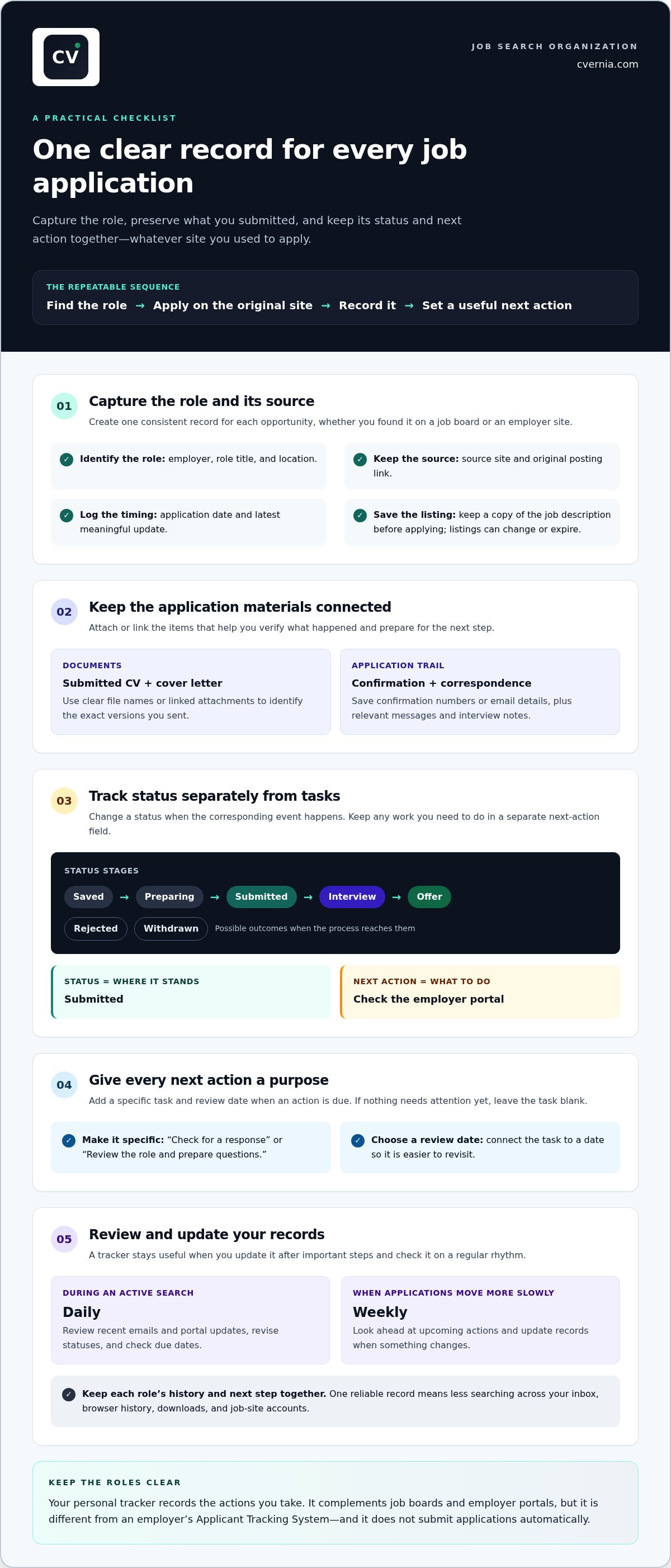
Give each role a consistent record. Start with the employer, role title, location, source site, posting link, and application date. Add the current status, the latest meaningful update, and any next action with its due date. For example, after setting a status to “Submitted,” you might add “Check the employer portal” and a date to review it.
Connect the record to the materials and messages that explain your application: the submitted CV, cover letter, saved job description, and relevant correspondence. Clear file names or linked attachments make it easier to identify the right version quickly.
Why does a single source of truth help?
One reliable record saves you from searching your inbox, browser history, downloads, and several job-site accounts to reconstruct what happened. Consistent fields also make reviews more useful. You can scan statuses, compare opportunities, and spot roles that need attention without deciphering a different note-taking method for each one.
Update the record after each important step, such as submitting an application or receiving an interview invitation. If you’re figuring out how to track job applications from multiple sites, keep each role’s history and next step together. A tracker is most useful when every active role has a clear status and, when needed, a specific next action.
How to capture and update job applications from different sites
Use the same sequence every time: find a role, apply on the original job board or employer site, record the details, then decide whether a next action is needed. This routine makes how to track job applications from multiple sites manageable without changing where you search or submit.
Save the posting link and job description before applying. Listings can change or expire, and a saved copy helps you revisit the role’s requirements when preparing for an interview or checking which CV you tailored. After submitting, log the application immediately instead of relying on memory or assuming the job board will sync with your personal tracker.
What is the fastest way to log a new application?
Keep a short capture checklist beside your tracker and complete it before moving to the next role. Add the employer, role title, source URL, and submission date. Save the job description, then note any confirmation number or email details that will help you verify the application later. Attach or link the submitted CV and cover letter if your system supports it.
Finish by setting a specific next action when one makes sense, such as “Check for a response” on a chosen review date. If no action is due yet, leave the task blank rather than creating a reminder without a purpose.
How should you define application statuses?
Choose a small set of stages and use them consistently: Saved for a role you may pursue, Preparing for an application in progress, Submitted after you apply, Interview once invited, and Offer, Rejected, or Withdrawn when the process reaches that outcome. Change a status only when the corresponding event happens.
Keep progress separate from tasks. “Submitted” describes the application’s status; “Review the role and prepare questions” describes work to do. This distinction makes records easier to scan and keeps action lists useful.
Build a brief review into your routine, daily during an active search or weekly when applications are moving more slowly. Check recent emails and portal updates, revise statuses, and look ahead at due dates. A centralized application tracking dashboard helps keep records and related materials together while you log applications from each site.
Spreadsheet, notes app, or application tracker: which method fits?
The right tool is the one you’ll keep current. A spreadsheet offers structure, a notes app is quick to start, and a dedicated application tracker can connect role details with documents and interview notes. Compare setup, visibility, and upkeep before choosing how to track job applications from multiple sites.
| Method | Setup and visibility | Upkeep |
|---|---|---|
| Spreadsheet | Easy to customize into rows and columns; application stages are visible together. | Requires manual updates and separate links or folders for documents. |
| Notes app | Fast for capturing details in free-form notes; records can be harder to scan consistently. | Needs a reliable naming and review routine to keep entries easy to find. |
| Dedicated application tracker | Designed to organize application records, with a central view of progress. | Requires you to enter or update information; features vary by platform. |
When is a spreadsheet enough for job applications?
A spreadsheet can suit a focused search with a few active applications and limited document-management needs. Create one row per role, with columns for employer, role, source, application date, status, next step, and posting link. Keep labels consistent, using “Submitted” rather than switching between “Sent” and “Applied.”
The trade-off is ongoing maintenance. If updates are missed, statuses become unreliable. If attachments live elsewhere, you’ll still need to locate the right CV or cover letter separately. For a broader routine that includes planning and follow-through, see this job search management system guide.
When does a dedicated tracker make more sense?
A more structured system can help when you’re handling many active roles, tailored document versions, or interview stages. A central dashboard makes applications easier to review, while connected attachments and notes help you retrieve the materials and details for a specific opportunity. You still maintain the records, so don’t assume a tracker automatically imports every application from job boards.
If interview preparation is becoming its own tracking challenge, this job interview tracker guide explores ways to organize stages and preparation. Match the method to your workload, then check whether it makes each application’s status and next action clear.
How to prevent missed follow-ups, lost documents, and duplicate applications
Turn reminders into useful prompts, not a stream of alerts. Whenever an application needs attention, record one specific next action and a review date. That could be “Check the employer portal for an update” or “Prepare questions for the scheduled interview.” Set the date around a real deadline, an employer’s stated response window, or an interview. Follow the employer’s instructions and the context of the application rather than applying one follow-up timeline to every role.
A weekly review helps catch details that can otherwise slip by. Scan for records that haven’t changed, upcoming interviews, and follow-ups that are due or still unanswered. After checking the relevant email or portal, update the record with the latest meaningful information and adjust the next action. Close out records when you withdraw or the process ends.
How can reminders support follow-up without becoming noise?
Make each reminder answer two questions: what will I do, and why now? “Follow up” alone is vague. “Review the employer’s response window and check the portal” gives you a clear task. If there’s no relevant deadline or next step, don’t add an alert just to fill the field. A smaller set of purposeful reminders is easier to act on.
How do you keep application documents accurate and organized?
Use a consistent file-naming pattern, such as Employer_Role_CV_VersionDate, and apply a matching identifier to the cover letter. Attach or link the exact files you submitted to that application’s record, not just the latest versions in your general folder. Then you can revisit what the employer received when preparing for an interview.
Keep tailored materials accurate. Highlight relevant experience and skills, but make sure every statement reflects your genuine background. For a deeper approach to preserving role-specific document history, read the CV version management guide.
Before submitting a new application, search your tracker by employer and role. Compare the location, team, posting link, and prior application history. Similar job titles may refer to different openings, while a reposted listing may point to a role you’ve already applied for. Record what you find before proceeding so you can distinguish a genuinely new opportunity from a duplicate entry.
Keep these safeguards together in a user-managed workspace. Explore CVernia’s application tracking dashboard to organize application records alongside relevant documents and interview notes.
How CVernia helps keep a multi-site job search organized
Once you’ve chosen a consistent capture routine, a central application dashboard helps keep each opportunity’s progress and supporting materials together. CVernia gives you a place to organize application records from different job sites, while you stay in control of entering and updating them.
What can you manage alongside each application?
Keep the application status connected to the details you’ll need later, including interview notes, relevant attachments, and role-specific CV and cover letter versions. Before an interview, for example, return to the record to review the submitted materials and notes you’ve gathered about the opportunity. This context helps you prepare using the same information you had during the application process.
As a role moves through different stages, update its record so your dashboard reflects its current status. If you revisit an employer or similar opening, smart reapplication detection and version management help you recognize prior application history and keep document versions organized. Review the details before acting, especially when a listing appears to be a new or reposted role.
How can tailored documents fit into the tracking workflow?
Tie each submission to the CV and cover letter prepared for that specific role, rather than relying on a generic “latest version.” CVernia’s tailored document tools and ATS analysis help you align materials with a job description and review compatibility. Use that review to refine clear, relevant language, not to add qualifications you don’t have.
Keep every statement truthful and grounded in your actual skills and experience. Tailoring makes relevant experience easier to see while preserving an accurate account of your background. The documents in a role’s record will then remain useful when you review the application or prepare for a conversation with the employer.
For a practical way to bring application records, document versions, and interview notes into one job-search workflow, explore CVernia’s career application tools.
Make your next application easier to manage
A dependable job-search system doesn’t need to be complicated. Record each application in one place, keep its status and next action current, and connect the role to the documents and notes you’ll need later. That routine is the foundation of how to track job applications from multiple sites without relying on memory or searching across scattered accounts.
Choose a tracking method you can maintain. As your search grows, a central application dashboard can bring status updates together with interview notes and attachments. CVernia also supports tailored CVs and cover letters, ATS analysis, and version management with smart reapplication detection, helping you keep role-specific materials organized.
Ready to bring your application records and career documents into a more connected workflow? Explore CVernia’s career application tools and take the process one application at a time.
Frequently Asked Questions
How do I track job applications from multiple websites?
Use one tracker as your central record, and log each application after submitting it on the original job site or employer portal. Include the employer, role, source link, application date, status, and next action. Attach the job description and the exact CV and cover letter you submitted. This approach to how to track job applications from multiple sites keeps updates, documents, and follow-ups connected without relying on memory.
What is the best way to keep track of job applications?
The best method is one you can update consistently. A spreadsheet may suit a focused search with straightforward records, while a dedicated application tracker can help organize status, documents, and interview notes together. Whichever you choose, use the same status labels for every role and record a specific next action when one is needed. Review your records regularly so upcoming tasks and changes don’t get overlooked.
Can I automatically import job applications from LinkedIn and other job sites?
Don’t assume applications will automatically sync from LinkedIn or other job sites into a personal tracker. Import options depend on the tools involved, and a tracker may require you to enter application details yourself. A dependable routine is to apply on the original site, then record the role, posting link, submission date, and confirmation details. CVernia supports user-managed application records and doesn’t automatically submit applications.
What should I include in a job application tracker?
Record the employer, role title, location, source site, posting link, and application date for each opportunity. Add a clear status, the latest meaningful update, and a next action with a due date when follow-up is appropriate. Link the job description, submitted CV and cover letter, and relevant correspondence. For interview-stage roles, include preparation notes and attachments so you can return to the details tied to that application.
How often should I update my job application tracker?
Update your tracker as soon as you apply or receive a meaningful change, such as an interview invitation, rejection, or request for more information. Then review it briefly each day during an active search, or weekly if updates are less frequent. Check upcoming actions, unanswered follow-ups, and stale statuses against your email and employer portals. Adjust each record to reflect the latest information rather than relying on old reminders.
Is a spreadsheet enough to track job applications?
A spreadsheet can be enough for a smaller, straightforward search if you keep it current and don’t need extensive document or interview-note management. Start with columns for employer, role, source, date, status, next step, and posting link. As records grow, manual upkeep can become harder, especially if attachments are stored separately or labels vary. Consider a dedicated tracker if you need connected documents, notes, and versions.


