

What if a job application didn’t disappear into a crowded inbox after you clicked submit? A clear career application management system connects each role with its tailored CV, cover letter, status, follow-up date, and interview notes. Without one, it’s easy to forget where you applied, send the wrong document version, or lose details that could help you prepare.
That disorganization isn’t a personal failing. A job search involves many moving parts, and each application needs attention. The goal isn’t to apply faster by sending the same materials everywhere. It’s to stay organized while making each application relevant and keeping every claim accurate.
This guide walks you through a repeatable process, from finding a role to following up and reviewing what you learned. You’ll see what to record, how to tailor documents without overstating your experience, and how to use version history and interview notes to prepare for your next step. With a reliable system, you can see every application and its next action in one place.
Key Takeaways
- Use career application management to connect each opportunity with its documents, notes, status, and next action.
- Follow a simple workflow from capturing a role to scheduling a follow-up, so important details stay easy to find.
- Compare spreadsheets, separate apps, and centralized platforms to choose an approach that fits how you work.
- Tailor each CV to the role using accurate experience, and label document versions clearly to avoid mix-ups.
- Review outcomes and interview notes to identify useful lessons, improve relevant materials, and make informed decisions about reapplying.
Why career application management matters when every role needs attention
A job search can quickly become a jumble of browser tabs, bookmarked listings, calendar reminders, email threads, and files with nearly identical names. You may remember the company but not the role, or recall a promising conversation without finding the notes you meant to save. Career application management brings these details together so each opportunity has a clear history and next step.
Think of an application as a process, not a single submission. The broader recruitment process can include sourcing, screening, and selection. Your own record can follow your application from discovering a role to receiving an outcome. Keeping the status and next action alongside the relevant documents makes it easier to follow through without relying on memory. It won’t guarantee an interview or offer, but it can help you prepare and respond consistently.
What belongs in an application record?
Build a record that lets you understand the opportunity at a glance and pick up where you left off. Capture the essentials, then keep the supporting materials with them:
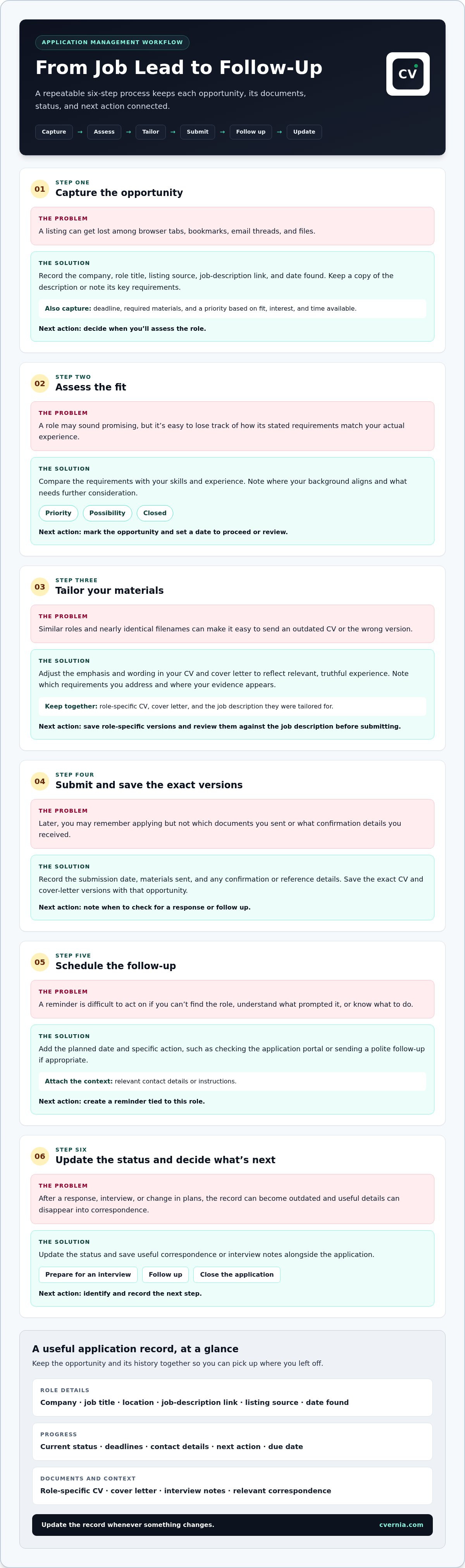
- Role details: company, job title, location, job-description link, where you found the listing, and the date you found it.
- Progress: current status, relevant deadlines, contact details, and your next action with a due date, such as preparing for an interview or sending a follow-up.
- Documents and context: the role-specific CV and cover letter, interview notes, and relevant correspondence.
Update the record whenever something changes. A follow-up date is useful only if you can find it, understand what prompted it, and know what action to take.
Why do applications become difficult to manage?
Each tool may hold one useful piece of information: a job description in a browser tab, a recruiter’s message in email, a reminder in your calendar, and a tailored CV in a local folder. When those pieces aren’t connected, you have to reconstruct the story every time you return to an application. That takes attention away from preparing for the next conversation.
Similar titles make the problem harder. Two “Marketing Manager” roles may have different requirements, contacts, and document versions. Without role-specific records, it’s easy to attach an outdated CV or forget a promised follow-up. A complete, well-maintained record reduces that risk and makes preparation more focused. You can review what the employer asked for, what you sent, and what you need to do next. Organization supports accuracy and follow-through, while hiring decisions remain with the employer.
Build a career application management workflow from job discovery to follow-up
A reliable workflow turns each opportunity into a sequence of small, trackable actions. Use the same steps every time, and update the record as you go rather than trying to reconstruct the process later.
- Capture the opportunity. Save the company, role title, listing source, job-description link, and date found. Keep a copy of the description or note its key requirements, since the listing may change. Record the deadline and required materials. Set a priority based on your fit, interest, and time available. Next action: decide when you’ll assess the role.
- Assess the fit. Compare the stated requirements with your actual skills and experience. Note where your background aligns, what needs further consideration, and whether the role is worth pursuing. Next action: mark the opportunity as a priority, a possibility, or closed, and set a date to proceed or review.
- Tailor your materials. Adjust the emphasis and wording in your CV and cover letter to reflect relevant, truthful experience. Note which requirements you chose to address and where your evidence appears in the documents. Next action: save role-specific versions and review them against the job description before submitting.
- Submit the application. Record the submission date, the materials sent, and any confirmation or reference details. Save the exact CV and cover-letter versions with the opportunity so you can refer to them later. Next action: note when to check for a response or follow up.
- Schedule the follow-up. Add the planned date and action, such as checking the application portal or sending a polite follow-up if appropriate. Include relevant contact details or instructions. Next action: create a reminder tied to this role.
- Update the status. After a response, interview, or change in plans, update the record and save useful correspondence or notes. Next action: identify what comes next, whether that’s preparing for an interview, following up, or closing the application.
Small updates keep the workflow useful. After submitting, confirm that the status, document versions, and follow-up date are recorded. This habit helps prevent an application from sitting unnoticed while you focus on other opportunities.
CVernia’s centralized application workspace brings role records, tailored documents, notes, and next actions together. A consistent career application management workflow gives you a dependable way to move each role forward while keeping your materials accurate. Explore CVernia’s application workspace.
Spreadsheet, separate apps, or platform: compare application management methods
The right setup depends on how many roles you’re managing and how much context you need to keep together. A spreadsheet can provide a clear tracker, while separate apps can handle specific tasks. A centralized platform can be more practical when you want application status, tailored documents, notes, and versions connected to each role.
| Method | Setup effort | Customization | Documents and notes | Progress visibility |
|---|---|---|---|---|
| Spreadsheet | Low to start | Flexible fields and layouts | Often stored separately or linked manually | Clear if regularly updated |
| Separate apps | Varies by tools used | Each tool can suit a specific task | May be spread across files, email, and note apps | Can require checking several places |
| Centralized platform | Requires setting up a consistent workspace | Organized around role-by-role records | Can connect documents, notes, and attachments to roles | Status and next steps can appear together |
When is a spreadsheet enough for job applications?
A simple tracker can work well when you have a small number of active applications and need only basic fields, such as company, role, status, and follow-up date. Spreadsheets are familiar and easy to adapt. Their limitations tend to emerge as records grow: updates are manual, attachments may live elsewhere, and it can be hard to see which document version you submitted. Choose based on the volume you’re managing and whether maintaining the tracker still feels straightforward.
What should a centralized application platform connect?
Look for a role record that brings status, deadlines, and next steps into view alongside the materials and context for that opportunity. Connecting a tailored CV and cover letter with interview notes, relevant correspondence, and attachments helps you review the full application history without piecing it together from different locations. Version management helps distinguish documents prepared for different roles, while reapplication history can prompt you to review a previous attempt before applying again. These features support organization and reflection, not a guaranteed hiring outcome.
Separate apps may suit you if you prefer specialist tools, but consider whether you can reliably connect their information yourself. For career application management, use a practical test: can you quickly find the current status, the exact materials used, and the next action for each role?
Keep every application accurate with tailored CV versions and interview notes
Tailoring is about making relevant evidence easier to see, not changing the facts. For each role, create a version that reflects the employer’s priorities while keeping every statement grounded in work you’ve actually done. Then connect that version and your interview notes to the right application record. This gives you a reliable reference before a conversation and helps prevent details from one opportunity carrying over incorrectly to another.
How can you tailor documents without losing accuracy?
Start with the job description. Identify requirements that match experience, skills, and qualifications you can substantiate. Then adjust the order of your experience, the phrasing of relevant accomplishments, and the emphasis in your cover letter. For example, if a role highlights project coordination, bring forward a real project where you coordinated work. Don’t claim a tool, responsibility, or result you can’t support.
Before submitting, compare the finished CV and cover letter with the job description and your own work history. Check that each claim is accurate and that the documents are intended for this role. Save the final files with descriptive names, such as Company-Role-CV-2026-10-05, and retain the submitted versions with the application. For more on checking document compatibility, see this ATS resume checker guide.
How should interview notes and attachments stay connected?
Keep interview preparation and follow-up details with the matching role, not in an unlabelled general folder. Record interviewer names, questions asked, examples you discussed, and any action you agreed to take. After the conversation, add a brief note about what you learned and set a due date for each follow-up task. Attach relevant correspondence or other role-specific files so the application history stays together.
This record helps you prepare for later interview stages without relying on memory or mixing up conversations with similar roles. For additional ways to organize interview stages and actions, read the job interview tracker guide.
Accurate tailoring and connected notes make career application management more dependable: each role has its own evidence, documents, and conversation history. CVernia’s application workspace connects tailored documents with interview notes and attachments. Organize tailored documents and interview notes.
Turn career application management into a repeatable learning loop
An application outcome is useful information, not a verdict on your entire professional story. A rejection may reflect the needs of one role at one point in time; an interview may show which examples connected with that hiring team. A brief, consistent review helps you learn from what happened without reading too much into a single result.
After each meaningful update, take a few minutes to:
- Record the outcome. Update the status and save any feedback or relevant communication. Separate direct feedback from your own interpretation.
- Compare the application with the role. Review the job requirements alongside the CV and cover letter you submitted. Note a specific improvement, such as making a relevant accomplishment clearer or addressing a requirement you overlooked.
- Carry forward useful details. Add interview questions, examples discussed, and preparation insights that may help with similar roles. Keep the context attached to the right application.
- Set the next action. Decide whether to follow up, revise a document for a future opportunity, prepare for another interview stage, or close the record.
Keep the review evidence-based. If you didn’t receive feedback, don’t guess at the reason for the outcome. Focus on what you can verify, such as whether your materials clearly showed relevant experience and whether you completed each planned follow-up.
How can smart reapplication detection support the next attempt?
If a similar opportunity appears again, recognizing a prior application can prompt you to revisit its history before taking action. Check the earlier status, the CV and cover-letter versions you used, any interview notes, and the previous role’s requirements. A past application is context for a decision, not a reason to resend the same materials automatically.
Make changes when there’s a clear basis for them: new, relevant experience; a revised job description; specific feedback; or a stronger way to present existing evidence. Keep every update truthful, and save the new version distinctly so you can tell it apart from the earlier submission.
CVernia connects application tracking with tailored-document creation, interview notes, attachments, and version management. Smart reapplication detection helps you revisit previous application history, while you stay in control of whether and how to apply. Used this way, career application management becomes a learning loop: record what happened, identify a grounded improvement, and choose the next step with the full context in view.
Organize your next application with CVernia and keep your application history, materials, and next actions connected.
Make Your Next Application More Organized
A steady career application management system gives every opportunity a clear record, from its current status to the next action. Choose a tracking method you’ll keep updated, and connect each role with the documents, notes, and follow-ups that belong to it.
Tailor your CV and cover letter to the role, but keep every claim grounded in your real experience. Save the versions you actually submitted, then use interview notes and outcomes to identify specific improvements for future applications. Reapplication history can help you revisit earlier details before deciding what to update, rather than resending documents without review.
CVernia brings application tracking, notes, and attachments together with tailored CV and cover-letter tools, ATS analysis, smart reapplication detection, and version management. These connected features help you keep your process organized while staying in control of each application.
Organize your applications with CVernia and take your next step with a clearer record and a more consistent process. Each thoughtful application can help you move forward with greater confidence.
Frequently Asked Questions
What is career application management?
Career application management is the process of organizing each job opportunity from discovery through application, interviews, follow-up, and outcome. A useful record connects role details and status with deadlines, next actions, submitted documents, and interview notes. This gives you a clear view of what needs attention and helps you review an application’s history later. It supports a more consistent job search, but it can’t control an employer’s hiring decision.
How do I keep track of multiple job applications?
Use one tracker as your source of truth, whether it’s a spreadsheet or an application management platform. For each role, record the company, title, job-description link, application date, status, and next action with its due date. Keep the tailored CV and cover letter, contact details, interview notes, and relevant messages connected to that record. Update it after submitting or receiving a response so follow-ups don’t depend on memory.
Is a spreadsheet enough to manage job applications?
A spreadsheet may be enough if you’re tracking a manageable number of roles and need only basic fields such as company, title, status, and follow-up date. It’s familiar and flexible, but you’ll need to maintain it manually. Documents and interview notes may remain in separate folders or apps, and comparing past CV versions can take extra effort. If those gaps make updates difficult, consider a method that keeps role details and materials connected.
Can a job application management platform tailor my CV for each role?
Some platforms provide tools to tailor a CV and cover letter to a specific job description and assess CV compatibility with ATS criteria. CVernia provides tailored-document creation and ATS analysis to help you align your materials with a role. Review each draft, confirm that its emphasis matches your real experience, and correct anything inaccurate before using it. Tailoring means highlighting relevant evidence, not adding skills or qualifications you don’t have. Keep the final version associated with the role so you know exactly what you submitted.
How do I organize different CV versions for multiple applications?
Save a separate copy for each application and use a consistent filename that identifies the company, role, document type, and date, such as Northstar-Analyst-CV-2026-10-05. Store the cover letter with the matching CV and application record. Before submitting, check the role title and document contents to avoid sending a version prepared for another opening. Preserve submitted files unchanged, then create a new version when you make later revisions.
What should I record after a job interview?
Record the interview date, interviewer names, questions or topics discussed, examples you shared, and any follow-up actions with due dates. Add feedback or next-stage details when you receive them, and attach relevant correspondence to the application record. Note specific preparation points for a future conversation, but separate direct feedback from your own interpretation. These notes help you recall the discussion accurately and follow through on commitments.
Can an application tracker guarantee more interviews or a job offer?
No. An application tracker can help you stay organized, keep documents and notes connected to each role, and remember planned follow-ups, but it can’t guarantee an interview or offer. Hiring decisions depend on factors beyond your records or tools. Use a tracker to make your process more consistent: tailor materials truthfully, monitor each application’s status, and learn from relevant feedback without treating any one outcome as a promise of what happens next.


