

You’re ready to apply, but three files have almost the same name, and you can’t remember which one matches the role. A small organizational problem can lead to a bigger one: sending the wrong resume or making a quick edit that changes a detail you can’t support. Good resume version management starts with one accurate source and keeps every tailored change traceable.
Tailoring your resume to a specific job can make your experience more relevant, but it shouldn’t mean starting from scratch or stretching the facts. You need a clear way to adapt your strongest, truthful evidence for each role and know exactly what you submitted.
This guide explains how to build a reliable source resume, label and update role-specific versions, and track each resume alongside its cover letter and application. You’ll also learn how to make targeted revisions without introducing inconsistencies. CVernia brings application records and tailored documents together, while compatibility analysis and smart reapplication detection can help you review versions with confidence.
Key Takeaways
- Build a complete, truthful master resume before adapting content for individual roles.
- Use resume version management to distinguish source, draft, reviewed, and submitted copies.
- Follow a consistent workflow to check role relevance, accuracy, and formatting before sending an application.
- Connect each application with its tailored resume, cover letter, and supporting notes so you can find the right materials later.
- Use job description compatibility insights to guide targeted revisions while keeping every claim grounded in your experience.
What Is Resume Version Management, and Why Does It Matter?
Resume version management is the practice of maintaining one accurate source resume and creating clearly labeled, traceable copies tailored to specific job applications. It helps you find the right document, see what changed, and know which version you sent to each employer.
A resume or Curriculum Vitae summarizes your professional background, but different roles may call for different evidence from that background. Version management lets you adjust emphasis and wording without changing the underlying facts. It’s more than saving duplicate files or renaming a document: a dependable system connects each copy to its purpose, edits, and application status.
When does one resume version stop being enough?
One version may work when you’re applying for similar roles. It becomes less effective when your applications have different priorities. For example, a project manager applying for a delivery role might foreground schedules, budgets, and coordination. For a process-improvement role, the same candidate might give more space to workflow changes and measurable results.
A generic resume can bury relevant evidence beneath details that matter less to a particular job description. Tailoring helps a hiring team see the connection sooner. Reorder information, select the most relevant verified achievements, and use accurate terminology from the posting where it describes your experience. Don’t claim a qualification, tool, or responsibility you don’t have. Tailoring changes the emphasis, not the truth.
What should a dependable version-management system preserve?
Start with a source document that reflects your accurate employment history, education, skills, and achievements. Treat it as the reference point for every tailored copy, rather than editing it for each application and losing track of your full record.
For each role-specific version, preserve enough information to identify and review it later:
- Target: role and employer
- Timing: date created or updated
- Status: draft, reviewed, or submitted
- Changes: what you adjusted and why, such as highlighting relevant customer research experience for a market-analysis role
This context turns a folder of similar-looking files into a record you can trust. If an employer follows up, you can retrieve the resume you actually submitted and recall how you tailored it. If you apply for a similar role later, you can use an earlier version as a starting point, then check that its details remain accurate and relevant.
Build a Truthful Master Resume Before Creating Tailored Versions
Before you customize a resume, create a complete source document you can trust. A master resume gives you a place to keep verified details about your work, education, skills, certifications, and achievements, including useful information that won’t fit every application. It’s a reference, not a document you need to send in full.
What belongs in a master resume?
Capture details you may want to draw on later: job titles, employers, dates, responsibilities, projects, tools, training, and results. For each achievement, note the evidence behind it and the scope of your contribution. For example, distinguish between leading a project and supporting one, and record a measurable outcome only when you can verify it.
- Keep confirmed facts: Include accurate employment and education history, skills, certifications, and relevant accomplishments.
- Retain useful context: Keep achievements that may matter for a future role, even if they aren’t relevant to your current target.
- Flag details to check: Mark dates, titles, metrics, or other wording that needs a final accuracy review. Don’t fill gaps with guesses.
This makes the source document a practical reference rather than a collection of polished claims with unclear origins. If a result, date, or responsibility needs checking, leave a clear reminder and resolve it before using that detail in an application.
How can you tailor without changing the facts?
Tailoring means selecting and presenting relevant evidence, not adding new qualifications. The Tulane University School of Professional Advancement’s guidance on tailoring your resume supports using a master resume as the basis for targeted changes. For each job description, identify the priorities that match your actual experience, then adjust the section order and phrasing to make that connection clear.
For instance, if a role emphasizes cross-functional work, bring forward a verified accomplishment involving collaboration. Preserve the dates, tools, responsibilities, and scope of the work. Use terminology from the posting only when it accurately describes what you did.
Every tailored resume should be traceable to verified information in your source document. Before saving a copy, compare its claims with both the master resume and the job description. Check that edits haven’t changed the meaning or overstated your contribution. This evidence-first approach makes resume version management more reliable and helps keep future revisions consistent. CVernia’s CV tailoring and compatibility tools can support this review against a specific job description.
Compare Resume Versions Without Losing Track of the Right File
A useful comparison makes each document’s purpose clear, from the broad source resume to the exact copy sent to an employer. Track the target role, relevant evidence, terminology, accuracy checks, and status. This gives your resume version management system a clear record from first draft to submission.
| Version | Target role | Relevant evidence and terminology | Accuracy checks | Status |
|---|---|---|---|---|
| Source resume | General reference | Full record of verified experience and skills | Confirm dates, titles, and claims | Source |
| Tailored draft | Role and employer identified | Selected evidence and relevant, accurate wording | Compare edits with source and job description | Draft |
| Reviewed version | Specific application | Relevant evidence is easy to find and understand | Check accuracy, readability, and formatting | Ready to submit |
| Submitted copy | Employer and role recorded | Final content as sent | Verify it matches the intended application | Submitted, with date |
Which details should each resume version record?
Choose one filename pattern and use it consistently, such as Role_Employer_Date_Status_Version. For example, Analyst_Northstar_2026-10-06_Submitted_v2 identifies the target, employer, date, status, and iteration at a glance. Save or record the related job description or role reference with the application so you can see why you tailored the resume that way.
Make status labels unambiguous. Keep a draft distinct from a reviewed copy, and preserve the submitted version rather than overwriting it with later edits. If you revise the resume after applying, save the revision as a new version.
How do you decide whether a revision improved the version?
Check whether the most relevant, evidence-backed experience is easier to find and whether the language accurately reflects the job description. Review structure and readability, too. A resume crowded with repeated keywords is harder to scan, and repetition doesn’t make a claim more credible.
An ATS compatibility result can help you identify areas to review, but it isn’t proof of hiring success or a prediction of an employer’s decision. Treat it as one input alongside your checks for clarity, relevance, and accuracy. For more on interpreting these results, see the ATS resume checker guide.
Reject any edit that inflates your responsibilities, results, skills, or qualifications. A stronger version makes your real fit clearer; it doesn’t make your experience larger than it was.
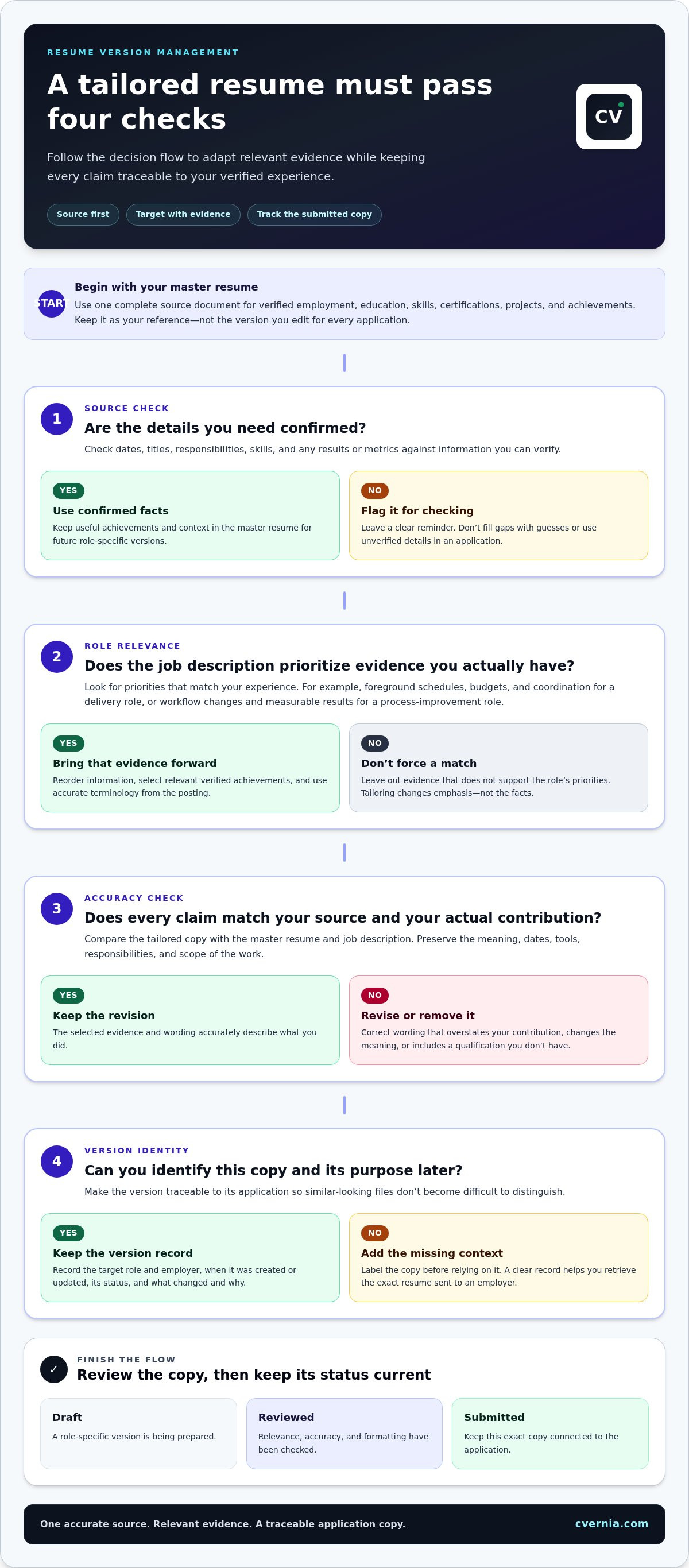
Use a Repeatable Resume Version Workflow for Every Application
A consistent process keeps each application connected to the right job description and resume. Use the same checks each time, then save the submitted copy as a record. That way, a later edit won’t leave you guessing which file an employer received.
What steps should you follow before submitting a tailored resume?
- Save the job description. Keep a copy or record the role details so you can refer back to the requirements you tailored for.
- Start from your accurate source resume. Create a separate copy for this application. Don’t edit the source document directly.
- Tailor relevant content. Bring forward experience that matches the role, and use job-description terminology only when it accurately describes your background.
- Review every change. Check claims against your source information. Confirm dates, titles, responsibilities, results, and skills. Remove wording that overstates your contribution.
- Check presentation. Review readability, section order, spelling, and consistent formatting. Make sure the document is easy to scan and clearly focused on the target role.
- Save and record the final copy. Give it a clear filename, mark it as reviewed or submitted, and update the application record with the filename and submission date.
Keep a submitted copy unchanged. If you spot an improvement later, create a new version rather than editing the record of what you sent. This separation is central to reliable resume version management.
How should you handle a reapplication or revised job posting?
Don’t assume a reposted role has identical requirements. Compare the new description with the earlier one and note changes in responsibilities, qualifications, or priorities. Then review your previous resume and application notes: which evidence did you emphasize, and what could be clearer or more relevant this time?
Use that review to create a new, clearly labeled draft. Keep the earlier submitted version intact, and update the application record so each copy remains tied to the correct posting and submission. Smart reapplication detection can prompt a review of an earlier version, but you should still assess the new role and verify every edit before using it.
For a broader approach to keeping job descriptions, application status, and related records together, read the job search management system guide. CVernia connects tailored documents with application tracking to help keep application details organized in one place. See CVernia’s application organization tools.
Manage Resume Versions with CVernia’s Application Tracking and Tailoring Tools
Keep application details and tailored documents connected so you can return to the right materials without searching through unrelated files. CVernia brings application tracking together with CV and cover letter tailoring, compatibility analysis, interview notes, and attachments. This gives you a central place to manage the information associated with each opportunity and support a more reliable resume version management process.
How can application tracking support document version control?
Use an application record to keep the role, employer, status, and relevant dates alongside the tailored resume and cover letter for that opportunity. Add interview notes and supporting attachments to the same application context. When you need to prepare for a follow-up or review what you sent, the record helps you locate the relevant documents and details.
Keep the status current as an application moves from preparation to submission and later stages. The goal is clarity: you should be able to tell which documents belong to which role and which version was submitted. Application tracking supports that organization, while clear labels and careful updates help preserve an accurate record.
How can CVernia support careful reapplication?
Smart reapplication detection can prompt you to revisit an earlier application when a related opportunity comes up. Treat that as a cue to review, not a reason to reuse the old resume unchanged. Compare the new job description with the earlier role, then look back at the tailored documents and any relevant application notes. Decide what still fits and what needs a fresh, truthful revision.
CV compatibility analysis can help you assess how a CV aligns with a specific job description and identify areas to review. Use the result as one source of guidance, not as a prediction of an employer’s decision or a substitute for your own judgment. Before using an updated document, check its wording, dates, skills, qualifications, and descriptions of your responsibilities. Keep every claim grounded in your actual experience.
CVernia supports tailored documents, application tracking, and reapplication review, while you remain responsible for approving the final content and recording what you submit. Explore CVernia’s tools for organizing your job search.
Make Every Application Easier to Manage
A dependable resume version management process starts with one accurate source, then gives each tailored copy a clear purpose and record. Keep the job description, application status, and submitted documents connected so you can find the right version later. Review each change for relevance and accuracy before sending it.
CVernia supports this workflow with CV tailoring, compatibility analysis, application tracking, and smart reapplication detection. These tools can help you revisit earlier materials and consider focused improvements, while you remain in control of the final review. Generated application content is designed to stay truthful, so your documents reflect the experience and qualifications you can stand behind.
Bring your application records and tailored documents into a more organized workflow. Organize your applications and tailored documents with CVernia.
Frequently Asked Questions
What is resume version management?
Resume version management is the practice of keeping one accurate source resume and clearly identified copies tailored to specific job applications. Each copy should be traceable to its target role, employer, and status, such as draft, reviewed, or submitted. This makes it easier to find the right document later and understand why you changed its emphasis, while keeping every claim consistent with your verified experience.
Should I have a different resume for every job application?
Create a tailored version when a role calls for a different emphasis, but you don’t need to rewrite your entire resume for every application. For similar positions, you may only need to adjust the order of achievements or refine relevant wording. For a role with different priorities, create a distinct copy that highlights the experience most closely related to its requirements. Keep all edits accurate and supported by your background.
How should I name my resume versions?
Use a consistent filename that identifies the role, employer, date, status, and version. For example, Analyst_Northstar_2026-10-06_Submitted_v1 makes the document’s purpose easy to recognize. Keep labels such as “Draft,” “Reviewed,” and “Submitted” distinct, and don’t overwrite a copy you’ve already sent. Record the related job description or role reference with the application so you can understand what the resume was tailored for.
How do I keep tailored resumes accurate?
Start from a source resume containing verified employment, education, skills, qualifications, and achievements. After tailoring, compare each edited claim with that source and check dates, titles, responsibilities, tools, and results. Use job-description terms only when they accurately describe your experience. If a detail or metric needs verification, resolve it before including it. A compatibility analysis can guide your review, but you’re responsible for checking and approving the final content.
Can I use one resume for multiple job applications?
Yes, you can use the same version for applications to similar roles if its content clearly fits each position and remains accurate. Before reusing it, compare the resume with the new job description and check whether different experience should be brought forward. If you make changes, save a separate, labeled version and connect it to that application. This helps you avoid confusing a reused document with the exact copy submitted elsewhere.
How do I manage resume versions when reapplying for a job?
Review the new job description alongside the earlier posting, then revisit the resume and notes from your previous application. Identify what still fits and where a truthful improvement could make relevant experience clearer. Save the revised resume as a new version, and preserve the earlier submitted copy. CVernia’s smart reapplication detection can prompt you to review previous application materials, while compatibility analysis can inform edits for the role.


