

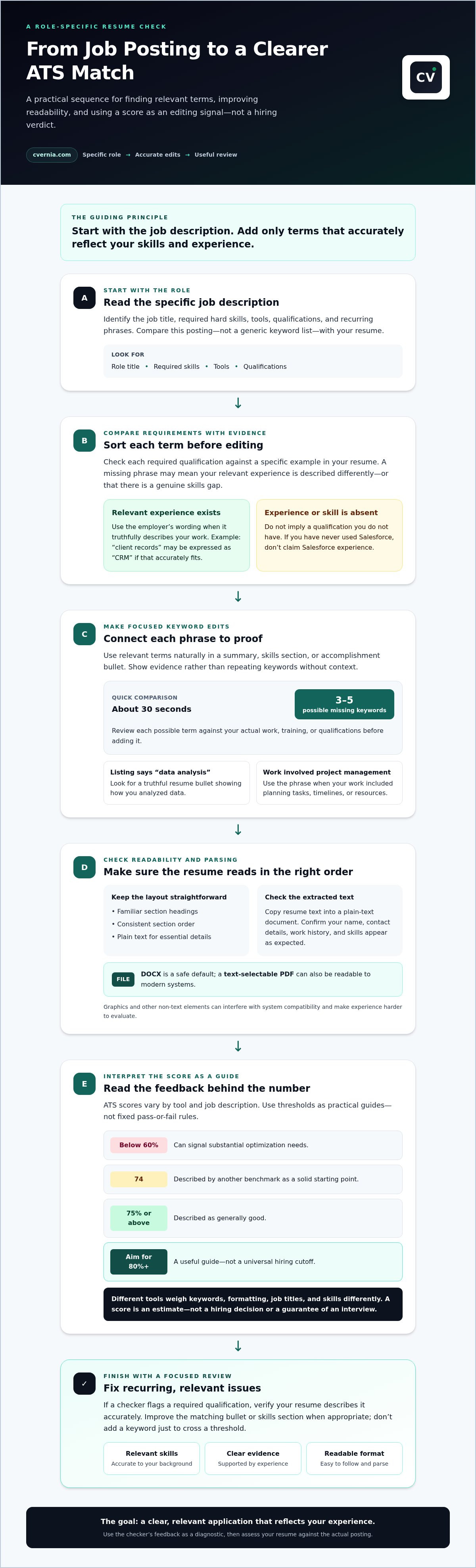
A stronger resume score starts with the job description, not a generic list of keywords. Use an ATS resume compatibility checker to compare your resume with the role, then add relevant terms only when they reflect skills and experience you genuinely have. Aim for a score of 80% or higher as a guide, while remembering that scores vary between tools and job descriptions.
It’s understandable to focus on the score: a low result can make it hard to know what to fix first. But the useful part is the match behind the number. Missing core skills, unclear wording, or formatting that makes details harder to read can all point to practical edits.
This guide explains how to find and add relevant keywords, interpret an ATS score without treating it as a hiring verdict, and compare free and paid checkers. You’ll also get a clear process for checking your resume against a specific job description, so you can make focused improvements while keeping your application accurate and personal.
Key Takeaways
- Compare a job description with your resume, then make targeted keyword edits that accurately reflect your skills and experience.
- Read an ATS score as a guide to possible improvements, not as a verdict on your application.
- Choose between free and paid checkers by considering the type of feedback you need and how you plan to use it.
- Use a role-specific check to spot gaps, improve clarity, and prepare a more relevant application.
Matching resume keywords to a job description
Match your resume to the specific role before applying. Compare the job description’s requirements with your experience, then tailor your wording without adding skills you don’t have.
Missing Skills and Keyword Identification
Compare each required qualification with a specific example on your resume. A missing term may point to an overlooked skill: for instance, you might describe “client records” in a bullet when the listing says “CRM.” It can also reveal a genuine gap. If the role requires Salesforce and you’ve never used it, don’t imply otherwise. Separate skills you can accurately describe from those you still need to develop.
Choosing Keywords for ATS Screening
Prioritize the job title, required hard skills, tools, and qualifications that match your background. Use the employer’s terms when they accurately describe your experience. For example, include “project management” if your work involved planning tasks, timelines, or resources. Add relevant phrases to your summary or an accomplishment bullet, and use variations only when they fit. Highlight evidence rather than repeating keywords without context.
For example, scan the listing for “data analysis,” then look for a truthful resume bullet showing how you analyzed data. A 30-second comparison can surface three to five missing keywords before you apply. Review each one against your actual work, training, or qualifications before adding it.
Keep the layout readable: use familiar section headings, a consistent order, and plain text for essential details. According to NIST, graphics and other non-text elements can interfere with system compatibility and prevent reviewers from evaluating your experience. DOCX is a safe default; a text-selectable PDF can also be readable to modern systems.
To check formatting, copy your resume text into a plain-text document and review the reading order. Confirm that your name, contact details, work history, and skills appear as expected. Then compare your resume with the listing again, making sure each keyword appears naturally in a relevant section, not as an unsupported claim.
ATS score thresholds and interpretation
An ATS score estimates how your resume matches a job posting and how clearly a tool can read it. Treat the result as an editing signal, not a universal hiring cutoff.
Comparing Scores Across ATS Tools
Different checkers can score the same resume differently because they weigh keywords, formatting, job titles, and skills in different ways. Compare results only when you upload the same resume and posting to each tool. Then focus on recurring feedback, such as a missing qualification or a section the tool cannot read. A change in score alone doesn’t show that one checker predicts a recruiter’s decision better.
Interpreting an ATS Resume Score
Use thresholds as practical guides, not fixed pass-or-fail rules. A score below 60% can signal substantial optimization needs, while 75% or above is described as generally good. Another benchmark calls 74 a solid starting point and recommends aiming for 80 or higher. These differences reflect tool-specific scoring. Review the feedback behind the number, then prioritize relevant skills and clear evidence.
If a checker flags a required qualification, check whether your resume describes it accurately. Improve the matching bullet or skills section where appropriate. Don’t add a keyword just to cross a filter threshold. Your goal is a clear, relevant application, not a score detached from your experience.
ATS Parsing and Resume Scores
A score can reflect both content match and how well the checker reads your resume. Upload your resume, then inspect whether the tool recognizes your contact details, employment history, and skills under the right sections. If text appears missing or misplaced, fix the layout before judging keyword alignment. A readable format with conventional headings helps both software and people follow your career history.
Online checkers can identify keyword gaps and parsing problems, but their scores are estimates based on each tool’s method. They don’t reproduce every employer’s system or establish whether a recruiter will invite you to interview. Use the feedback as a diagnostic, then assess your resume against the actual posting.
Once you’ve identified what needs revision, tailored CV and cover letter creation can help shape a role-focused application.
Free and paid ATS checker comparisons
Compare free and paid tools by the feedback they provide, not just their headline score. The right choice depends on scan access, formatting analysis, and how often you tailor your resume.
Free Checker Tiers and Paywalls
A free tier can help you compare a resume with a job description and spot obvious gaps. Before using it, check whether the results include keyword feedback, parsing notes, or only a score. Some tools reserve detailed reports, repeat scans, or AI features for paid plans. If a plan uses AI credits, note what consumes them, such as generating edits or analyzing another posting.
Limits of Free Resume Checkers
Free scans may be enough for a focused application, but limited features can restrict what you learn. A checker might assess one resume and one posting while keeping formatting feedback or suggested edits behind a paywall. Test the result against a specific role: if it identifies a missing skill but provides no context, review the job description and your own evidence.
Compare tools using the same resume and posting, then assess four things: scan limits, feedback detail, file-format support, and whether edits require a resume builder. Employers use different applicant tracking systems, so a checker’s output is an approximation, not a universal screening result. A paid plan is useful only if its extra analysis solves a real problem, such as repeated scans for distinct roles.
What are the risks of uploading a resume to an online checker? Uploading can expose personal information, including contact details and employment history, to the service handling the file. Before submitting, review its privacy and data-retention terms; consider removing your phone number and street address from a test copy.
To protect your information while comparing options, use a copy of your resume and avoid entering sensitive details the scan doesn’t need. Track which feedback leads to a clear improvement, then decide whether a free scan covers your next application or a paid feature offers practical value.
Checking a resume against a job description
Run a role-specific check before submitting an application. A checker can return a score and keyword-gap analysis in about five seconds, but the useful work is deciding which results deserve an edit.
- Choose one posting. Use the complete job description, not a broad job title or several listings. The required skills and responsibilities give the software a clear comparison target.
- Use the exact application draft. Upload the resume version you plan to send, then confirm the checker reads its sections in the right order. If contact details or work history appear misplaced, address parsing before interpreting the score.
- Review matches and gaps. Compare flagged requirements with your actual experience. If the posting asks for Excel and your resume shows spreadsheet reporting, make that connection clear in a relevant accomplishment bullet.
- Make evidence-based edits. Add relevant wording where it naturally fits, then run the check again. Don’t insert a missing skill if you can’t support it with experience or training.
Separate a real skills gap from a wording gap. For example, “managed customer records” may describe experience relevant to a posting that names a CRM. Clarify the tool or task only when it accurately reflects what you did. If you lack a required qualification, treat it as a development need rather than disguising it with keywords.
Use each ATS score as a prompt to inspect specific feedback, not as a standalone verdict. A low result may reflect missing terms, unclear phrasing, or text the checker couldn’t parse. A higher result can still overlook an important requirement, so compare the feedback directly with the job posting’s responsibilities.
Sam Struan’s two-minute ATS-friendly resume test and three-minute parsability method offer quick manual checks alongside software. Read the extracted text in order, verify that key sections remain recognizable, and review the role’s core requirements. Keep notes for each application so you can see which resume version matches each posting.
Keep your role-specific resume versions organized as you apply. Track your application versions alongside the job posting and checker feedback.
CVernia: Career Application Management Platform
CVernia brings resume compatibility checks and application organization together in one career management platform. Use it when you want to compare your CV with a job description, track tailored versions, and keep your search organized in one place.
CV Compatibility & ATS Analysis helps you review how your resume aligns with a role. The Application Tracking Dashboard helps you manage applications, while Interview Preparation & Guidance supports your next step after applying. Together, these tools connect resume refinement with the wider application journey, making role-specific edits and application progress easier to manage.
Keep your materials and next steps aligned as you move between opportunities. Explore how CVernia can support your application process at cvernia.com.
Make Your Next Application More Intentional
Let each application reflect a deliberate choice, not a last-minute change to your resume. Use an ATS resume compatibility checker as one part of your preparation, then decide whether each suggested edit improves clarity and accurately represents your experience. A thoughtful application focuses on the role and the value you can bring, not just a score.
If you want to bring those pieces together, CVernia’s Career Application Management Platform includes CV Compatibility & ATS Analysis and Tailored CV & Cover Letter Creation. Use these tools to refine role-specific materials and keep your next application focused on the opportunity you’re pursuing.
Explore CVernia’s resume support and take your next application forward with greater clarity.
Frequently Asked Questions
How do I improve my resume score?
Improve your resume by addressing the checker’s specific feedback, not by adding keywords indiscriminately. Use an ATS resume compatibility checker with the full job description, then review flagged terms against your real experience. If the tool misses a relevant skill, clarify it in a work example. For instance, describe a reporting task where you used Excel rather than listing the software without context.
What file format is best for ATS?
DOCX is a safe default for resume parsing. Many modern systems also accept PDFs, especially when the document’s text is selectable. Before submitting, test the file by selecting and copying its text into a plain document. If the words paste in the wrong order or disappear, export a fresh file and review its text again before applying.
Do applicant tracking systems really reject 75% of resumes?
The claim that 75% of resumes are rejected by ATS before a recruiter sees them should not be treated as an established universal rate. A related claim that 75% of resumes are never seen by a human traces back to a 2012 sales pitch. Focus instead on making your qualifications easy to identify and your resume text readable by software.
How do I know my resume is ATS compliant?
There isn’t one universal compliance badge that confirms a resume will work with every employer’s system. Check whether the document’s text can be selected, copied, and read in a logical order. Review the extracted contact details, headings, dates, and experience. Then compare your resume with the specific posting, because clear parsing alone doesn’t show how closely your experience matches the role.
What if the missing keywords are skills you do not have?
Leave them out rather than implying experience you don’t have. A missing term may reflect a genuine skills gap, or simply different wording between the posting and your resume. Check whether your experience demonstrates the same capability in other words. If it doesn’t, present your existing qualifications honestly and consider whether the role fits your current background.
Can ATS detect PDF?
Yes, many modern applicant tracking systems can read PDFs, particularly when the text is selectable rather than embedded as an image. Open the file, highlight a sentence, and copy it into a plain-text document to test it. If the text is inaccessible or scrambled, submit a DOCX version when the employer’s application instructions allow that format.


