

The best job search organizer tools bring application tracking, job listings, and alerts into a more manageable workflow. But the tool with the most features isn’t automatically the best fit. Choose one that helps you keep opportunities visible, record each application’s progress, and stay on top of follow-ups.
A job search can quickly become difficult to manage when job details, application documents, and interview notes are scattered across tabs and files. A clear system makes it easier to see what needs attention and keep your next steps organized.
This guide explains how organizer tools track applications, surface listings and alerts, and support a consistent search. You’ll also learn how to compare features and assess reported user outcomes, so you can choose a setup that fits your habits and priorities. Use the comparison to focus on what will make your search easier to manage, not just what looks impressive in a feature list.
Key Takeaways
- Build a tracking system for roles, contacts, and interview progress, and save job descriptions so useful details stay accessible.
- Assess user testimonials by looking for specific outcomes and context, rather than treating individual experiences as a promise of results.
- Compare listing alerts by how well they help you find relevant openings and manage incoming opportunities.
- Choose apps and tools that fit your search habits, then look for ways to keep applications, documents, and interview notes organized.
Job application tracking
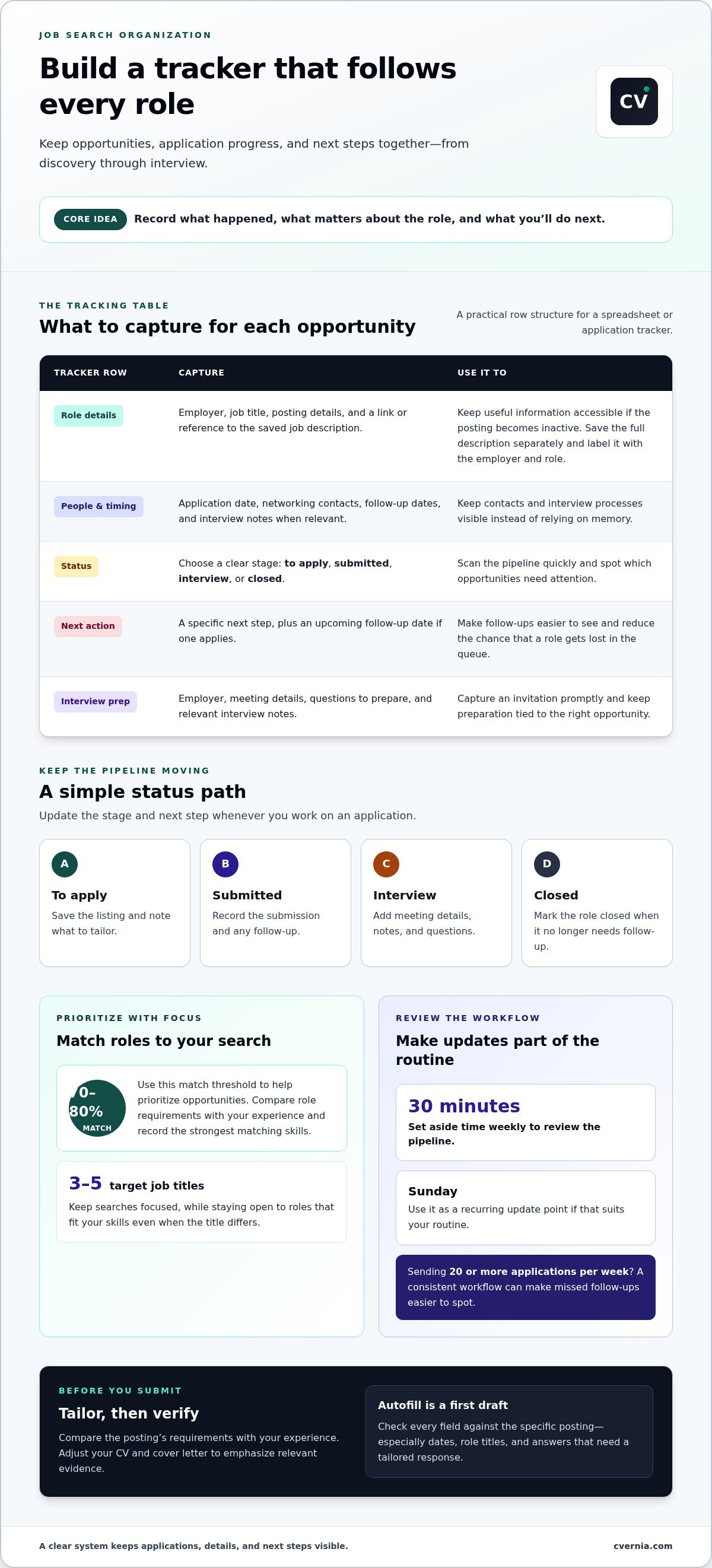
Track each role from discovery through interview, rather than relying on memory. Columbia Career Education recommends tracking positions of interest, networking contacts, and interview processes during a job or internship search. Save the full job description in a separate document, because postings can become inactive. For example, label the file with the employer and role so you can find it later.
For a spreadsheet, use columns for employer, job title, posting details, application date, status, contact, and next action. Add fields for follow-up dates and interview notes when relevant. Choose a layout you can update quickly and scan by status, such as “to apply,” “submitted,” “interview,” or “closed.” Link or refer to the saved job description in its row.
Tailor each application to the posting before submitting. Compare the role’s requirements with your experience, then adjust your CV and cover letter to emphasize relevant evidence. A 70 to 80 percent match threshold can help prioritize opportunities, while a target list of three to five job titles keeps searches focused. For example, record the strongest matching skills beside each role, then use them to guide revisions.
Autofill can speed up repetitive application forms by entering details such as contact information and work history. Treat it as a first draft, not a final review. Check each field against the specific posting, especially dates, role titles, and answers that need a tailored response. A saved profile may not match a new application’s wording or requirements.
Close each tracking session by recording the submission status and next step. If you send 20 or more applications per week, a consistent workflow makes missed follow-ups easier to spot. Set aside thirty minutes weekly to review the pipeline, and use Sunday as a recurring update point. Mark interview invitations promptly, then capture the employer, meeting details, and questions to prepare.
User testimonials and reported outcomes
Testimonials can show how people use an organizer, but they don’t prove it caused a hiring outcome. Read each account in context: consider the user’s role, search approach, and the feature they describe. “I stayed organized” is less informative than an explanation of how a status board helped track an employer’s interview stages. Treat personal stories as individual experiences, not promises of the same result.
Look for details you can compare across reviews. Does the writer explain how they recorded applications, set reminders, saved resume versions, or prepared for an interview? A useful account links a feature to a specific task. If alerts helped someone notice a listing, consider whether they explain how they filtered relevant roles or acted on the alert. That context makes the account more useful.
Separate measurable activity from final outcomes. A user may report submitting more applications or keeping follow-ups visible, while hiring decisions depend on factors beyond an organizer. Check whether a review explains its timeframe and starting point. Moving from scattered notes to one updated board is a concrete workflow improvement, even without a claim about landing a role.
Use reviews as a shortlist, then test the workflow against your own search. Choose one resource or app, add a sample role, and record its source, resume version, status, and next action. Notice whether the process makes details easier to retrieve or adds extra steps. For a structured way to strengthen application materials, explore career learning resources alongside your tool comparison. Favor specific examples over glowing but vague praise.
Job listing volume and alerts
Job alerts can save time, but broad settings may bury relevant roles. Start with a clear search phrase, such as “project coordinator,” then narrow by location, work arrangement, or experience level. Compare results with your target skills, not just the title. An “operations associate” role may match your strengths better than a title you expected. Adjust alert settings when results repeatedly miss the mark.
A large listing feed can mean more sorting work, not better options. Check whether a tool lets you refine results by employer, date, or keywords. For example, a product manager searching for “roadmap” might add relevant skills and exclude terms tied to other fields. Save focused searches separately from broader discovery searches. That keeps strong matches visible without losing sight of adjacent roles.
Before acting on an alert, open the original listing and compare its requirements with your experience. Note the employer, essential skills, and application instructions. If the posting asks for customer research and your resume describes user interviews, record that connection before tailoring your materials. A personalized letter should address the role’s priorities, not simply repeat your resume. Check that your application matches the specific opening before submitting.
Use a simple alert routine: review new matches, remove irrelevant searches, and save promising listings for closer review. If alerts repeatedly show senior roles while you’re targeting associate positions, revise the title or experience filters. Record where each listing appeared, since the same vacancy may show up across job boards. Compare alerts by relevance, clarity, and filter controls, not listing count alone. The best setup helps you spot suitable opportunities and decide what to do next.
Job search apps and tools
Compare tools by how they support your workflow, from finding roles to preparing application materials. Prioritize useful features, clear controls, and a process you can maintain.
Features and Ease of Use
Application trackers vary in how they organize roles, notes, documents, and next steps. Compare how easily you can add an opportunity, update its status, and retrieve a tailored resume or cover letter. A simple interface can suit a focused search, while detailed fields may help with a more complex pipeline. Try the workflow with an example application before settling on a tool.
Integrations with job sites, email, and calendars vary by tool. Choose a setup that fits where you discover roles and receive interview updates. CVernia Job Capture supports LinkedIn and Indeed through its Chrome extension. For other sources, you can add opportunities manually and keep their details together in the platform.
Recent graduates can prioritize role discovery and materials for entry-level applications. Career changers may value the ability to track different target roles and tailored documents. Experienced professionals can benefit from organizing multiple conversations and interview stages. Match the organizer to your job hunt, rather than choosing by popularity alone.
Free Plans and Pricing Tiers
Free plans and paid tiers differ across organizers, so compare the features each plan includes before choosing. Look at application limits, saved documents, reminders, integrations, and export options. A free tier can suit a straightforward search, while a paid tier may be useful when its added functions address a specific workflow need. Review renewal terms and plan changes before relying on any feature.
When storing resume and personal information, review the tool’s privacy policy, account security controls, data access, and deletion options. Avoid storing sensitive details the organizer doesn’t need. Use a unique password and keep a separate copy of important application documents. These steps help you manage your information carefully while using a digital job search tool.
Choose the features that reduce friction in your own process, then organize your career applications with a workflow that keeps documents and next steps accessible.
CVernia: Career Application Management Platform
CVernia brings application organization and preparation together in one career management platform. Use the Application Tracking Dashboard to keep opportunities and progress visible, and use CV Compatibility & ATS Analysis to assess how your CV aligns with a job description. Interview Preparation & Guidance helps you prepare for the next stage.
Turn to CVernia when separate files and notes make it harder to manage applications from submission through interview preparation. Explore the platform at cvernia.com.
Make Your Next Application More Intentional
Choosing the best job search organizer tools is only the start. Build a routine that reflects your priorities, keeps your materials aligned with each opportunity, and helps you learn from each response. Let your system support deliberate decisions, not simply collect listings.
Choose one habit to strengthen first: reviewing target roles, refining an application draft, or preparing for an upcoming conversation. Build your workflow around that action, then adjust it as your search develops. CVernia’s Career Application Management Platform combines job search organization with Tailored CV & Cover Letter Creation and CV Compatibility & ATS Analysis. These tools help you present your genuine experience thoughtfully for each opportunity.
Take the next step at a pace that feels right for you. Contact CVernia about your job search to explore how its platform can support your application process. Your search can become more focused, one thoughtful step at a time.
Frequently Asked Questions
What are the best job search organizer tools in 2026?
The best job search organizer tools in 2026 are the ones that match your search habits and keep your next actions clear. A spreadsheet can suit a focused search, while a dedicated platform can bring application preparation and tracking together. For example, CVernia Job Capture supports LinkedIn and Indeed through its Chrome extension. Compare workflows and choose the setup you’ll consistently maintain.
What features should a job search organizer include for tracking applications, contacts, interviews, and follow-ups?
Choose an organizer that connects each contact and conversation to the relevant role. Record who you spoke with, their connection to the hiring process, when you last communicated, and what you agreed to do next. For interviews, keep interviewer names, discussion points, and questions together. This context helps you personalize a follow-up and prepare for another conversation with the same employer.
What are the best job search organizer apps for iPhone and Android?
The right iPhone or Android option depends on how you prefer to manage your search on the go. Check whether the tool works through a mobile app or browser, then test key tasks: adding a role, finding saved notes, and updating progress. If you often apply from a computer, make sure your mobile workflow complements that process rather than creating a separate record.
How can you set up a job application tracking system step by step?
Set up a tracking system by creating a clear structure before adding opportunities. Use this sequence:
- Choose a spreadsheet or application organizer you can access reliably.
- Create a record for each role and link its source materials.
- Choose status labels that reflect your actual process.
- After each action, update the record and note the next move.
Review the system regularly and remove fields that don’t help you make decisions.
Which job search organizers are best for recent graduates, career changers, and experienced professionals?
Recent graduates should prioritize role discovery and entry-level application materials. Career changers may value tracking different target roles and tailored documents, while experienced professionals may benefit from organizing multiple conversations and interview stages. Choose an organizer that fits your search habits.


