

Automation should handle repetitive tasks, not your career decisions. Automating job search organization starts with clear preferences, then uses filters to surface relevant roles and a consistent system to track applications, updates, and next steps. You remain in control of which opportunities deserve your attention.
A structured workflow makes a busy search easier to manage without turning it into a stream of generic applications. Set preferences around the roles and conditions that matter to you, keep each application’s status and notes together, and use reminders to stay on top of follow-ups. This guide shows how to build that workflow, reduce routine admin with automation, and review AI-generated summaries or application content before relying on them. You’ll find practical ways to organize job preferences, track applications, and save time while keeping your experience and priorities at the center of your search.
Key Takeaways
- Set role, location, and fit criteria before filtering listings so your shortlist reflects what matters to you.
- Use application records to bring confirmation emails, interview details, and follow-up tasks into one reviewable workflow.
- Automate repetitive searches and document updates, then reserve your attention for tailoring materials and evaluating opportunities.
- Connect tools through clear triggers and actions, such as turning a new application confirmation into an updated tracking record.
Job preferences and filters
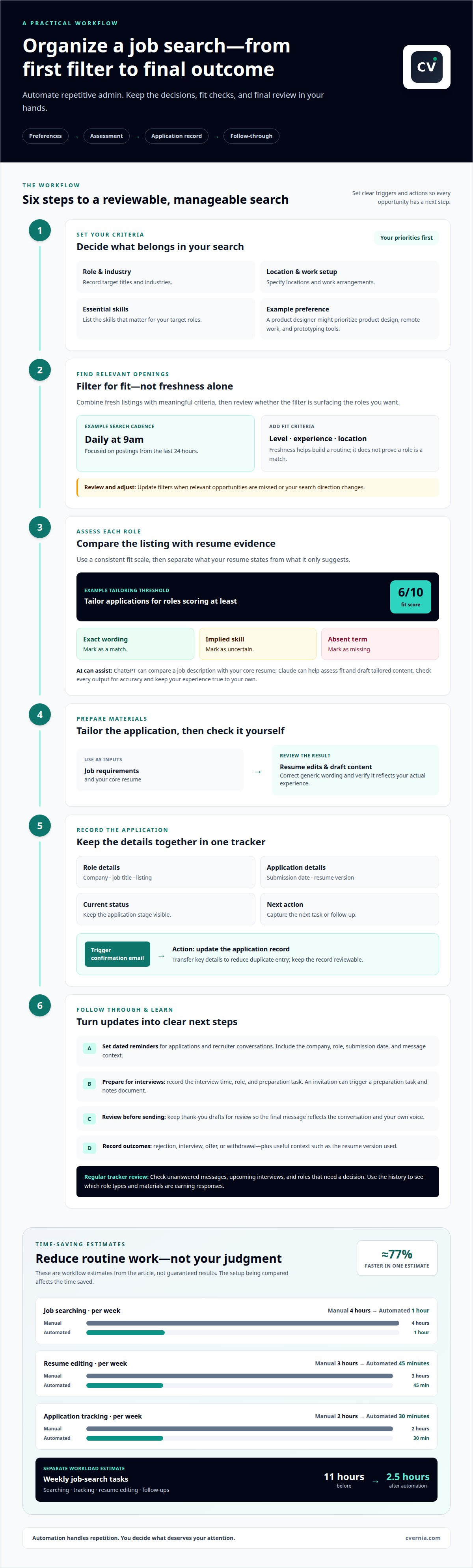
Start by defining which roles belong in your search. Record target titles, industries, locations, work arrangements, and essential skills before setting alerts. For example, a product designer might prioritize product design roles, remote work, and experience with prototyping tools. Clear criteria make automated results easier to assess and reduce distractions from unrelated listings.
Choose filters that match your priorities, then review how they perform. One automated search focused on postings from the last 24 hours and ran daily at 9am. Those settings can help create a regular review routine, but freshness alone doesn’t indicate fit. Add meaningful criteria, such as job level, required experience, or location, and adjust them when relevant opportunities are missed.
Use a consistent fit scale to decide which listings deserve more attention. In one workflow, applications were tailored for roles scoring at least 6 on a 1-to-10 fit scale. Compare each description with your core resume: mark exact wording as a match, implied skills as uncertain, and absent terms as missing. This distinction helps avoid treating a related skill as proof of direct experience.
What are the best AI tools for matching resumes to job listings? ChatGPT can compare a job description with your core resume, while Claude can help assess fit and draft tailored application content. Treat both as assistants: check their output for accuracy and keep your experience true to your own.
- Set preferences: Define role titles, location, work arrangement, and essential skills.
- Filter listings: Combine freshness with criteria that reflect your actual priorities.
- Assess fit: Compare job-description wording with resume evidence, separating exact matches from implied skills.
- Review AI output: Check summaries and tailored materials against your experience before using them.
Make your criteria specific enough to guide useful results, but revisit them when your search direction changes. A new target role may call for different titles or skills. Update your filters to keep the shortlist aligned with your current goals.
Job search tracking
Track each role from discovery to outcome, keeping applications, messages, and next steps in one clear record. A shared workflow can connect email updates with interview preparation and follow-up reminders.
Application Tracking Tools
An application tracker should capture the company, job title, listing, submission date, resume version, current status, and next action. When a confirmation email arrives, automation can transfer key details into a record, reducing duplicate entry. One estimate puts automated application tracking at 30 minutes, compared with manual tracking at 2 hours per week. Popular tool costs vary by plan and features, so compare current subscription terms and limits before choosing.
Protect your information by limiting what a workflow collects and who can access it. Avoid putting sensitive personal details in general-purpose notes, for example, and review connected email or document permissions before enabling automatic capture. Keep resume files and interview notes in storage you control.
Follow-Ups and Interview Reminders
Set a dated reminder for each application or recruiter conversation. After submitting an application, for example, create a follow-up task with the company, role, submission date, and message context. An inbox status change can update the record, while a stalled conversation can prompt you to decide whether another follow-up makes sense.
Use the calendar entry to record the interview time, role, and preparation task. When interview details arrive by email, a workflow can create a notes document. Keep thank-you email drafts for review, so the final message reflects the conversation and your own voice.
Workflow and Outcome Tracking
Build the process in sequence: collect openings, assess each role, prepare tailored materials, record submitted applications, then track replies and outcomes. Give each stage a clear trigger and action. A confirmation email, for example, can prompt an application record update, while an interview invitation can create a preparation task and notes document.
Review the tracker regularly for unanswered messages, upcoming interviews, and roles that need a decision. Record outcomes such as rejection, interview, offer, or withdrawal, along with useful context, including the resume version used. This history helps you see which role types and application materials are earning responses, and where an adjustment may be most useful.
Job-search time savings
Automation saves time by reducing repetitive tasks, not by removing your judgment. One estimate compares manual job searching at 4 hours per week with automated searching at 1 hour per week. That workflow estimate describes a particular setup, not a fixed result for every search. Use it to identify where routine work could be streamlined.
Start with tasks that recur across applications. A job-search workflow can gather listings, remove duplicates, and create a shortlist for review. A Python script generated with Claude can score and rank descriptions by fit, helping you focus on relevant openings. You still decide whether a role matches your priorities and whether to apply.
Resume editing is another time-intensive task. One estimate puts manual resume editing at 3 hours per week and automated editing at 45 minutes. Automation can draft cover letter content from a job description, but treat the draft as a starting point. Tailor each application by checking the role’s requirements against your actual experience and revising wording that sounds generic.
A separate workload estimate compares 11 hours of weekly job-search tasks with 2.5 hours after automation, or approximately 77% faster. The listed tasks include searching, tracking, resume editing, and follow-ups. Those figures depend on the workflow being compared; they don’t mean every task disappears. Keep time for reviewing listings, refining materials, and making application decisions.
Use a simple process to capture value without automating everything:
- Identify repetition: List recurring tasks, such as sorting alerts or updating records.
- Automate a draft: Let a workflow collect listings or prepare application text.
- Review the result: Check relevance, accuracy, and your personal voice before acting.
- Compare effort: Note which steps still take the most time and adjust the workflow.
In one reported process, daily job-search time fell from 3 hours to 10 minutes after automation. Treat that as an individual example, not a standard outcome. The useful goal is to reclaim time from repetitive administration and spend it on thoughtful, tailored applications.
The page estimates automation saves 75% of job-search time and claims it can reduce search time by 70% or more. Workflows can produce a deduplicated shortlist of roles from public job boards each morning.
What tools automate job search organization and application tracking?
A practical workflow combines job alerts, an inbox, a tracking document, and automation rules. Each tool has a distinct role: alerts collect openings, email captures updates, and a central record keeps applications visible. Choose tools based on how well they pass information between stages, not simply on the number of features they offer.
Start with job-alert emails. A workflow can summarize each alert with the job title, company, and application link for a quick inbox review. Another setup can send SMS notifications for matching listings and add them to a single document. These options gather opportunities, while deduplication can remove repeated listings from your shortlist.
Next, connect email updates to your application record. A confirmation message can trigger capture of application details, while a new status update can prompt a notification. A regular recap can collect recent applications and inbox changes for review. This makes the workflow easier to scan, without searching separately through messages and notes.
Build the automation in clear stages:
- Connect tools: Link the job-alert inbox, tracking document, and reminder system you plan to use.
- Define triggers: Specify which event starts an action, such as a new alert or application confirmation.
- Set actions: Choose what happens next, such as adding a record, sending a reminder, or preparing a recap.
- Review outputs: Check captured details and correct errors before relying on the record.
Keep the workflow focused. For example, a new interview email can prompt a preparation reminder, while an application confirmation updates its record. Avoid automating decisions about whether a role suits you; use the system to surface information, then make the judgment yourself. To bring your application records and materials into a more organized process, organize and track your applications.
Use reminders for follow-through and preparation: an application, recruiter reply, or interview can trigger a follow-up prompt. Link each prompt to the relevant application record so you can distinguish a task from a status change during your next review.
A connected workflow can also capture application details from Gmail when a confirmation arrives, while inbox status changes can prompt notifications. Compiling recent applications and inbox updates into a recap gives you a consolidated view to review.
CVernia
CVernia brings job preferences, application records, and interview preparation into a more organized process. Its Career Application Management Platform helps you manage applications, while CV Compatibility & ATS Analysis assesses how a CV aligns with a job description. The Application Tracking Dashboard makes progress easier to follow, and Interview Preparation & Guidance supports you when an employer responds.
Turn to CVernia when separate notes, tailored documents, and application updates become difficult to manage together. You stay in control of which roles to pursue and what to include in each application, while the platform gives you tools to keep the process structured.
For support organizing your job search, contact CVernia.
Make your next application more intentional
Let automation handle routine organization while you make the decisions that shape your search. A thoughtful approach to automating job search organization keeps your process adaptable: refine your criteria as priorities change and focus on roles that fit your direction. Use each application to present relevant experience clearly, rather than sending the same materials everywhere.
When you want structured support preparing application materials, CVernia offers Tailored CV & Cover Letter Creation. These tools can complement your workflow by helping you align your documents with the roles you choose to pursue. Keep your experience accurate, your choices deliberate, and your next step manageable.
Contact CVernia about your job search to explore support for your application process. You can move forward with greater clarity, one considered application at a time.
Frequently Asked Questions
How to build an automated job application tracker in Google Sheets or Notion?
Create a table with fields for company, role, listing link, date saved, application status, resume version, and next action. In Google Sheets, use dropdowns for statuses and filters to sort upcoming tasks. In Notion, create a database with equivalent properties and saved views, such as “To apply” and “Waiting for response.” Add reminders for dates that need follow-up.
How can job alerts be automated by role, location, and salary?
Set separate alerts for each target role and location, then add salary criteria where the job board supports them. For example, create distinct searches for “data analyst” in each preferred city instead of combining locations in one broad alert. Route alert emails into a dedicated folder, then review listings against your priorities. Salary filters only reflect postings that include salary information.


