

No single app handles every part of a job search well. The most useful tools to make job hunting easier work together: AI resume tools help tailor and assess applications, job-matching platforms surface relevant openings, and broad or niche job apps help you find roles across industries or in a specific field. Use them to focus your search, not replace your judgment.
When listings, applications, and resume versions are scattered across platforms, it is easy to feel overwhelmed. The right mix of tools can bring structure to your search and help you focus on roles that fit your goals.
Learn what each type of tool does, how AI can help strengthen your resume and identify relevant jobs, and when a broad job app or niche platform makes more sense. You’ll also see how to organize applications from the first search through interview preparation.
Key Takeaways
- Use AI resume tools to tailor your application to a role while keeping your experience accurate and your voice clear.
- Choose job platforms by what you need: application tracking, role recommendations, or access to opportunities in a specific field.
- Combine broad job apps with niche platforms to make your search more focused across the United States.
- Use CVernia’s ATS analysis and application tracking tools to bring resume alignment and application management into one workflow.
AI resume tailoring and scoring
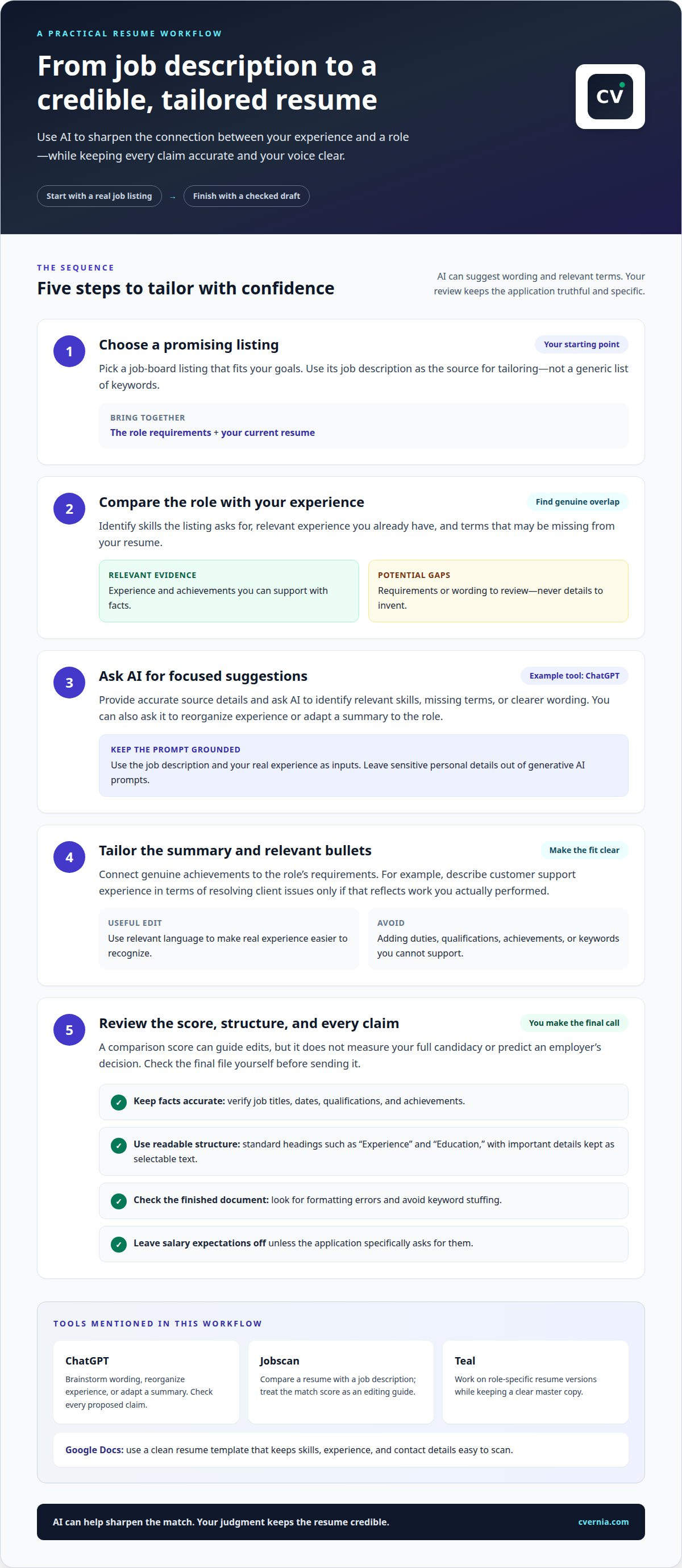
AI resume tools can turn a general resume into a focused draft for a specific role. Start with a job description, then use an assistant such as ChatGPT to identify relevant skills and suggest clearer wording. Review every suggestion rather than copying it as fact. Keep job titles, dates, qualifications, and achievements accurate.
For a practical workflow, choose a promising job-board listing and compare its requirements with your resume. Ask an AI assistant to identify missing terms and experience you already have that supports them. Then tailor your summary and relevant bullet points. For example, connect customer support experience to a posting’s focus on resolving client issues, without claiming duties you did not perform.
- ChatGPT: Use it to brainstorm resume wording, reorganize experience, or adapt a summary to a role. Provide accurate source details, then check every proposed claim.
- Jobscan: Use its resume comparison approach to review how closely your document reflects a job description. A match score can guide edits, but it doesn’t measure your full candidacy or predict an employer’s decision.
- Teal: Use its resume-building and editing features to work on role-specific versions. Keep a clear master copy so each tailored draft stays consistent with your actual history.
- Google Docs: Use its resume templates to create a clean, structured document. Choose a simple layout that keeps skills, experience, and contact details easy to scan.
ATS optimization means using readable structure and relevant language, not stuffing in keywords. Choose standard section headings such as “Experience” and “Education,” and make sure important details remain selectable text. Before sending your file, check the final version for formatting errors and unsupported claims.
Leave salary expectations off your resume unless an application specifically asks for them. A focused document connects your genuine achievements to the role. AI can help sharpen that connection, while your judgment keeps the result credible.
What are the best job search tools, AI platforms, and apps for 2026?
Choose tools based on the tasks that slow your search: tracking applications, completing forms, researching employers, or preparing for interviews. Google Sheets can organize job leads and application progress, while Simplify’s browser extension can assist with repetitive application fields. Review autofilled answers before submitting, since saved information may be outdated or unsuitable for a role.
- Google Sheets: Create columns for employer, role, application stage, submission date, and next action. Filter the sheet to find applications that need follow-up.
- Simplify: Use its application autofill features to reduce repeated data entry, then review each field for accuracy.
- LinkedIn: Use professional connections and shared employer or alumni backgrounds to find people who may offer insight or referrals.
- ChatGPT: Ask it to summarize employer information you provide or create interview practice questions from a job description.
For networking and employee referrals, LinkedIn can help you find connections at a target employer. Send a concise, personalized message that names the role and asks for insight or a referral when appropriate.
Paid job-search and résumé tools differ in features, access terms, and billing plans. Before choosing one, compare what a paid tier adds, such as application tracking or editing features.
Protect your privacy on hiring platforms by reviewing profile visibility and data settings. Avoid entering sensitive personal details into generative AI tools, and leave unnecessary private information out of prompts.
An applicant tracking system (ATS) review can help you assess whether your resume reflects a role’s requirements. Use standard headings and clear formatting so both people and software can follow your experience.
Before an interview, spend five minutes using AI-assisted research to prepare questions about the employer and role. Treat generated details as leads, not verified facts. Keep automation focused on form entry; tailor each application and confirm its answers yourself.
AI-powered job matching
Job-matching platforms compare your profile with role requirements and recommend relevant postings. Suggestions may reflect skills, experience, location preferences, and keywords. A broad search for “marketing” may return varied roles; adding “email campaigns” or “content strategy” makes your target clearer. The most useful tools to make job hunting easier let you refine recommendations around the work you want.
- LinkedIn: Use job recommendations alongside professional profiles and employer pages. Keep preferred roles and skills current to help align suggested listings with your career direction.
- Indeed: Search across employers, then refine results with job titles, locations, and experience terms suited to your target role.
- ZipRecruiter: Review profile-based recommendations for roles related to your experience. Read each listing’s duties instead of relying only on its match label.
- Google for Jobs: Use its search results to discover postings from different sources. Open the original listing to review full details and application instructions.
Improve recommendations by making your profile specific. Add skills such as “SQL reporting” rather than “data,” and use role titles that reflect your experience. Compare suggested postings with your priorities, including responsibilities, work arrangement, and growth opportunities. A match score can help sort options, but your goals should determine which roles deserve attention. Treat tools to make job hunting easier as filters, not decision-makers.
To spot fake job listings and recruitment scams, watch for vague duties, inconsistent company details, or early requests for payment or sensitive information. Before sharing personal documents, verify the role on the employer’s official careers page.
Curated listings can narrow your search by industry, experience level, or work style. A nurse, for example, can combine broad platforms with healthcare-focused job boards; a designer might use portfolio-oriented communities. Save useful searches, review new matches, and adjust keywords when results miss relevant roles. This helps refine your search without treating automated recommendations as hiring decisions.
What are the best tools for finding jobs in the United States?
Build a U.S. search around employer type, location, and occupation. A broad job board can show openings across industries, while government and niche platforms help narrow the field. Compare duties, qualifications, work arrangement, and application instructions before deciding where to apply.
- USAJOBS: Search for federal government positions by agency, location, and job category. Review each announcement’s qualifications and application steps before preparing your materials.
- CareerOneStop: Use this U.S. Department of Labor resource to explore occupations, training, and career options. It can help connect job listings to a longer-term career direction.
- State workforce agency sites: Search local job listings and employment resources based on your state. These can add region-specific opportunities to results from national boards.
- Handshake: Explore early-career roles, internships, and employer events through a platform used by students and recent graduates.
- Idealist: Find nonprofit and social-impact roles, including opportunities in areas such as education and community services.
The U.S. Department of Labor’s online tools PDF provides resources for unemployed workers, job seekers, and career counseling professionals. Use it to identify employment and career-support resources, then search relevant job boards for current openings.
Make your search manageable with a repeatable process. Save searches using a precise job title and location, then add related terms for responsibilities or skills. For example, a project coordinator might search “project coordinator” alongside “operations” or “program support.” Review results regularly and record promising roles, deadlines, and next steps in one tracker.
For a focused U.S. search, combine a broad platform with one source suited to your target. A recent graduate might pair Handshake with USAJOBS for public-sector roles; a nonprofit candidate could add Idealist. Tailor your resume to each posting’s relevant requirements, and prepare a role-focused CV and cover letter for applications that match your goals.
CVernia
CVernia brings key parts of your job search together in one workflow. Its Career Application Management Platform supports tailored applications, while CV Compatibility & ATS Analysis assesses how your CV aligns with a job description. The Application Tracking Dashboard organizes roles and application progress, making it easier to see what needs attention next.
Use these tools when job boards, resume drafts, and interview notes become difficult to manage separately. CVernia also offers Interview Preparation & Guidance to help you organize your thoughts before conversations with employers. These features support a focused search while you stay in control of which roles to pursue. Explore CVernia’s platform to organize your applications and plan your next steps.
Turn your search into a clear next step
Set a simple rhythm for your search: identify a role worth pursuing, prepare an application that reflects your experience, and record what you learn. The best tools to make job hunting easier support this process without making decisions for you. Focus on roles that fit your priorities, and use each application to sharpen how you present your strengths.
CVernia supports this workflow with its Career Application Management Platform, Tailored CV & Cover Letter Creation, and CV Compatibility & ATS Analysis. These tools help you prepare role-aligned materials and manage your applications in one place, while you remain in control of where to apply and what to say.
Contact CVernia for job search support and take your next step with greater clarity. A focused search is built one considered application at a time, and you can move forward with confidence.
Frequently Asked Questions
How can candidates maximize their success with AI job search tools?
Give AI a specific task and accurate information, then review its output before using it. For example, ask it to turn a genuine project achievement into a clearer resume bullet that reflects a target role’s priorities. Check every skill, date, and result against your records. Use AI to organize and refine your materials, not decide which opportunities fit your goals.
How does job search software help candidates streamline applications?
Job search software can keep role details, application materials, and progress together, so you do not have to reconstruct each application from memory. Save the posting, note which resume version you submitted, and record the next action. For example, a reminder to prepare a work sample can keep an important task from getting lost among unrelated application emails.
How have job search tools evolved over the past two decades?
Online job boards’ first wave arrived in the 1990s and early 2000s, making digital listings a central search method. Since 2020, AI has become part of job-search workflows, supporting tasks such as drafting, matching, and interview preparation. The shift is from finding postings online to using connected tools that also help organize and personalize the application process.
What features should candidates look for in a 2026 job search tool?
Prioritize features that solve your actual bottlenecks: finding relevant roles, customizing your resume, tracking applications, and preparing for interviews. Check whether you can save job details and keep notes alongside each opportunity. If you use AI features, look for clear editing controls and a way to review generated content. A useful tool supports your process without obscuring what you submitted.
What tools can tailor a résumé and cover letter to each job?
Resume builders and AI writing assistants can help adapt a document to a specific posting. Start with a reliable master resume, then use the role’s responsibilities to choose relevant examples for the tailored version. A cover letter tool can help structure a focused draft, but personalize the motivation and examples yourself. Remove any suggestion that overstates your experience.
Which tools help track applications, interviews, and follow-ups?
Use an application tracker, spreadsheet, or calendar to connect each employer with its role, submission date, interview notes, and follow-up task. A spreadsheet suits flexible columns; a dedicated tracker may group notes and attachments with each opportunity. After an interview, record topics discussed and questions to revisit, keeping your preparation specific to that employer.


