

A tailored cover letter can make your application more relevant, not just longer. A practical approach to avoiding mistakes on job applications is to match your CV and cover letter to the role, show your achievements with clear evidence, follow every application instruction, and proofread before submitting. Each document should support the same case: why your experience fits this specific opportunity.
It’s easy to focus on polishing a CV and overlook the details that can weaken an otherwise strong application. Tailoring doesn’t mean repeating the job description or claiming skills you don’t have. It means highlighting relevant experience, using appropriate language from the posting, and explaining how your results connect to the employer’s needs. This guide walks through how to do that, present measurable achievements, catch spelling and grammar errors, and write a cover letter that addresses the role’s criteria. You’ll also learn how to make each application accurate, complete, and professional, so you can submit with greater confidence.
Key Takeaways
- Match your application to the role by identifying its key criteria and choosing the most relevant evidence from your experience.
- Strengthen your work history by showing the value and results behind your responsibilities.
- Proofread your application carefully to catch errors that can distract from your qualifications.
- Use a tailored cover letter to connect your experience to the role and address the employer’s priorities.
1. Reading and tailoring applications to job descriptions
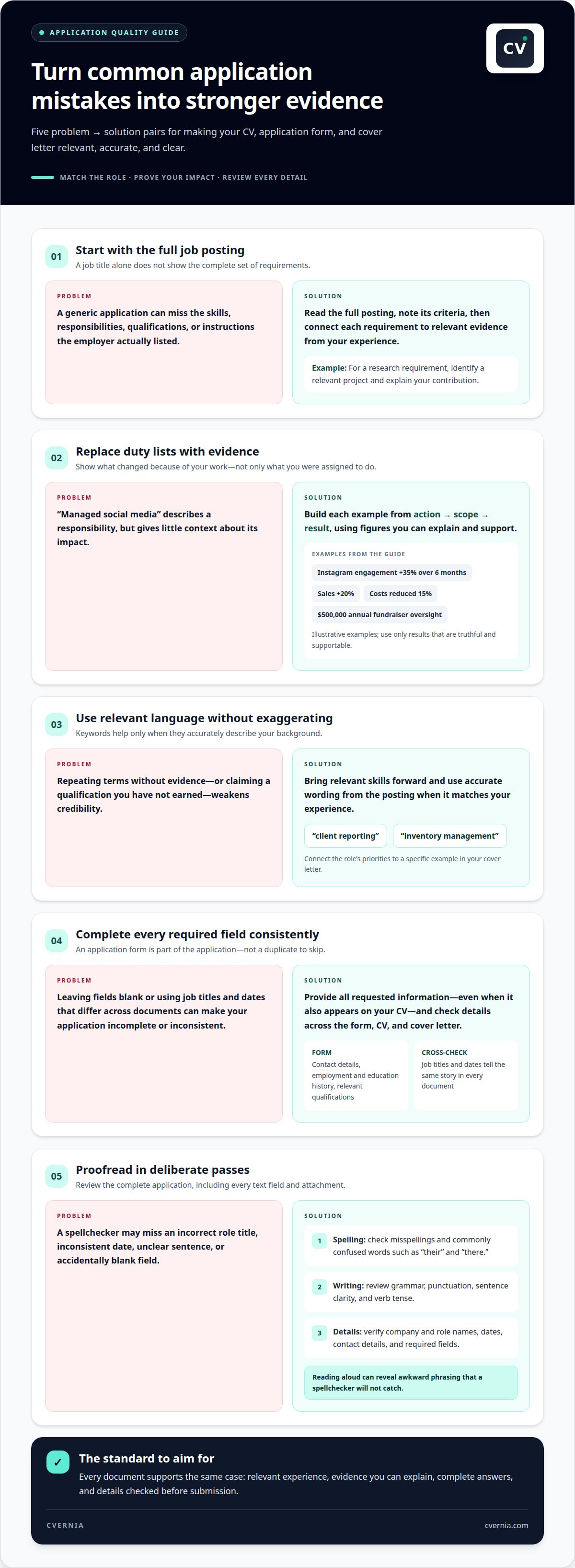
Start with the full job posting, not just its title. Note the required skills, responsibilities, qualifications, and application instructions, then match each requirement to evidence from your experience. If a posting asks for research experience, for example, identify a relevant project and explain your contribution. Answer every application question fully, even when the same information appears on your CV. Follow the requested process and include all required documents.
Tailor your CV by bringing your most relevant experience and skills forward. Use accurate keywords from the job description when they match your background, such as “client reporting” or “inventory management.” Relevant terms can help align your CV with applicant tracking system screening, but repeating keywords without evidence weakens your application. In your cover letter, connect the role’s priorities to a specific example of your work. Never claim a qualification you haven’t earned.
For U.S. applications, focus your resume on qualifications rather than adding personal details such as age or disability. If a form asks about protected information, follow its instructions and answer accurately where required. Don’t volunteer unrelated details. Keep the application relevant without treating sensitive information as a selling point.
If an application asks about an employment gap, give a brief, honest explanation. An entry such as “career break for family responsibilities” is more useful than leaving a required field blank. For salary expectations, follow the form’s instructions. Don’t include salary requirements on your resume unless the employer asks. If the application requires an answer, provide a considered figure or range you can discuss.
Answer questions about criminal history or work authorization truthfully and within the scope of the question. To reduce scam risks, use an application channel you can connect to the employer, and don’t share sensitive personal or financial details in unexpected messages. If you spot a mistake after submitting, correct it through the employer’s application process if possible. Otherwise, send a concise correction to the listed contact. A careful review beforehand is central to avoiding mistakes on job applications.
2. Presenting achievements and measurable results
Replace duty-only statements with evidence of what changed because of your work. Start with an action, describe the task, then show its result. “Managed social media” gives little context; “increased Instagram engagement by 35% over 6 months” shows a measurable contribution. Use figures you can explain and support, not estimates presented as exact results.
Choose measurements that fit the role. A sales position may call for revenue growth, while an operations role may value reduced costs or faster processes. For example, “increased sales by 20%” or “reduced costs by 15%” gives a recruiter a clearer picture of impact. For a nonprofit role, financial oversight of a $500,000 annual fundraiser can demonstrate responsibility at scale.
For an online application, provide all requested information, including contact details, employment and education history, and relevant qualifications. Complete each field accurately, even if your resume contains the same details. Keep job titles and dates consistent across the form and your resume so they tell the same story.
Describe each achievement with a simple sequence: action, scope, result. Explain what you improved, who or what the work affected, and how the outcome was measured. “Streamlined monthly reporting for three departments, reducing preparation time” is more informative than “responsible for reports.” Keep the example truthful and clarify your contribution when the result came from teamwork.
Choose examples that reflect the employer’s priorities. If the posting emphasizes customer retention, lead with a verified retention result rather than an unrelated achievement. If you lack formal workplace metrics, use a concrete project outcome, such as completing a research project or coordinating an event. Specific evidence makes your contribution clear without exaggeration.
Use an application management platform to keep role-specific materials organized as you refine your achievements for each opportunity.
When choosing which responsibilities to feature, explain how you added value rather than listing duties alone. Emphasize your contribution and why it mattered, so each example says more than what you were assigned to do.
3. Proofreading for spelling and grammar
Proofread the complete application, not just your resume. Check spelling, grammar, punctuation, and clarity in every text field and attachment. A typo in a company name or role title can make a polished application look careless. Before submitting, compare names, dates, and contact details across the form, resume, and cover letter.
Check one type of error at a time. First, scan for misspellings and commonly confused words such as “their” and “there.” Next, review sentence structure, verb tense, and punctuation. Use past tense for a completed role and present tense for responsibilities you still perform. Finally, make sure each sentence communicates one clear idea.
Read the application aloud to catch awkward phrasing your eyes might skip. “Responsible for managing and improving reports” is clearer as “Managed reports and improved their accuracy.” A spellchecker may catch misspellings, but it won’t reliably identify an incorrect job title, inconsistent date, or unclear sentence.
Check details that tools often overlook. Confirm that your email address is professional, your phone number is correct, and your employment dates match across documents. Make sure no required field is accidentally blank. If a form asks for a short response, review it separately for relevance and clarity.
When possible, ask someone to review the application. Share the job posting and ask them to flag confusing sentences, missing words, or inconsistencies. Make the final corrections, then reopen the finished documents and inspect them again. This helps catch changes introduced during editing, such as a deleted word or misplaced punctuation. A deliberate final review makes avoiding mistakes on job applications a repeatable step.
Give spelling and grammar a dedicated final check rather than assuming an earlier read was enough. Review the wording in every part of the application and correct any errors before submitting. When possible, ask someone else to review it too; a fresh reader can spot issues you may have missed.
4. Including a tailored cover letter
A tailored cover letter explains why your experience fits the specific role. Use it to connect your strongest evidence to the employer’s priorities instead of repeating your resume. If the posting requests a letter, include it with the other required documents. A generic letter that names the wrong company or role can undermine an otherwise relevant application.
Start with the job advertisement’s essential criteria. Choose an example for each major requirement, then explain what you did and how it relates to the role. Address desirable criteria too, when you have relevant evidence. For example, if a communications role asks for stakeholder engagement, describe a project where you coordinated updates for different groups. Keep each example truthful and specific.
Research the employer before drafting. Spend 10 minutes reviewing its website or LinkedIn page, and note details that help explain your interest. Address a named contact when the posting provides one, rather than using a generic salutation. Then state the correct job title and show how your skills connect to the work. Avoid broad claims such as “I’m a perfect fit” without supporting evidence.
Use a clear structure: introduce the role and your interest, develop your strongest matching examples, then close with a concise statement of your value. If you’re seeking a new position, explain your reasons diplomatically. Focus on developing a skill or taking on different responsibilities rather than criticizing a current or former employer. Keep the tone professional throughout.
Before sending, confirm the employer’s name, contact’s name, role title, and every criterion you reference. Make sure the letter adds context rather than duplicating resume bullets. A focused letter makes your fit easier to understand and gives your application a clear, role-specific message. Create a tailored CV and cover letter to align your materials with the opportunity.
CVernia
CVernia brings tailored applications and job-search tasks together in one career management platform. Use CV Compatibility & ATS Analysis to review how your CV aligns with a job description, then organize applications in the Application Tracking Dashboard. It’s useful when applying for several roles and managing role-specific versions, documents, and next steps.
As you move through the process, Interview Preparation & Guidance helps you prepare for conversations related to your applications. CVernia supports your workflow, while you review and confirm the details and claims in your materials. Use the platform to tailor documents, track opportunities, and prepare for interviews in one place. Get started with CVernia to organize your application process.
Make Your Next Application More Intentional
Treat each application as a deliberate choice, not a rushed repeat of the last one. Before submitting, ask whether your materials reflect the role you want and the contribution you can genuinely make. That final reflection makes avoiding mistakes on job applications part of a steady process, not a stressful last-minute fix.
Build a simple routine you can use for every opportunity. Keep your claims accurate, adapt your materials thoughtfully for each role, and leave time to review the finished application. This approach can help you communicate your value clearly and confidently.
If you’d like support organizing your application journey, Contact CVernia for application support. Take the next step with care, and submit an application that feels true to your experience and goals.
Frequently Asked Questions
What are the most common job application mistakes to avoid?
Common mistakes include sending the wrong resume version, leaving required fields blank, using inconsistent dates, and attaching a document intended for another employer. Before uploading, check that the file name, role title, and company name match the application. Avoid unsupported claims and copied text that doesn’t reflect your experience. A final review of the completed form can catch errors that were not visible in your draft.
How can I proofread a job application for spelling and grammar errors?
Review the application in a different format from the one you used to write it. For example, print it or change the screen zoom, then read each field slowly from the end to the beginning to spot typos without focusing on meaning. Check names, email addresses, and attachment labels separately. A trusted reviewer can flag unclear wording, and a spellchecker can help find missed misspellings.


