

What if the career tool with the longest feature list still leaves your job search scattered? The best career management software for individuals should keep applications, CV versions, notes, and deadlines together, rather than add another disconnected system. It’s frustrating to tailor materials for each role and then lose track of which version you sent.
You need a tool that fits your job search, not a platform built mainly for an employer’s workforce planning. This guide compares career management tools by how well they organize applications, support truthful document tailoring, and help you prepare for your next move.
We’ll compare a basic job tracker with a broader application-management platform, then assess features such as tailored CVs and cover letters, compatibility analysis, interview preparation, notes, and attachment management. You’ll also see what to consider when comparing individual-focused tools with enterprise platforms. The goal is a clearer, more consistent application workflow, while keeping you in control of reviewing and validating every detail in your documents.
Key Takeaways
- Choose career management software for individuals based on your personal job-search workflow, not features designed for employer workforce planning.
- Use a checklist to compare application tracking, tailored documents, notes, attachments, and version history. Treat ATS analysis as guidance, not a screening guarantee.
- Weigh an all-in-one platform against spreadsheets and separate apps by setup effort, context across applications, document version control, and ease of use.
- Test your shortlist with one real opportunity, from saving the role to preparing tailored documents and interview notes, before deciding.
- See how CVernia’s tracking, document tools, ATS analysis, notes, and version management can support an organized application process while you review and validate your content.
Why career management software for individuals differs from enterprise HR platforms
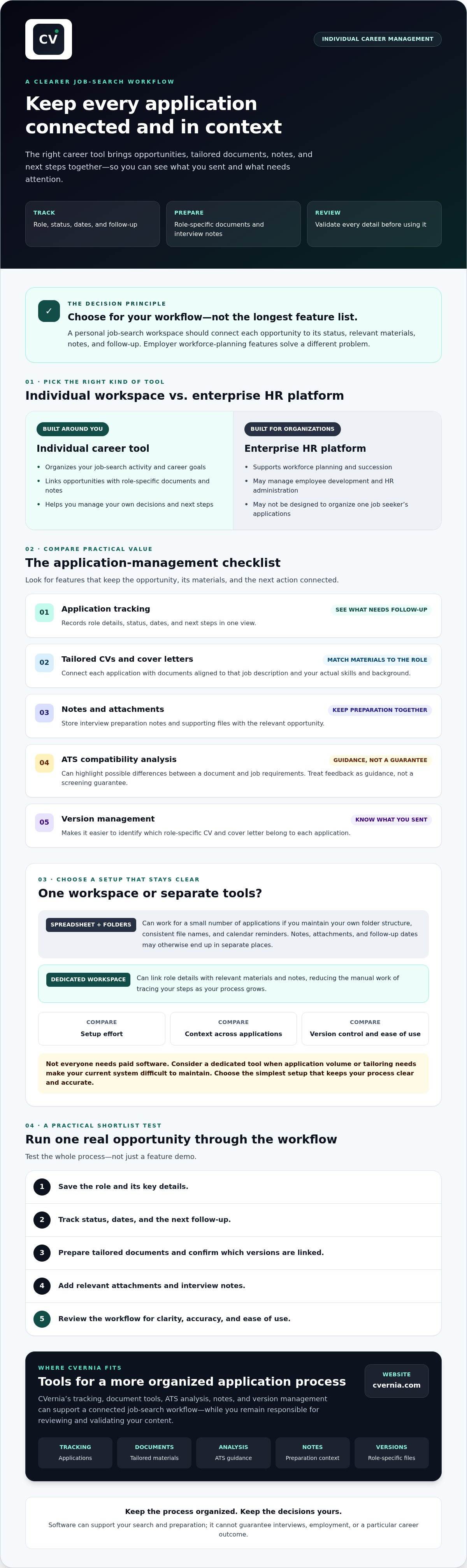
Career management software for individuals helps a person organize career goals and job-search activity, from tracking opportunities to preparing for interviews. It supports your own decisions and application workflow. Employer platforms serve a different purpose: they help organizations manage workforce planning, succession, employee development, and HR administration. Those systems may be useful to an employer, but they aren’t necessarily built to keep one job seeker’s role-specific documents and follow-up tasks organized.
Career management involves structured planning as well as active choices about your professional direction. For an individual, software can make those choices easier to act on by bringing application details, materials, and next steps into a coherent process. It can support your search, but it can’t guarantee interviews, employment, or a particular career outcome.
What should individuals expect from career management software?
Look for a personal workspace where each opportunity has its own status, notes, supporting documents, and follow-up tasks. That context matters when you apply for similar roles: one position may call for a CV that emphasizes project leadership, while another calls for different, equally truthful experience. Tailored CVs and cover letters help connect your actual skills and background to a specific job description. Review each detail before using the documents.
Learning resources can also help you explore skills or make more informed career decisions. They complement the software, but they aren’t a substitute for individualized coaching or a promise about which career path to take.
When is a spreadsheet no longer enough?
A spreadsheet can work well when you’re managing a small number of applications and are comfortable maintaining your own folder structure. Add a row for each role, use consistent file names, and set calendar reminders for follow-ups. The challenge is keeping everything connected as the process grows. Interview notes may live in a separate document, attachments in another folder, and a follow-up date in a calendar. Updating one record won’t necessarily update the others.
Version confusion is easy to create: two similar roles may need different CVs, but files named “CV final” and “CV final updated” don’t show clearly which document went with which application. A dedicated tool can link role details with relevant materials and notes, reducing the manual work of tracing your steps. Still, not every job seeker needs paid software. Consider it when your application volume or tailoring needs make your current system difficult to maintain. Choose the simplest setup that keeps your process clear and accurate.
Which career management software features matter most to individual job seekers?
Compare tools by how well they connect each opportunity to its next action and relevant materials. The best career management software for individuals should make it easy to see an application’s status, what you sent, and what you need to prepare next. Use this checklist to judge practical value, not just the length of a feature list.
| Feature | Individual benefit | Question to ask before choosing |
|---|---|---|
| Application tracking | Records role details, status, dates, and next steps in one view. | Can I quickly see what needs follow-up? |
| Interview notes and attachments | Keeps preparation notes and supporting files with the relevant opportunity. | Can I find the right notes and documents before an interview? |
| Tailored documents | Helps align a CV and cover letter with the specific job description. | Can I connect each role to the materials I prepared for it? |
| ATS compatibility analysis | Highlights possible differences between a document and job requirements. | Does the tool explain its feedback without presenting it as a guarantee? |
| Version management | Makes it easier to distinguish role-specific CV and cover letter versions. | Can I identify which version belongs to each application? |
Application tracking, reminders, and interview records
Check whether you can record an employer, role, application status, key dates, and a clear next action, such as following up or preparing for an interview. Interview notes and attachments are most useful when they stay linked to the opportunity they relate to. This context helps you revisit what you learned, check details before a conversation, and follow up consistently instead of relying on memory.
Document tailoring, ATS analysis, and version management
A useful tool should let you match role-specific CVs and cover letters to their job descriptions. ATS compatibility analysis can point to terms or requirements worth reviewing, but it can’t guarantee that an application will pass screening. Treat suggestions as prompts for your own judgment. Keep every edit truthful: don’t add qualifications, skills, or experience you don’t have, and review generated content before using it.
As you decide which features matter, start with your career direction and the tasks you need help managing. MIT Career Advising & Professional Development’s 8-step career plan offers a structured framework for clarifying those priorities. Then explore CVernia’s individual job-search tools to see how application tracking, tailored documents, ATS analysis, notes, and version management fit your checklist.
How do individual career management tools compare with separate apps?
There’s no single setup that suits every job search. A spreadsheet and folders can be clear and flexible for a handful of applications. Separate apps offer focused tools for tasks such as document creation or CV analysis, while an all-in-one personal platform may bring role details, tailored materials, and application progress together. The key trade-off is control versus coordination: more tools can mean more manual handoffs.
| Approach | Setup effort | Cross-application context | Document versions | Learning curve |
|---|---|---|---|---|
| Spreadsheet and folders | Low to start, with ongoing manual upkeep | Depends on the fields and links you maintain | Managed through your own naming and folder system | Usually familiar, but requires consistent habits |
| Collection of separate tools | Varies as you set up each app | May require copying details between tools | Depends on how each tool saves or labels documents | Learn each tool’s workflow |
| All-in-one personal platform | Requires learning one central workflow | Can keep application activity and related materials in one place | Look for role-linked versions and clear labels | Depends on the platform’s layout and features |
A central platform versus spreadsheets and folders
A spreadsheet can record a company, role, deadline, and status, while folders hold the CV, cover letter, and interview notes. That approach works if you keep the structure current and can quickly locate each item. As applications multiply, you may need to enter the same information in several places. A central platform may reduce that duplication by connecting role details with related notes and documents. Choose based on your application volume and preferred workflow, not on the assumption that spreadsheets are inadequate.
A single job-search tool versus multiple specialist tools
Separate tools can suit you if you need only one focused capability, such as document editing or ATS analysis. Check how easily you can move between them: do role details and document versions stay connected, or must you re-enter information and remember which file you used? An integrated tool may offer more continuity across tracking, document tailoring, and analysis, while still requiring you to review and validate your materials.
For broader career exploration alongside application organization, CareerOneStop, sponsored by the U.S. Department of Labor, offers career and job-search resources. For a closer look at organizing application activity, consult the guide to job search management systems. Compare the approaches against your actual routine, then choose the setup you’ll maintain consistently.
How to choose career management software that fits your workflow
The right career management software for individuals should fit the work you need to do now, not overwhelm you with features you may never use. Use this five-step check to compare options on your own terms:
- Map your needs. Note the tasks that currently take effort or get missed, such as tracking applications, tailoring documents, or preparing for interviews.
- Prioritize features. Separate must-haves from useful extras. Application tracking and version management may matter most during an active search, while learning resources may be more relevant as you explore career growth.
- Test one real workflow. Follow a saved opportunity through role details, tailored CV and cover letter preparation, compatibility review, and interview preparation. Notice where the tool keeps information together and where you still need manual work.
- Review safeguards. Check whether suggestions are editable, whether content stays grounded in your actual experience, and what the current privacy, data-handling, and subscription terms say.
- Decide based on fit. Choose the option that makes your regular process clearer and easier to maintain. Revisit the decision if your search needs change.
Match software features to your current career goal
Start with your immediate objective. An active job seeker may prioritize role tracking, deadlines, tailored documents, and interview records. A career changer may need to organize different versions of their experience for roles in a new field. A professional exploring growth may value resources that support learning and informed planning. Consider application volume and document complexity, too. Centralization may help when you’re managing many role-specific materials, but a simple setup can be enough for a focused search.
Test usability, truthful output, and data practices
Review the language and documents a tool suggests before using them. You should be able to edit the content, verify every claim, and remove anything that doesn’t accurately reflect your skills, qualifications, and experience. Don’t rely on a tool that presents compatibility analysis as a promise of passing screening. For a closer look at compatibility tools, consult the ATS resume checker guide.
Before committing, read the provider’s current privacy and data-handling information, including how it describes the use and retention of your information. Check subscription conditions and confirm which features are included in the plan you’re considering. Details can change, so verify them directly rather than relying on an old comparison. Ready to assess an individual-focused workflow? Explore CVernia’s career application tools and compare them against the needs you’ve mapped.
How CVernia supports a more organized individual career journey
For job seekers comparing career management software for individuals, CVernia brings key application tasks into one individual-focused platform. Its tools connect application tracking with role-specific documents and interview preparation, helping you follow a consistent process from opportunity to follow-up. The platform supports your search, but it doesn’t apply for jobs on your behalf or guarantee interviews or employment outcomes.
One workspace for applications and tailored documents
Use the application tracking dashboard to organize opportunities, then keep interview notes and attachments associated with the relevant application. This gives you a place to return to as you prepare for a conversation or review an application’s status. Tailored CV and cover letter tools help you shape documents around a job description, while ATS compatibility analysis can help assess how well those materials align with it.
Analysis and generated suggestions are starting points, not a substitute for your judgment. Review each document before using it. Confirm that every skill, qualification, and example accurately reflects your experience, and adjust the language so it sounds like you. A well-organized workflow should make truthful tailoring easier, not encourage claims you can’t support.
Support for reapplications and continued career learning
If you revisit an opportunity, smart reapplication detection and version management can help you identify relevant application history and distinguish documents prepared for different roles. That can make it easier to update materials deliberately rather than accidentally reusing an unsuitable version. Career Academy resources complement these practical tools and support exploration without positioning the platform as personal career coaching.
If you’re comparing interview workflows in more detail, see the guide to interview trackers for ideas on organizing interview stages. Then consider whether CVernia’s combination of tracking, tailored documents, compatibility analysis, notes, attachments, and version management fits the way you want to manage your search. Explore the platform and assess its tools against your own needs before deciding whether it’s the right fit.
Build a more focused plan for your next career move
The right career management software for individuals should match your needs, whether that means tracking applications, keeping role-specific documents straight, or preparing for interviews. Compare tools by how well they connect each opportunity to its CV and cover letter, notes, and next steps. Then test a real workflow and review the provider’s current privacy and subscription terms before deciding.
CVernia brings application tracking together with tailored CVs and cover letters, ATS compatibility analysis, and smart reapplication detection with version management. These tools can support a more organized search, while you remain responsible for reviewing your materials and ensuring they accurately represent your experience. No platform can guarantee an interview or job offer.
Ready to see whether this approach fits your workflow? Explore CVernia’s career application platform and assess its tools against your priorities. With a clear system and truthful, role-specific materials, you can take your next step with greater confidence.
Frequently Asked Questions
What is career management software for individuals?
Career management software for individuals is a digital tool for organizing personal career goals or job-search activity. Depending on the platform, it may bring application tracking, tailored documents, interview notes, and learning resources into one workflow. This differs from enterprise HR software, which supports employer processes such as workforce planning and employee administration. Before choosing a tool, check that its features suit your needs. It can support your search, but it can’t guarantee a job.
Do individuals need career management software to find a job?
No. A spreadsheet, calendar, and organized folders may be enough for a straightforward search. Dedicated software can help if you’re managing numerous applications, tailoring documents for different roles, or trying to keep interview notes and attachments connected to each opportunity. Compare the time and effort needed to maintain your current system with the features a platform offers. Choose the approach that fits your application volume and habits, not simply the one with the most tools.
What features should I look for in career management software?
Prioritize application tracking, role-specific CV and cover letter tools, version management, interview notes, and attachment organization. The right feature set depends on your goals, search volume, and preferred workflow. If you use ATS compatibility analysis, treat its feedback as an assessment aid, not a promise that an employer’s system will advance your application. Also review usability, privacy information, and subscription terms so you understand how the tool fits your process and what conditions apply.
Can career management software tailor my CV for each job?
Some platforms help you adapt CV content to a specific job description, but review every suggestion before using it. Effective tailoring highlights relevant, genuine experience; it doesn’t add skills, qualifications, or achievements you don’t have. Check whether you can edit and verify the suggested content, then save a distinct version for each role. This makes it easier to track what you prepared and ensure the document accurately represents your background.
Is career management software the same as an applicant tracking system?
No. An applicant tracking system, or ATS, is generally used by employers to organize recruitment and candidate information. Career management software for individuals helps job seekers manage their own applications, documents, and preparation. Some job-seeker platforms include ATS compatibility analysis, but that doesn’t make the tool an employer’s ATS. Nor can its analysis guarantee how a particular employer will process or assess your application.
How much does career management software for individuals cost?
Pricing varies by provider, plan, and included features, so check the product website for current terms before choosing. Compare what’s included, how billing works, and how cancellation is handled rather than relying on an assumed market average. For CVernia, confirm current plans and feature availability directly before making a decision. A clear comparison of relevant features and subscription conditions can help you judge whether a tool suits your needs.
Can career management software guarantee interviews or a job offer?
No. Career management software can help you organize applications, prepare role-specific documents, and keep track of next steps, but it can’t guarantee interviews or job offers. Hiring decisions depend on employers, role requirements, and factors beyond an applicant’s control. Be cautious of claims promising guaranteed employment or implying that software can secure outcomes without your review and involvement. Use tools to support a careful, truthful application process while keeping expectations realistic.


