

A polished resume can still make your experience harder to find if its layout confuses a screening system. Good ats resume formatting isn’t about stripping away your personality. It’s about making your skills and accomplishments clear to both software and people.
If you’re unsure whether columns, tables, headers, or a designed template could affect how your resume is read, that’s a reasonable concern. File-format advice can be confusing too. This guide will help you make practical choices without turning your resume into a generic list of duties.
You’ll learn how to build a clear structure, choose readable headings and layouts, and check your file before submitting it. We’ll also cover when to use DOCX or PDF, how to tailor each version to a job description, and how to keep your presentation distinctive while representing your experience accurately. The goal is a resume that’s easy to scan, straightforward to parse, and ready for a careful final review.
Key Takeaways
- Use a clear, logical structure so your experience is easier for both screening software and recruiters to review.
- Choose a readable layout and file type, and follow the employer’s application instructions instead of relying on one format for every submission.
- Review tables, columns, text boxes, graphics, and headers, since they can make information harder to extract or interpret.
- Use this ats resume formatting checklist to inspect your document’s structure, content, and extracted text before applying.
- Tailor each resume with accurate language from the job description, and keep role-specific versions organized without overstating your experience.
ATS resume formatting: what it means and why clear structure matters
ATS resume formatting means organizing your resume so recruitment software can extract its content reliably and a person can review it quickly. An applicant tracking system, or ATS, is recruitment software used to manage applications. It isn’t one universal resume-reading system. Employers may use different systems and settings, so a layout that works in one application process may not behave the same way in another. For a general overview of the software’s role in hiring, see Applicant Tracking System (ATS).
Clear formatting helps keep your information organized, but it can’t make experience relevant if it isn’t. Formatting controls how information is organized and displayed; keyword tailoring aligns accurate language in your resume with the role. Neither replaces relevant, truthful evidence of what you’ve done. If an employer specifies a file type or application method, follow those instructions before applying general file-format advice.
How an ATS may read resume content
Some systems extract text from your document and try to recognize details such as your name, contact information, section headings, employment dates, and experience. Think of it as sorting text into useful fields rather than simply looking at the page as a person would. The exact process varies, so parsing can sometimes place a date under the wrong role, miss contact details, or make a heading less clear than you intended. Learn more in this guide to how applicant tracking systems work.
Why a human-readable resume still matters
Recruiters need to spot relevant evidence without searching through dense blocks of text. Consistent headings such as “Work Experience,” “Education,” and “Skills,” paired with concise descriptions, make that scan easier. A simple layout can still look polished. Use deliberate spacing, aligned dates, and consistent typography to create visual order without distracting from your achievements.
Keep the goal in view: make your experience easy to locate, understand, and assess. A clean structure supports that goal for both software and people, while accurate, role-relevant details give the structure substance.
Choose a resume layout, font, and file type that preserve readability
Make the page easy to follow before adding visual flourishes. A single-column layout gives your information a straightforward reading order. Multiple columns may save space, but can make the sequence less predictable when software extracts text. Neither choice guarantees how a particular system will handle your document, so treat simplicity as a practical starting point, not an ATS-proof rule.
When to use a simple single-column layout
Arrange your resume in a clear sequence: contact details, summary or skills if relevant, work experience, education, and other useful sections. Use consistent alignment, restrained styling, and enough white space to separate entries. Complex visual arrangements can make it harder to tell which heading belongs with which details. Familiar, legible fonts and consistent text sizing also help people scan the page without distracting from your experience.
A clean resume doesn’t have to look plain. A consistent typeface, clear heading hierarchy, and deliberate spacing can create a polished presentation without decorative elements. For additional practical guidance, see MIT’s ATS-friendly resume formatting check.
How to decide between DOCX and PDF
Start with the employer’s instructions. If the application portal requests DOCX or PDF, use that format. If it doesn’t specify, DOCX is often a practical choice for compatibility, while a text-based PDF can preserve the layout you see on screen. PDF extraction can vary by system, so don’t assume every file will be read the same way. Avoid submitting a scanned or image-only PDF when the application needs selectable text.
Use this comparison as general guidance, not a guarantee. Your ats resume formatting choices should support readability, while the portal’s requirements determine what to upload.
| Choice | Practical benefit | Check before applying |
|---|---|---|
| Single column | Clear, linear reading order | Headings and details are easy to scan |
| Multiple columns | Can use page space efficiently | Text still reads in the intended order |
| DOCX | Commonly used for editable documents | The employer or portal accepts it |
| Text-based PDF | Can preserve visual presentation | Text remains selectable and instructions allow PDF |
Before uploading, open the file and review its appearance, then check the application portal’s instructions again. CVernia’s CV compatibility and ATS analysis can also help you assess a resume version without treating compatibility as a promise of success.
Formatting choices that can make an ATS resume harder to interpret
Some design choices can make the relationship between details less obvious when a system extracts text. A table may separate dates from job titles, while text in a box or decorative graphic may not appear in the same order as the surrounding content. Multiple columns can also make reading order less predictable. These are possible risks, not proof that every ATS will reject a resume with complex design. The goal of ats resume formatting is to keep essential information clear and easy to verify.
Tables, columns, graphics, and text boxes
Keep core details, including contact information, qualifications, job titles, employers, and dates, in ordinary document text. Don’t make an icon, chart, or graphic the only place a key skill or detail appears. A quick structural edit can improve clarity:
- Before: A two-column table places a job title and dates in one cell, with the employer and achievements in another.
- After: Put the job title, employer, and dates together in a plain-text heading, then list achievements beneath it.
The revised version makes the connection between each role and its details clearer for a reader and may reduce ambiguity during text extraction. You can still use restrained visual styling, but don’t let visual placement carry meaning that the text itself doesn’t state.
Headers, footers, symbols, and inconsistent headings
Contact details placed only in a page header or footer deserve a final check. Open the file, select and copy the text, then paste it into a plain-text document. Confirm your name, email, phone number, and other essential details appear in the expected order. If anything is missing or misplaced, move it into the main document body.
Use familiar section labels such as “Experience,” “Education,” and “Skills” when they accurately describe the content. A creative heading may look distinctive, but it can be less informative than a standard label. Keep dates consistent throughout. For example, use the same month-and-year style for each role. Choose conventional bullets and avoid relying on special symbols to communicate meaning.
Safest practice: place essential information in clear, selectable text in the main body of the resume.
These checks can reduce avoidable confusion, but no format can guarantee identical results across every system. Review the extracted text as well as the page itself, and follow the employer’s application instructions.
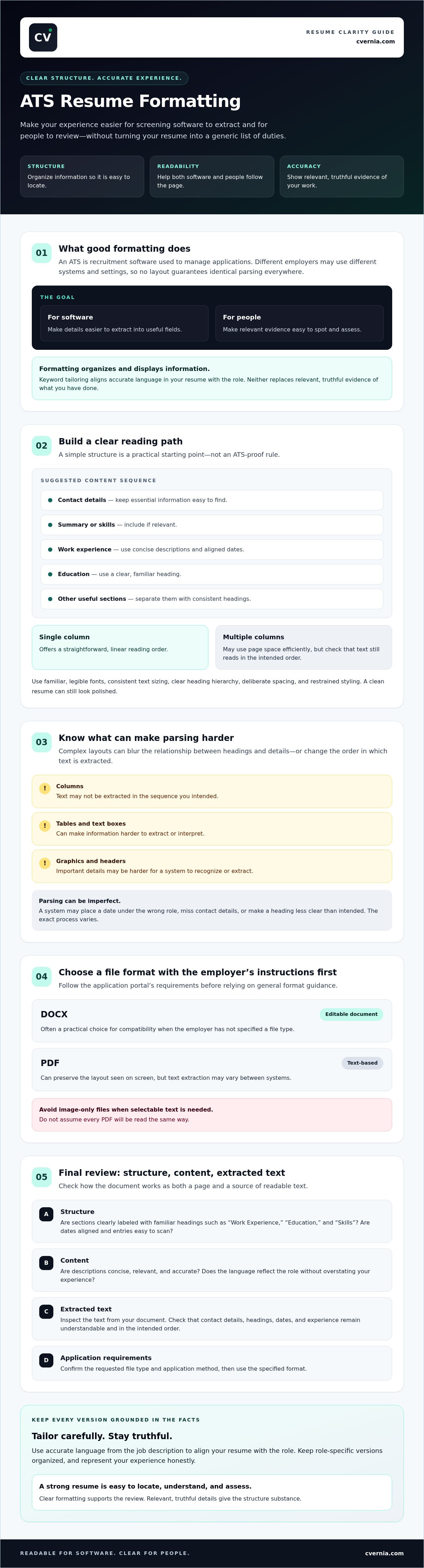
Use this step-by-step ATS resume formatting check before applying
A focused final review can catch layout issues, mismatched details, and submission errors before your resume reaches an employer. Work through these checks for each tailored version, and let the application instructions guide your choices.
A quick pre-submission formatting checklist
- Follow the employer’s instructions. Confirm the requested file type, naming convention, and any application-specific requirements before uploading.
- Check the reading order. Review the document from top to bottom. Make sure each job title, employer, date, and description clearly belongs together.
- Review headings and dates. Use clear section labels where they fit, and keep date styles consistent across roles and education.
- Verify contact details. Confirm your name, email, and phone number are visible, selectable, and correct in the document body.
- Open the final file. Check that it displays properly and contains selectable text. Remove layout elements that don’t add useful information or improve readability.
- Inspect extracted text. Copy the resume into a plain-text document to see whether details appear in a sensible order. If the application portal offers a preview or parsed-text view, review that too.
Next, check the content against the role. Use relevant terms from the job description when they accurately describe your skills and experience. Don’t add qualifications you don’t have or imply responsibilities you haven’t held. Keep a separate, clearly named version for each application so you can confirm you’re submitting the right document.
Check compatibility without treating a score as a guarantee
A compatibility analysis can flag formatting or content areas to review, but it can’t predict how an employer will assess your application or guarantee a hiring outcome. Treat any score as a prompt to inspect the document, not a pass-or-fail verdict. For more guidance on what these tools can and can’t tell you, read the ATS resume checker guide.
For a broader view of application preparation, use this application readiness checklist as a related next step.
CVernia’s CV compatibility and ATS analysis can serve as a review aid during your final ats resume formatting check. Use the results to guide your own review, then confirm that every detail is accurate and the file matches the employer’s instructions.
Keep ATS resume formatting truthful, tailored, and ready for each application
Consistent formatting helps readers follow your resume, while tailored content shows why your experience fits a particular role. Keep the structure steady and adjust the evidence you bring forward. Use the job description to identify relevant skills and responsibilities, then describe them in language that accurately reflects your work.
Tailor relevant experience without overstating qualifications
Prioritize genuine achievements and skills that connect to the role’s requirements. If a posting asks for project coordination, for example, highlight a real project you helped organize and explain your contribution. Don’t claim a tool, credential, responsibility, or number of years you can’t support. Matching terminology is useful only when it truthfully describes your background.
Career changers can also connect transferable experience to a new field. Focus on demonstrated skills and relevant outcomes, and explain the context clearly rather than implying direct experience you don’t have. For more guidance, see this career-change resume guide.
Manage a separate, accurate version for each application
Save a role-specific copy of your resume with a clear file name, such as FirstName-LastName-Role-Company-Date. Before submitting, check that the document matches the position, uses the required file type, and includes no leftover details from another application. A consistent base document makes it easier to tailor relevant sections while keeping dates, titles, and claims accurate.
CVernia’s tools support tailored CV creation, compatibility analysis, and application version management, helping you review documents and keep role-specific versions organized. Compatibility analysis is a review aid, not a prediction of an employer’s decision. Your final check still matters: confirm that each version is clear, relevant, and truthful.
Thoughtful ats resume formatting makes your experience easier to review, while careful tailoring helps each application speak to the role without changing the facts.
Make your next application clear, accurate, and ready
Strong ats resume formatting starts with a clear structure that helps software process your details and lets recruiters scan your experience. Follow the employer’s file instructions, keep essential information easy to find, and review the document’s extracted text before submitting. Then tailor the content to the role by highlighting relevant evidence, not by adding claims you can’t support.
Consistency matters, but every application should reflect its own opportunity. Keep role-specific versions organized and check that each one accurately represents your skills, experience, and qualifications. CVernia brings together tailored CV creation, CV compatibility and ATS analysis, and application version management to support that process. Its analysis is a review aid, not a promise of ATS success or a particular hiring outcome.
Ready to organize and review your application materials? Explore CVernia’s tools for tailoring and reviewing your resume.
Frequently Asked Questions
Can an ATS read a PDF resume?
Often, yes, but the result depends on how the PDF was created and how the employer’s system processes it. Follow the application’s file instructions first. Before submitting, confirm that the text is selectable, the reading order makes sense, and your contact details are visible. If the application portal offers a preview after upload, review it to catch display or text-extraction issues.
Is a two-column resume ATS-friendly?
It may work in some systems, but columns can make reading order or text extraction less predictable. A single-column layout is a straightforward option if reliable parsing is a priority. If you choose columns, keep essential information in the main text and inspect the exported file to see how its content reads. Don’t assume every applicant tracking system will either accept or reject the same layout.
What font should I use for an ATS resume?
Choose a familiar, easy-to-read font and use it consistently throughout your resume. Prioritize legibility over decorative styling, and make headings, body text, and dates easy to distinguish. No single font guarantees ATS compatibility. Check the finished document on screen and in the file format requested by the employer to confirm the text is clear and the page remains easy to scan.
Can I use tables or graphics on an ATS resume?
You can use them, but tables and graphics may make text order or extraction less predictable in some systems. Keep essential qualifications, dates, and contact details in ordinary text rather than placing them only inside visual elements. After exporting, inspect the document and review any portal preview available. Choose simpler formatting if you want key information to be straightforward to parse and review.
Should I submit my resume as a DOCX or PDF?
Use the file type specified by the employer or application portal. If either format is accepted, consider whether preserving the resume’s appearance or providing an editable text document better suits the instructions. Neither DOCX nor PDF is universally best for every ATS. Before submitting, make sure the file opens correctly, contains selectable text, and presents information in a clear reading order.
Do ATS-friendly resume formats guarantee an interview?
No. Clear ats resume formatting can make your information easier to process and review, but it can’t guarantee that you’ll pass screening or receive an interview. Employers consider factors such as the role’s requirements and the evidence in your application. Use a readable structure to present relevant experience clearly, then tailor your resume truthfully without adding skills, qualifications, or experience you don’t have.


