

A job search dashboard shouldn’t just tell you where you’ve applied. It should help you decide what to do next. If application details are scattered across email, documents, and notes, creating a job search dashboard can bring them together, clarify which roles need attention, and make follow-ups easier to remember.
It’s understandable to wonder whether a spreadsheet is enough or whether you need a dedicated app. The right setup isn’t the one with the most features; it’s the one you’ll keep using. A clear system can help you track each application, prepare for interviews, and find the documents tied to every opportunity without creating extra admin.
This practical guide shows you how to build a dashboard around your search, choose fields for status, next steps, follow-up dates, interview notes, and relevant files, then compare a spreadsheet with a dedicated platform. You’ll also learn how to establish a simple review routine so your dashboard stays useful as your priorities change. Think of it as a decision tool, not just a list.
Key Takeaways
- Start with the decisions your dashboard should support, so it stays focused on opportunities, progress, and clear next actions.
- When creating a job search dashboard, choose core fields that make follow-ups easier, then add optional details only when they serve a purpose.
- Compare spreadsheets, general workspaces, and dedicated platforms based on the setup and document-management features you’ll actually use.
- Build a simple routine for updating your dashboard after applications, employer messages, interviews, and decisions.
- If your spreadsheet no longer keeps applications, interview notes, attachments, and document versions together, consider a platform designed to manage those parts of your search.
Creating a Job Search Dashboard Starts With a Clear Search Workflow
Application details can quickly end up spread across job boards, email, CV files, and calendar reminders. That makes it harder to see which roles need a follow-up, where you saved a job description, or what to prepare before an interview. A dashboard brings these details into one view, so you can focus on the next useful action instead of searching through scattered records.
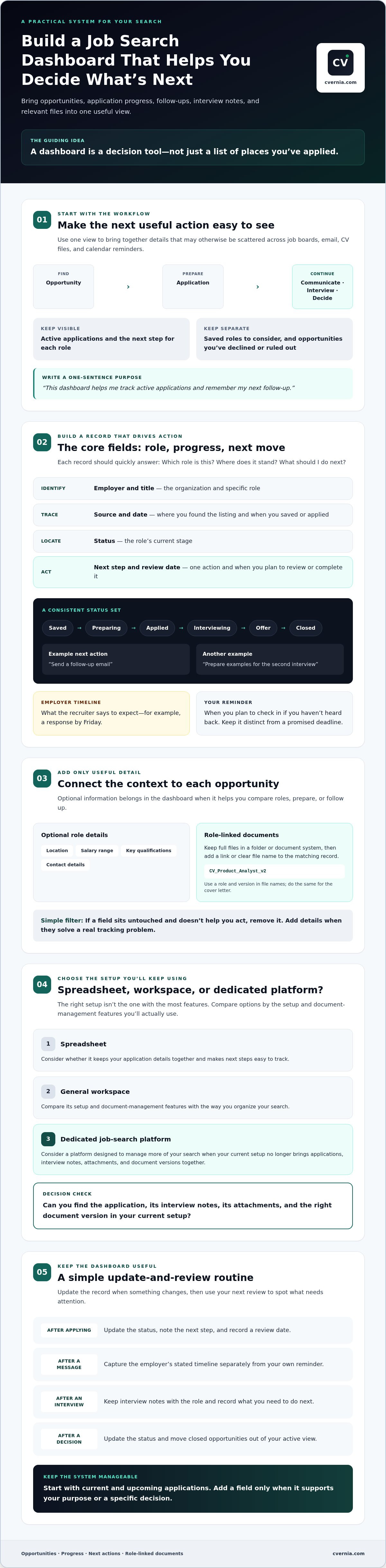
A job-search dashboard is a single view of opportunities, application progress, and the next action needed for each role. It should reflect your existing search process, not force you into an elaborate new one. A clear job search workflow typically moves from finding an opportunity to applying, communicating with the employer, interviewing, and making a decision. Your dashboard can make those stages easier to follow.
Decide what the dashboard needs to help you do
Start with the friction you want to remove. Do you mainly forget follow-ups, lose track of tailored application materials, or need a reliable place for interview preparation? Choose one primary purpose, then use it to decide what belongs in the dashboard. For a broader look at organizing each stage of a search, see this job search management system guide.
Separate opportunities by what you’re doing with them. Keep active applications distinct from saved roles you may pursue, and move opportunities you’ve declined or ruled out out of your active view. This distinction keeps current priorities visible instead of mixing them with every role you’ve considered.
Write a one-sentence purpose before adding fields, such as: “This dashboard helps me track active applications and remember my next follow-up.” If a field doesn’t support that purpose or a specific decision, leave it out for now. Add it later if your workflow shows you need it.
Choose a manageable scope for your job search
Begin with current and upcoming applications, not a full archive of past roles. Include an opportunity when you can identify its source, the role, or a clear next action. If you’ve only saved a listing to consider later, keep it in a separate section so it doesn’t obscure applications already in progress.
For a useful first version, track each role you’re considering or pursuing, its current stage, and the next step you need to take. This keeps creating a job search dashboard manageable from the start. As your routine settles, refine the scope and add details that solve a real tracking problem rather than building a complicated system before you know what you need.
Build Your Job Search Dashboard With Fields That Drive Action
A useful dashboard record should answer three questions quickly: Which role is this? Where does the application stand? What should I do next? Begin with a compact set of fields for every opportunity:
- Employer and title: Identify the organization and specific role.
- Source and date: Note where you found the listing and when you saved or applied.
- Status: Show the role’s current stage.
- Next step: Record one action and when you plan to review or complete it.
Add optional details only when they support a decision or follow-up. Location, salary range, key qualifications, and contact details may be useful when comparing roles or preparing for a conversation. If a field sits untouched and doesn’t help you act, remove it. The goal of creating a job search dashboard is to make decisions easier, not to maintain a database for its own sake.
Create a status and next-action system
Keep status labels short and consistent, such as Saved, Preparing, Applied, Interviewing, Offer, and Closed. For every active application, pair the status with one specific next action, such as “send a follow-up email” or “prepare examples for the second interview,” and a review date.
Track an employer’s stated response timeline separately from your own reminder. If the recruiter says they expect to respond by Friday, record that as an employer timeline. Set a personal reminder for an appropriate follow-up if you haven’t heard back. This distinction keeps your notes accurate and prevents your planned check-in from being mistaken for a promised deadline.
Connect documents and interview details to each role
Keep full files in a folder or document system, then add a link or clear file name to the relevant dashboard record. For example, label a CV by role and version, such as CV_Product_Analyst_v2, and do the same for the cover letter. You’ll be able to identify what you submitted without copying entire documents into a spreadsheet. For guidance on checking a CV against a specific role, see this ATS resume checker guide.
Use one consistent place to capture interview dates, interviewer names, discussion points, and questions you want to ask. After each conversation, add brief, factual notes while details are fresh. Record what was discussed and any agreed next steps, rather than assumptions about the employer’s intentions. Those notes can support thoughtful follow-ups and help you prepare if the process continues.
If managing application records, interview notes, attachments, and document versions in separate places is becoming difficult, an application-management platform may help bring those materials together.
Spreadsheet or Job Search Platform: Choose the Dashboard That Fits
The best tool is the one that fits your search habits. A spreadsheet offers a fast, flexible start. A general workspace can combine a tracker with notes and project pages, but may need more setup. A dedicated career platform may bring application tracking and related materials together, reducing the need to switch between tools. Compare them by the work you need to do, not by the length of a feature list.
- Setup effort: A spreadsheet is usually quick to customize. A workspace or platform may take time to configure or learn.
- Customization: Spreadsheets and workspaces let you shape fields and views. Dedicated platforms may follow a more defined application workflow.
- Reminders: Check whether reminders are built in, require integrations, or depend on your calendar and manual checks.
- Documents and notes: Consider how you’ll find tailored CVs, cover letters, job descriptions, and interview notes from each role.
- Maintenance and collaboration: Choose a system you can update consistently, and check whether it suits your search alone or with others.
For a small search, a spreadsheet may be all you need. If you’re comparing broader career-management options, explore CVernia as one centralized option for application tracking and related materials.
When a spreadsheet is enough
Choose a spreadsheet if you’re tracking a manageable set of roles and manual updates feel straightforward. Filters can show only active applications, consistent status labels keep records readable, and sorting by date can bring upcoming follow-ups into view. You can add links to files and calendar reminders, but those connections may need extra upkeep. Maintaining document versions and interview notes alongside the tracker can also take additional work.
If you share the search with someone else, consider whether the sheet’s permissions and editing process will be easy to manage. Keep the structure simple enough that updates don’t become a separate project.
When a dedicated platform can reduce friction
A dedicated platform may be worth considering when applications, notes, attachments, and document versions are scattered across several places. Look for features that match your actual workflow, such as application tracking and ways to organize interview notes and related files. Check how the tool handles reminders and versions rather than assuming those functions are included.
Creating a job search dashboard should make your process clearer, not add another system to maintain. Choose based on your application volume, whether you need to collaborate, and how much manual updating you’re willing to do. A platform can support organization, but it won’t guarantee interviews or submit applications on your behalf. Check that its capabilities fit before moving your workflow.
Create a Job Search Dashboard Routine You Can Keep Using
A dashboard only helps if it stays current. Build a small version first, then connect updates to actions you already take, such as submitting an application or finishing an interview. Creating a job search dashboard doesn’t require a complex setup; it needs a reliable rhythm that shows what’s active and what deserves your attention next.
Set up and populate the first version
Start with a tool you’re comfortable opening and updating. Then follow this sequence:
- Add the core fields. Include employer, role, source, application date, status, next action, and review date.
- Enter active opportunities. Add current applications and roles you’re preparing to pursue, rather than trying to recreate your entire search history.
- Connect relevant materials. Record the file names or links for the tailored CV, cover letter, and job description associated with each application.
- Check it at a glance. Ask whether you can quickly identify what needs attention today. If not, adjust the layout or simplify the fields.
Use the first pass as a practical test, not a final design. For example, if an application’s status is clear but you can’t tell whether to prepare for an interview or follow up, add or clarify the next-action field. For more detailed interview tracking, see this job interview tracker guide.
Keep records current without creating busywork
Update a record after a meaningful event while the details are fresh. After submitting an application, confirm the date and status, then note the next step. After an employer message, record the response and any stated timeline. After an interview, save the date, key discussion points, and follow-up task. When you accept, decline, or rule out a role, close it so it no longer competes with active opportunities.
Set a brief recurring review, such as a weekly check-in that fits your schedule. Scan for overdue actions, upcoming employer timelines, and applications that need a personal follow-up. Then update dates or next steps as needed. Keep employer-provided timelines separate from your own reminders, so it’s clear which dates came from the hiring process and which are your planned check-ins.
Use the review to trim the dashboard, too. If a field never helps you make a decision or take action, remove it. A lean dashboard is easier to maintain and more likely to stay useful throughout your search.
If you’d prefer application tracking and related materials in one place, explore CVernia’s application management platform as an option for organizing applications, notes, and attachments.
Use CVernia When Your Job Search Dashboard Needs More Than a Spreadsheet
A spreadsheet can track where you’ve applied, but it may not be the easiest place to manage the documents and context behind each application. If you’re searching across multiple roles and find yourself hunting through folders for the right CV, interview notes, or employer message, bringing those details together may make your process easier to follow.
CVernia is a career application management platform that combines application tracking with tools for tailored documents, interview notes, and attachments. It may suit job seekers who want more than a list of roles, especially when organizing application materials has become a separate task.
Match CVernia’s tools to dashboard needs
Connect each application with the information that helps you prepare and follow through. CVernia supports application tracking alongside interview notes and attachments, so role-related details can be managed in one platform. Its tailored CV and cover-letter tools let you prepare materials for specific opportunities, while CV compatibility and ATS analysis can help you review how a CV aligns with a job description.
Smart reapplication detection and version management may also help if you apply to an employer again or tailor documents for different roles. Version management can help you distinguish files and keep application materials organized. These tools support a clearer process, but your content still needs to reflect your real background.
Keep customization honest. Highlight skills and experience you genuinely have, and adjust how you present them to fit the role. Don’t add qualifications, accomplishments, or experience that aren’t yours. A compatibility review can inform your edits, but it can’t replace your judgment or guarantee an interview.
Take the next step with a clear, honest workflow
Before choosing a platform, name your biggest tracking gap. Is it remembering follow-ups, finding the correct document version, or keeping interview notes with the right application? Start with a manageable set of active roles, then review whether your current setup makes those tasks easier. If it doesn’t, look for tools that address the gap without adding features you won’t use.
Creating a job search dashboard is ultimately about making your process more consistent. An application platform can help organize materials and preparation, but it doesn’t place you in a job or promise hiring results. Choose a workflow you can maintain and keep every application truthful.
Explore CVernia’s career tools to see whether its application-management features fit the way you want to organize your search.
Make Your Next Job-Search Step Easier to See
A useful dashboard is more than a record of applications. It helps you see where each opportunity stands, what needs attention, and which action comes next. Start with a few fields that support your workflow, choose a tool you’ll maintain, and review it regularly. That’s the practical foundation of creating a job search dashboard that stays useful as your search evolves.
If your spreadsheet can’t keep applications and supporting materials together, CVernia brings application tracking, interview notes, and attachments into one platform. Its tools also support tailored CVs and cover letters, compatibility analysis, smart reapplication detection, and document version management. Use them to organize and refine truthful application materials, not to imply experience or qualifications you don’t have.
Choose a system that gives you clarity and confidence, then keep moving forward one well-prepared step at a time.
Frequently Asked Questions
How do you create a job search dashboard?
Choose a spreadsheet or platform, then add each active role with its employer, title, source, application date, status, and next action. Link the job description and tailored documents so you can find them quickly. Add interview notes and follow-up dates as they become relevant. Keep the first version simple, then test whether it helps you decide what to do next. Remove fields that add upkeep without informing a decision or action.
What should a job search dashboard include?
Start with the employer, role title, job-posting link, source, application date, current status, and next action. Add follow-up dates, contact details, interview notes, and links to tailored documents when they help you prepare or follow through. You may also record outcomes and document versions for reapplications. Keep the information accurate and relevant. The dashboard should clarify your next step, not become a second archive of every detail.
Is a spreadsheet enough to track job applications?
A spreadsheet can be enough if you’re managing a manageable number of applications and don’t mind updating records manually. Use consistent status labels, filters, and date sorting to find upcoming actions. You can link to files and add reminders, but those may require separate upkeep. If interview notes, attachments, reminders, or document versions are becoming hard to manage, compare a dedicated platform with your current setup before switching.
What is the best tool for creating a job search dashboard?
The best tool depends on the number of roles you’re managing and the information you need to keep together. A spreadsheet is flexible and quick to start. A general workspace may suit you if you already use one for notes and projects. A career platform may be useful when you want application tracking, tailored documents, interview notes, and versions organized in the same system. Choose a tool you’ll maintain consistently.
How often should I update my job search dashboard?
Update your dashboard after a meaningful event, such as submitting an application, receiving an employer message, completing an interview, or making a decision about a role. Record the new status and next action while the details are fresh. Then review the dashboard on a regular schedule to spot upcoming follow-ups and deadlines. A short, consistent check helps keep records reliable and reduces the need to reconstruct your search later.
Can a job search dashboard help me prepare for interviews?
Yes. A dashboard can keep each role’s job description, application materials, interview date, contact details, and preparation notes together. Before an interview, review the role requirements and your relevant experience, then note questions you want to ask. Afterward, add factual discussion points and any agreed next steps. This organization can support preparation and follow-up, but it can’t guarantee an interview or hiring outcome.


