

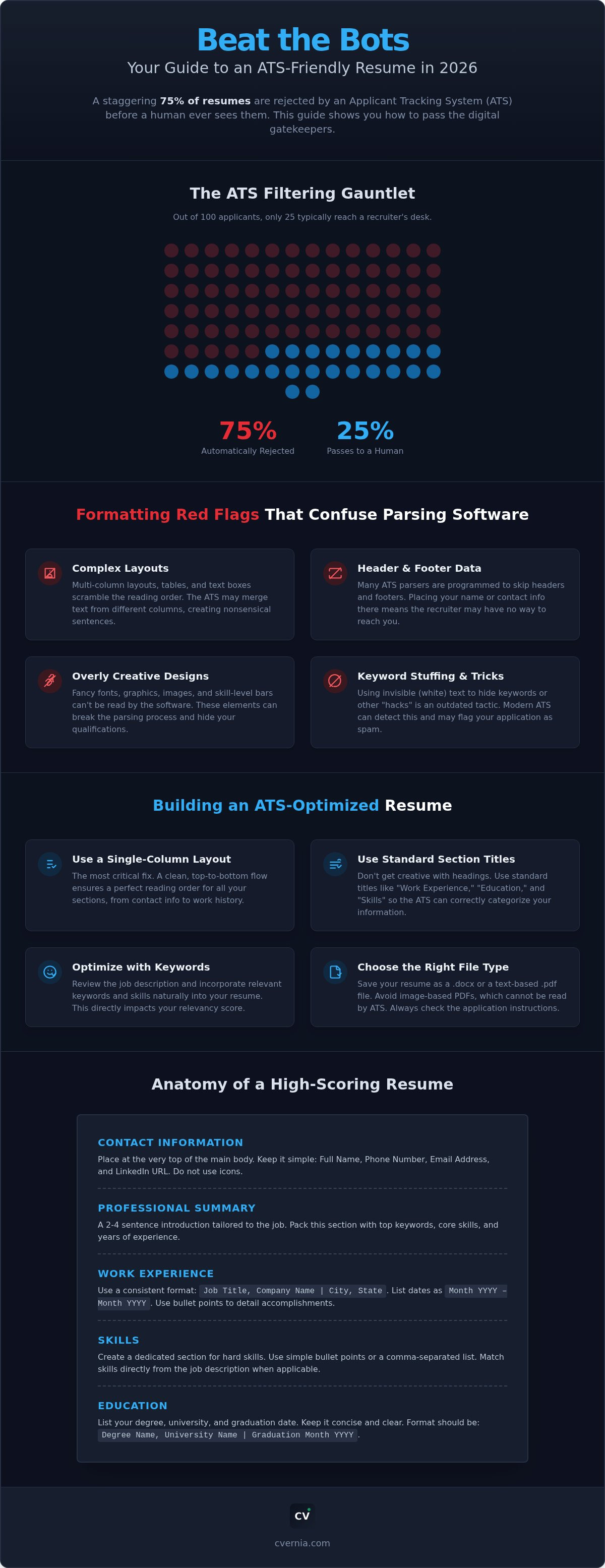
Nearly 75% of resumes are rejected by an Applicant Tracking System before a human recruiter even glances at them. It's a staggering statistic that explains why you might feel invisible in a competitive job market despite having the right qualifications. You've likely spent hours perfecting your history, only to be met with automated silence. This happens because even small, hidden errors in your document can confuse the software used by 99% of Fortune 500 companies. We understand how exhausting it is to follow conflicting advice while your applications vanish into a digital void.
This guide breaks down the most common ats resume mistakes that are currently triggering rejections in the 2026 hiring landscape. You'll learn how to resolve these critical formatting and content errors to ensure your profile reaches a real person. We'll provide a clear list of fixes you can apply immediately, teach you to optimize for keywords without lying, and show you how to manage multiple tailored versions of your CV with ease. By the end of this article, you'll have a reliable system to transform your resume from a rejected file into an interview-ready asset.
Key Takeaways
- Learn why 75% of qualified applicants remain invisible and how to position your experience so digital gatekeepers actually see it.
- Discover how to eliminate common ats resume mistakes such as multi-column layouts and header traps that cause critical data to vanish during the scan.
- Implement specific date and acronym formatting to ensure modern parsers accurately calculate your years of experience and skill proficiency.
- Use simple DIY audit techniques to verify your document’s reading order and select the best file type for 2026 recruitment software.
- Optimize your workflow by using real-time compatibility analysis to diagnose hidden errors and manage tailored versions of your professional profile.
Why Your Resume Fails the ATS Scan (Even With Great Experience)
You've likely heard of the "resume black hole." It's the place where 75% of applications disappear before a recruiter ever sees them. To stop this from happening to you, you must understand what an applicant tracking system (ATS) is . It isn't just a digital filing cabinet; it's a sophisticated gatekeeper designed to rank you based on specific criteria. Many common ats resume mistakes occur because candidates treat their resume like a piece of art rather than a structured data source. When you submit a file, the system calculates an ATS score based on your relevancy to the job description. If your score doesn't hit the recruiter's threshold, your application remains invisible.
Recruiters use this score to sort hundreds of applicants in seconds. They often set a "knock-out" threshold to manage the volume of candidates. If the system can't find your years of experience or specific skills because of a layout error, you're disqualified before the human ever starts their morning coffee. It's helpful to view the ATS as a partner that needs clear instructions to help you succeed.
The Mechanics of Modern Resume Parsing
Modern systems use Optical Character Recognition (OCR) to turn your document into a text-only profile. In 2026, these tools have evolved from simple keyword matching to Natural Language Processing (NLP). This means the bot understands the context of your skills and how they relate to the industry. If your formatting is messy, the OCR might misread your job titles or dates, leading to a technical parsing error. A ranking error happens when the data is read correctly but fails to align with the specific requirements. Stop trying to "beat the bot" with tricks like hidden white text. Focus on providing high-context, truthful data that a machine can categorize without confusion.
The Hidden Cost of "Creative" Resume Design
Aesthetic designs from popular graphic platforms often look stunning to the human eye, but they're frequently the source of common ats resume mistakes. These templates often use complex layouts or decorative elements that break the extraction phase. The machine might read across the entire page simultaneously, turning your work history into a jumbled mess of unrelated sentences. You don't have to sacrifice style entirely, but you must prioritize machine-readability. A hybrid approach uses a clean, single-column structure with professional typography. This ensures the machine extracts your contact info and work history accurately while still looking polished when it finally reaches a human desk.
Top Formatting Mistakes That Confuse Modern ATS Parsers
Even with the best experience, your resume can fail if the formatting creates a digital maze for the parser. Many common ats resume mistakes stem from trying to make a document look modern without understanding how machines process data. When you place your contact information in the header or footer, you risk it becoming invisible. Most parsers ignore these sections entirely to focus on the main body of the text. This means a recruiter might love your qualifications but have no way to call you. Referencing UIC Career Services' guide to ATS formatting confirms that keeping essential data in the main body is non-negotiable for success.
Simple icons, like a phone or envelope next to your contact details, can also break the parsing process. A bot might misinterpret these graphics as text characters, resulting in a phone number that looks like a string of random symbols. Keep your contact section plain and direct. This ensures that your identity and contact details are the first things the system successfully extracts.
The Danger of Tables, Columns, and Text Boxes
Multi-column layouts are a primary culprit for scrambled data. Parsers typically read from left to right across the entire width of the page. If you have two columns, the system might merge the first line of the left column with the first line of the right column. This creates a nonsensical string of text that ruins your ranking. Tables present a similar hurdle because the system "flattens" the document, often losing the logical connection between a job title in one cell and the dates in another. Use a clean, single-column layout instead. This structure maintains a clear visual hierarchy that both humans and bots can follow without error. Text boxes are the absolute dead end of parsing because most systems cannot extract the text trapped inside them at all.
Fonts and Special Characters: What the Bot Can’t See
Your choice of typography impacts more than just aesthetics. Stick to web-safe fonts like Arial, Calibri, or Georgia to ensure the OCR software recognizes every letter. Exotic or decorative fonts can lead to character recognition errors, which is one of the most common ats resume mistakes seen by modern recruiters. Similarly, avoid using non-standard bullet points like arrows, diamonds, or checkmarks. These often translate as empty squares or strange symbols in the recruiter's view. Stick to simple, solid circles. High-contrast text is also vital. Light gray text might look elegant, but it can fade into the background during the scanning process. Use black text on a white background for maximum clarity. If you're unsure if your layout is holding you back, you can analyze your CV's compatibility to catch these technical glitches before you hit send.
Critical Content Errors: Keywords, Acronyms, and Date Logic
While clean formatting ensures your data is readable, the actual words you choose determine your ranking. Many common ats resume mistakes occur when candidates use creative section headers that the system cannot categorize. If you label your work history as "My Professional Journey" or "Where I’ve Been," the parser may fail to recognize the section as employment data. Stick to standard headings like "Work Experience," "Education," and "Skills." According to University of Minnesota Duluth's ATS tips, using these conventional labels is essential for ensuring the bot correctly maps your information to the recruiter’s database.
Modern AI parsers in 2026 are also designed to detect and penalize "white fonting" and repetitive keyword lists. This outdated tactic involves hiding keywords in white text to trick the bot. Today’s systems easily flag this as a manipulation attempt, which can lead to an automatic rejection. Instead of stuffing your document with a list of buzzwords, focus on integrating them naturally into your bullet points. This shows the system that you possess the skill and understand its application in a professional environment.
The Acronym Trap and Keyword Context
Never assume the ATS knows that "PMP" stands for "Project Management Professional." Some systems are programmed to search for the acronym, while others look for the full title. To cover all bases, use both versions at least once in your document. This ensures you appear in search results regardless of the recruiter's specific query. Focus on "contextual keywords" by describing the outcomes of your actions. Don't just list "Sales Strategy" as a skill. Instead, write about how you "implemented a new sales strategy that increased quarterly revenue by 15%." To reinforce these keywords across your entire application, use a tailored cover letter generator to create a consistent narrative that supports your CV's data.
Date Formats and Employment Gap Logic
Standardize your dates to the MM/YYYY format to help the system calculate your total years of experience accurately. Using "Month Year" or just the year can lead to duration calculations that are off by several months, potentially dropping you below a required experience threshold. Be consistent with your separators. Choose either slashes (08/2026) or dashes (08-2026) and stick with them throughout the entire document. If you have overlapping roles, list them clearly to avoid a parsing timeline error. Inconsistent date logic is one of the most common ats resume mistakes that can make a qualified candidate look like they have unexplained employment gaps. Clear, standardized dates provide the bot with a logical timeline that builds trust in your professional history.
How to Audit Your Resume for ATS Compatibility in 2026
Perform a final audit before you hit the submit button to ensure your application doesn't fall victim to common ats resume mistakes. While you might have spent weeks refining your accomplishments, a technical glitch can still render you invisible. Start by standardizing your section headers. Use the "big four" categories: Contact Information, Work Experience, Education, and Skills. Deviating from these standard labels confuses the parser's logic and prevents it from assigning your data to the correct fields in the recruiter’s dashboard.
Many candidates struggle with the file type showdown. While a PDF is excellent for preserving your design for human eyes, some legacy systems still struggle to extract data from them accurately. If a job portal doesn't explicitly mandate a PDF, consider using a .docx file. This format is often superior for parsing because it provides a more direct text stream for the software to read. Using an ats compliant resume framework ensures that regardless of the file type, your information remains structured and accessible.
The Plain Text Audit
Open your resume and perform the "Select All + Copy" test. Paste the entire content into a plain text editor like Notepad. This simple 5-second DIY audit shows you exactly what the machine sees. Look for merged words, such as "ProjectManager" instead of "Project Manager," or sections that have jumped out of order. If the plain text version is messy or unreadable, your ATS score will be low regardless of your actual experience. Fix these alignment issues in your original document until the plain text version appears logical and clean. To get a detailed report on your document's health, you should audit your CV for compatibility using professional analysis tools.
The 2026 ATS Readiness Checklist
Run through a final checklist to verify your document's technical integrity. Ensure you've used 1-inch margins on all sides to prevent text from being cut off during the OCR scan. Stick to standard 10-12pt font sizes for the body text to maintain readability for both bots and humans. Double-check that your contact information lives in the main body of the page rather than a header. Finally, verify that all ats resume keywords align perfectly with the specific job description. This final verification step prevents common ats resume mistakes from undermining your hard work and helps you move directly to the interview stage.
Beyond the Fix: Managing Versions with CVernia
Fixing your layout and content is the essential first step, but it's only half the battle. To succeed in the 2026 job market, you must move beyond a one-size-fits-all approach. Every company uses different software configurations, which means a resume that passes one bot might fail another. This is where strategic management becomes your greatest advantage. By using CV Compatibility & ATS Analysis , you can diagnose hidden technical errors that a manual audit might miss. Centralizing your efforts within an application tracking dashboard ensures you never repeat the common ats resume mistakes that previously held you back.
Managing multiple versions of your CV is no longer a luxury; it's a requirement. If you apply for two different roles at the same firm, the ATS stores both files in your candidate profile. If these versions aren't consistent or properly tailored, you risk looking disorganized or untruthful. Our platform helps you maintain a clear, professional narrative across every submission while ensuring each one is technically optimized for the specific gatekeeper it will encounter.
Smart Reapplication and Version Management
Stop wondering which version of your CV earned you an interview. CVernia tracks exactly which file was sent to which company, allowing you to identify winning patterns in real-time. Our Smart Reapplication detection alerts you if a previous version of your resume failed at a specific company, giving you the chance to optimize your second attempt before the next opening. Use Version Management to iterate on your ATS score for every new job post without losing your original data. This system allows you to refine your profile for maximum alignment while maintaining the truthful representation of your career history. You don't need to invent experience when you have a system that highlights your actual strengths so effectively.
Real-Time ATS Analysis
Modern recruitment platforms like Greenhouse and Lever have specific ways of interpreting data. CVernia’s scanner mimics this modern parsing logic to give you an accurate preview of how a recruiter will see your profile. In 2026, a "high score" isn't just about keyword density. It's about how well your skills and experiences align with the specific intent of the job description. Our tool provides a detailed breakdown of your compatibility, identifying the common ats resume mistakes that could trigger a silent rejection. Take control of your career path today. Audit your resume now with CVernia’s ATS checker to ensure your next application is the one that gets seen.
Take Charge of Your Digital Professional Identity
You now possess the strategic insights needed to transform your CV from a hidden file into a high-ranking candidate profile. By eliminating complex layouts and standardizing your professional data, you've already bypassed the technical hurdles that stall most applicants. Remember that passing the bot isn't about manipulation; it's about providing the clear, structured information that recruiters need to make informed hiring decisions. Addressing these common ats resume mistakes is the essential first step toward a more visible and successful career journey.
Ready to verify your progress and reach the interview stage? Gain a strategic advantage by using our real-time ATS compatibility analysis to catch hidden errors before you apply. You can manage every tailored version of your profile through a comprehensive application tracking dashboard and use smart reapplication detection to refine your strategy with every new submission. Check your resume for ATS mistakes with CVernia today to ensure your hard work finally lands on a human desk. You have the experience and the drive. Now, you have the technology to prove it.
Frequently Asked Questions
Does a low ATS score mean I am not qualified for the job?
A low ATS score doesn't necessarily mean you lack the qualifications; it often indicates that the software failed to read your data correctly. If your document contains common ats resume mistakes, the parser might miss your skills or years of experience. This leads to a low ranking even if you are the perfect fit. Focus on fixing the structure to ensure the bot can accurately calculate your suitability.
Is it better to submit my resume as a PDF or a Word document?
It is usually safer to submit a Word document (.docx) if the application portal doesn't specify a format. While PDFs preserve your layout for human eyes, some older systems struggle to extract text from them accurately. Using a .docx file provides the most direct text stream for the machine to process. This simple choice can prevent your history from becoming a jumbled mess during the extraction phase.
Can I use color and lines on my resume if I want it to be ATS-friendly?
You can use simple horizontal lines and standard text colors without confusing the software. The bot treats these as background elements it can easily ignore. Avoid using complex graphics, icons, or background images that overlap with your text. These visual elements are common ats resume mistakes that can break the reading order and cause the OCR to misinterpret your contact details or job titles.
How do I know if a company is using an ATS for my application?
You can identify an ATS by looking at the application URL or the portal's branding. Most companies use recognizable platforms like Greenhouse, Lever, or Workday. If you have to create a profile or upload your file to a specific portal rather than emailing a person, you are definitely interacting with an ATS. Checking the bottom of the page for a software logo is another quick way to confirm.
Does "white fonting" or keyword stuffing still work in 2026?
No, "white fonting" and keyword stuffing are completely ineffective in 2026. Modern AI parsers are designed to detect hidden text and repetitive lists, often flagging these documents for manual rejection. Instead of trying to trick the bot, focus on describing your achievements naturally. Use your skills in the context of your work history to show the system you truly understand the role's requirements.
Should I include my photo on an ATS-friendly resume?
You should never include a photo on an ATS-friendly resume. Images are often read as corrupt data or random characters, which can scramble the surrounding text. Most companies also prefer resumes without photos to avoid legal risks related to unconscious bias during the initial screening. Keep your document focused on text-based information to ensure a smooth parsing process and a professional first impression.
How many keywords should I include to get a high ATS score?
You should include each primary keyword two to three times throughout your document. Aim for a natural balance rather than hitting a specific number. The system looks for these terms in your skills section and within your bullet points to verify context. Overloading your CV with the same phrase can actually hurt your ranking if the AI perceives it as low-quality or manipulative content.
Can the ATS read my cover letter as well as my resume?
Yes, modern systems parse your cover letter to verify your alignment with the job description. The software looks for consistency between your resume and cover letter to build a more complete candidate profile. Ensure both documents use the same keywords and professional terminology. This unified approach strengthens your overall relevancy score and proves your genuine interest in the specific position.


