

Did you know that 75% of resumes are eliminated by an Applicant Tracking System before a human ever sees them? It's a staggering figure. This data explains why sending out hundreds of applications often leads to total silence. You've worked hard to build your career, and the fear that a "bot" is unfairly judging your experience is exhausting. If you're confused by modern layouts, you aren't alone. We understand how draining the search becomes when your efforts disappear into a digital void. Learning how to optimize resume for ats isn't about trying to trick an algorithm. It's about removing technical friction so your true value can shine.
You deserve to have your application seen. This guide provides the exact structural and strategic steps you need to ensure your resume passes through systems like Workday 2026R1 or Ashby with ease. We'll walk you through a clear list of formatting rules and show you how to find the right keywords for the current market. You'll gain the confidence that comes from knowing your application is actually reaching human eyes. From mastering "power skills" to passing the plain text test, we're here to help you move toward readiness.
Key Takeaways
- Understand how modern 2026 systems prioritize contextual relevance over simple keyword counts. This shifts your focus from "gaming the system" to presenting your true professional value.
- Adopt the "Clean Slate" rule for formatting. Simple layouts ensure that scanners correctly parse your career history without technical errors or jumbled text.
- Learn how to optimize resume for ats by strategically aligning high-impact keywords with your specific technical skills and certifications.
- Follow a disciplined 5-step workflow to audit your current documents and remove the formatting friction that often leads to automatic rejections.
- Implement version management to scale your applications. Staying organized allows you to tailor every submission effectively without losing track of your professional narrative.
Understanding the Modern ATS: Why Optimization is Mandatory
An Applicant Tracking System (ATS) isn't a digital wall designed to keep you out. It's an organizer. To understand What is an Applicant Tracking System? is to see it as a recruiter’s primary tool for managing high volumes of candidate data. In 2026, systems like Workday 2026R1 and Greenhouse don't just store your document. They actively analyze it. The "black hole" myth suggests that a bot automatically rejects you for no reason. In reality, resumes get lost because of technical friction. If the system can't read your file, it can't present you to a human. Learning how to optimize resume for ats ensures your data is accessible and ready for review.
Recruiters don't always see your original PDF first. They often view a text-only profile generated by the ATS. If your formatting is broken, your profile looks incomplete or messy. By aligning your document with modern standards, you control how you appear on that dashboard. This clarity builds immediate trust and ensures your expertise isn't skipped over during the initial scan.
How ATS Parsing Technology Works
Modern parsing technology uses Optical Character Recognition (OCR) to transform your CV into structured data. It breaks your document into specific "fields" such as Experience, Education, and Skills. If you use complex columns or non-standard fonts, the system might place your job titles into the education field or skip them entirely. This is why following ats compliant resume standards is the absolute foundation of a successful job search. When the data is clean, the recruiter sees a perfect summary on their screen.
- Standard headings: Use "Work Experience" instead of "My Professional Journey."
- File types: While .docx is widely accepted, many 2026 systems now handle PDFs with layered text perfectly.
- Contact info: Avoid placing your phone number or email inside the header or footer, as some parsers still struggle with these areas.
The Shift from Keyword Matching to Semantic Search
The hiring landscape has moved beyond simple word counts. Older systems looked for exact matches of a word like "Management." Modern 2026 systems use semantic search to understand topical relevance. They recognize that "leading a team" and "department oversight" describe the same core competency. Your resume needs to be a cohesive narrative rather than a list of tags. When you focus on how to optimize resume for ats, you are actually writing for both the machine's logic and the human's preference for clarity. Focus on natural language that describes your achievements clearly. This helps the system categorize you as a high-intent, qualified candidate.
Formatting for Readability: The Technical Foundation
Simplicity isn't just a design choice; it's a technical requirement. The "Clean Slate" rule is your most powerful tool in 2026. It means stripping away any element that doesn't serve a clear, structural purpose. When you research how to optimize resume for ats, the first hurdle is often visual. While a human recruiter might appreciate a creative layout, an ATS sees a complex design as a series of obstacles. Your goal is to create a document that is as easy for a machine to read as it is for a person to scan.
File types play a critical role in this process. While .docx was once the only safe bet, modern systems like Ashby and Greenhouse now handle PDFs with layered text perfectly. However, you must ensure your PDF isn't just a flat image. A quick way to test this is to try highlighting the text in your document. If you can't select individual words, the bot can't read them either. For the best results, stick to standard sans-serif fonts like Arial, Calibri, or Helvetica. These fonts ensure that characters don't bleed together during the parsing process. These resume optimization tips from Columbia University emphasize that standardizing your typography is the first step toward a readable file.
Visual Elements to Avoid
Tables, columns, and text boxes are the primary culprits behind jumbled resume data. Most parsing engines read from left to right; they don't always recognize the vertical boundaries of a column. This often results in the system merging two different blocks of text into a single, nonsensical paragraph. Avoid placing critical contact information in the header or footer sections of your document. Some older versions of Workday still struggle to "see" these areas, which could leave a recruiter with no way to reach you. Similarly, remove images, icons, and social media logos. These elements often turn into "garbage characters" in the recruiter's dashboard, making your application look unprofessional.
Structuring Your Experience Section
Bots look for predictable patterns to categorize your history. The standard "Company, Job Title, Dates" format remains the most effective way to present your career path. Using a reverse-chronological order is the gold standard because it places your most relevant, recent achievements at the top of the file. If you have a non-traditional career path, such as a gap or a pivot, resist the urge to use a "functional" resume layout. Instead, maintain the chronological structure and use your summary or bullet points to explain the transition. This keeps the data mapping accurate while still telling your story. If you're unsure if your layout is safe, using an ATS analysis tool can provide immediate peace of mind by showing you exactly how a system sees your file.
Standardize your section headings to ensure the system knows exactly where to find your information. Use clear, common titles like "Professional Experience," "Education," and "Technical Skills." Avoid creative headings like "Where I've Been" or "My Toolkit." While these might seem unique, they often cause the ATS to skip the entire section because it doesn't recognize the category. Stick to the labels the system expects, and you'll find your data lands in the right fields every time.
Content Optimization: Keywords and Skill Alignment
Once your technical foundation is solid, the focus shifts to the strategic use of language. Modern systems in 2026 prioritize contextual relevance over simple word counts. To master how to optimize resume for ats, you must move beyond generic descriptions. You need to identify "high-impact" keywords that signal your expertise to both the algorithm and the recruiter. These words are usually found in the job description's requirements and responsibilities sections. They represent the specific tools, certifications, and competencies the company values most. Precision wins here. A vague list of duties won't trigger the same interest as a targeted set of achievements.
Balance is your greatest asset. While hard skills like "Python" or "Project Management" are essential for the initial scan, soft skills provide the nuance recruiters look for in the final stages. Weave these ats resume keywords naturally into your bullet points. Use strong action verbs like "orchestrated," "delivered," or "accelerated" to replace passive phrases like "responsible for." According to Columbia University's guide to ATS optimization, using specific terminology from the field ensures your experience is categorized correctly within the recruiter's dashboard.
The 'Job Description Mirror' Technique
Your resume should feel like a direct answer to the employer's needs. Analyze the job description to identify primary, secondary, and tertiary requirements. Primary requirements are often mentioned multiple times or appear at the top of the list. Mirror the exact terminology the employer uses. If they ask for "Client Relationship Management," don't just write "Customer Service." Using the employer's preferred vocabulary reduces the mental load for the recruiter and increases your topical relevance score. Keep the frequency natural. If you stuff keywords into every sentence, the document becomes unreadable for the human who eventually reviews it.
Truthful Tailoring vs. Content Invention
Integrity is the cornerstone of a sustainable career. We prioritize ats-friendly content that remains 100% honest. "Gaming" the system with white-fonting or inventing skills is a high-risk strategy that modern 2026 systems easily detect. If you lack a specific software keyword, focus on your transferable skills. Highlight your ability to learn new platforms quickly or showcase your mastery of a similar tool. This approach builds trust from the very first interaction. Recruiters value authenticity over a perfectly "hacked" score every time. By being truthful, you ensure you're applying for roles where you can actually succeed and grow.
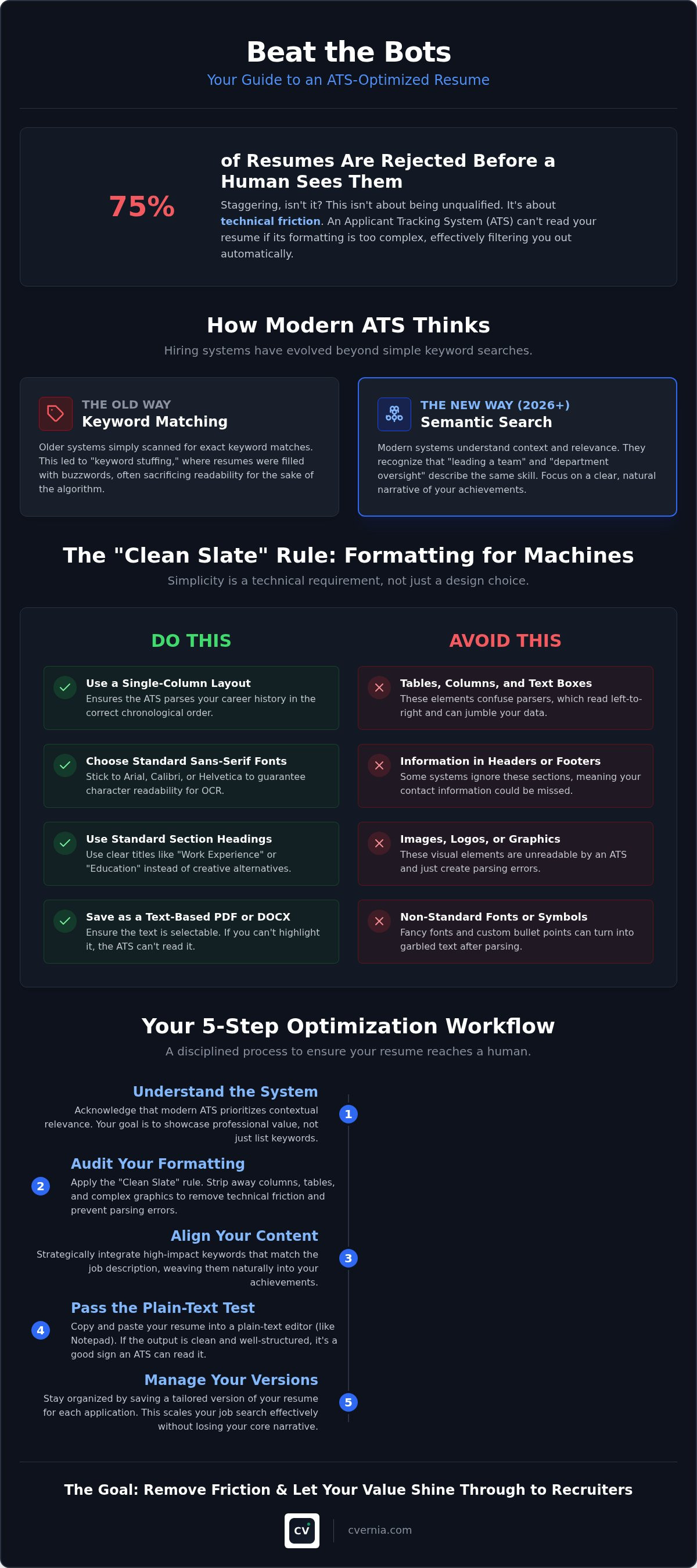
Your 5-Step ATS Optimization Workflow
Success in a modern job search requires a methodical approach. You can move from frustration to interviews by following a structured plan that addresses technical friction. This 5-step workflow simplifies the process of how to optimize resume for ats, turning a daunting task into a series of manageable wins. By the end of this progression, your document will be ready for the most sophisticated systems used in 2026.
- Step 1: Perform a baseline scan. Upload your current resume to a compatibility tool to identify existing parsing errors. This initial audit reveals exactly which sections are invisible to the bot.
- Step 2: Strip away complex layouts. Remove the columns, tables, and graphics discussed in previous sections. Revert to a single-column, text-based format to ensure every word is indexed correctly.
- Step 3: Align your skills. Match your core competencies to the specific requirements of the job description. Focus on the primary keywords that signal your readiness for the role.
- Step 4: Quantify your impact. Replace vague duties with hard data. Numbers provide the scale and context that 2026 systems use to score your relevance.
- Step 5: Verify with a professional checker. Run your final draft through a dedicated analyzer. This confirms that your changes have successfully resolved previous technical issues.
Following this rhythm ensures that no detail is overlooked. It moves you logically from identifying a hurdle to presenting a streamlined solution. When you treat optimization as a workflow rather than a one-time fix, you gain a strategic advantage in a high-volume market.
Quantifying Achievements for Better Parsing
Data points act as anchors for your experience. When you include percentages, dollar amounts, or headcounts, you provide the ATS with evidence of your performance. A system scoring your relevance sees "increased sales by 20%" as a significantly stronger keyword than a generic mention of "sales" because it provides a measurable result. Use the "Formula for a Perfect Bullet Point" to structure your sentences: Action + Context + Result. This structure ensures your achievements are both bot-readable and human-persuasive. To see how your current achievements measure up, use our ATS compatibility analysis tool for instant feedback.
Final Proofing and Sanity Checks
Small errors can have a large impact on your visibility. A single spelling mistake in a job title or a key software skill makes that keyword invisible to the system. Perform the "Copy-Paste Test" by copying your entire resume into a plain text editor like Notepad. If the text appears jumbled or out of order, the ATS will likely struggle to parse it too. Finally, verify that your contact information is located in the main body of the document rather than the header. This simple check ensures that a recruiter can actually reach you once your profile reaches their desk.
Scaling Your Success with Application Management
Learning how to optimize resume for ats for a single job is a great first step. However, a modern career search often involves targeting several related but distinct roles. Sending the same document to every opening dilutes your impact and reduces your chances of triggering the semantic search matches we discussed earlier. High-volume markets in 2026 demand a more sophisticated approach. You need to scale your efforts without sacrificing the precision of your tailoring. This ensures that every application you submit is a perfect match for the specific role.
Effective application management means treating your job search like a data-driven project. If you're applying for both "Operations Manager" and "Supply Chain Lead" roles, your keywords and achievement quantifications must shift to reflect those specific priorities. Tracking which versions of your resume generate the most interview requests allows you to double down on what works. Utilizing a job search management system provides the clarity you need to stay organized across dozens of submissions. It transforms a chaotic process into a streamlined path toward your next role.
Managing Multiple Resume Versions
Organization is the antidote to search fatigue. Label your files clearly, such as "Role_A_Marketing_2026" and "Role_B_Analytics_2026," so you never upload the wrong version by mistake. We provide smart reapplication detection to help you avoid duplicate errors when applying to different departments within the same large enterprise. This technology ensures your professional reputation remains intact by preventing redundant submissions. Additionally, maintain consistency between your submitted CV and your LinkedIn profile. While your resume is tailored for a specific bot, your public profile should serve as a broader foundation that supports the claims made in your applications.
Transitioning from 'Bot Ready' to 'Interview Ready'
Your optimized resume does more than just bypass a digital screen. It serves as the primary script for your interview preparation. Since you've already quantified your achievements and selected high-impact action verbs, you have a list of talking points ready to go. Use your centralized dashboard to manage interview notes and keep track of specific attachments you've sent to each recruiter. This level of preparedness moves you from a state of uncertainty to total readiness. When you're organized, you project the confidence of a top-tier professional. Start optimizing your career journey with CVernia today.
Master the Rules of Modern Hiring
You now possess a strategic blueprint to navigate the 2026 job market. Success begins with a clean technical foundation that ensures your professional history is fully accessible to systems like Workday or Greenhouse. By aligning your achievements with semantic search priorities, you transform your experience into a compelling narrative that machines index and recruiters value. Mastering how to optimize resume for ats is your most effective tool for reclaiming confidence in a competitive landscape.
Precision beats volume every time. Our platform offers built-in ATS-compatibility analysis to identify technical friction before you hit submit. We focus on better presentation and truthful representation rather than fake content, ensuring you build trust with every application. Stay organized using a centralized dashboard designed to track your data and version history in one place. It's time to move from uncertainty to total readiness.
Optimize your resume and track your applications with CVernia
Your next career milestone is within reach. Step forward with the assurance that your expertise is finally being seen by the right people.
Frequently Asked Questions
Is it better to use a PDF or a Word document for ATS?
Both formats are widely accepted in 2026, but a .docx file remains the safest choice for universal compatibility across older and newer systems. If you prefer using a PDF, ensure it is a text-based file rather than a flat image. You can verify this by trying to highlight and copy the text within the document. If the text is selectable, the parsing engine can read your data correctly.
Does the ATS automatically reject candidates with low scores?
Most systems don't automatically reject you; they rank your application based on its relevance to the job description. Recruiters typically focus their attention on the top-scoring candidates first. Because 75% of resumes are often eliminated before a human review, a low score effectively makes your application invisible. Focus on how to optimize resume for ats to ensure you land at the top of the recruiter's dashboard.
Can I use columns or tables if they make my resume look better?
Avoid using columns and tables as they frequently disrupt the natural reading order of the parsing engine. Most systems read from left to right across the entire page, which can cause text from two different columns to merge into a single, nonsensical sentence. Maintain a clean, single-column layout to ensure your experience and skills map correctly to the structured fields the recruiter sees.
How many keywords should I include in my resume to be optimized?
Focus on quality over quantity by naturally integrating 15 to 20 high-impact keywords that appear most frequently in the job description. Avoid "keyword stuffing" or listing terms without context. Modern 2026 systems use semantic search to understand the relationship between your skills and achievements. Learning how to optimize resume for ats means placing these terms within descriptive bullet points that prove your impact.
Does the ATS check my LinkedIn profile too?
Modern platforms like Greenhouse and Ashby often provide recruiters with tools to cross-reference your application with your LinkedIn profile instantly. While the ATS might not "crawl" your profile automatically, the recruiter will likely compare the two for consistency. Ensure your dates, job titles, and core responsibilities align across both platforms to build trust and demonstrate your professional transparency during the screening process.
What are the most common ATS systems used in 2026?
Workday remains the dominant leader for Fortune 500 companies, accounting for over 39% of installs as of 2025. Mid-sized companies and tech firms frequently use Ashby, which holds about 15.6% of the market, followed by Greenhouse and Crelate. Because each system has slightly different parsing logic, following the "Clean Slate" formatting rule is your best strategy for passing through any platform successfully.
Should I use a summary or an objective for better ATS results?
Choose a professional summary to provide the system with immediate context regarding your value and expertise. Objectives focus on what you want from the company, while summaries highlight what you offer the employer. A well-crafted summary allows you to naturally weave in primary keywords and "power skills" at the very top of your document, which helps the ATS categorize your profile accurately from the start.
Can I use 'white fonting' to hide extra keywords in my resume?
Never use "white fonting" or other hidden text hacks because modern 2026 systems are designed to detect and flag these deceptive practices. When a recruiter switches to the "plain text" view on their dashboard, your hidden keywords will appear as a jumbled mess of text. This immediate red flag suggests you are trying to game the system rather than presenting your experience truthfully, which often leads to an immediate rejection.


