
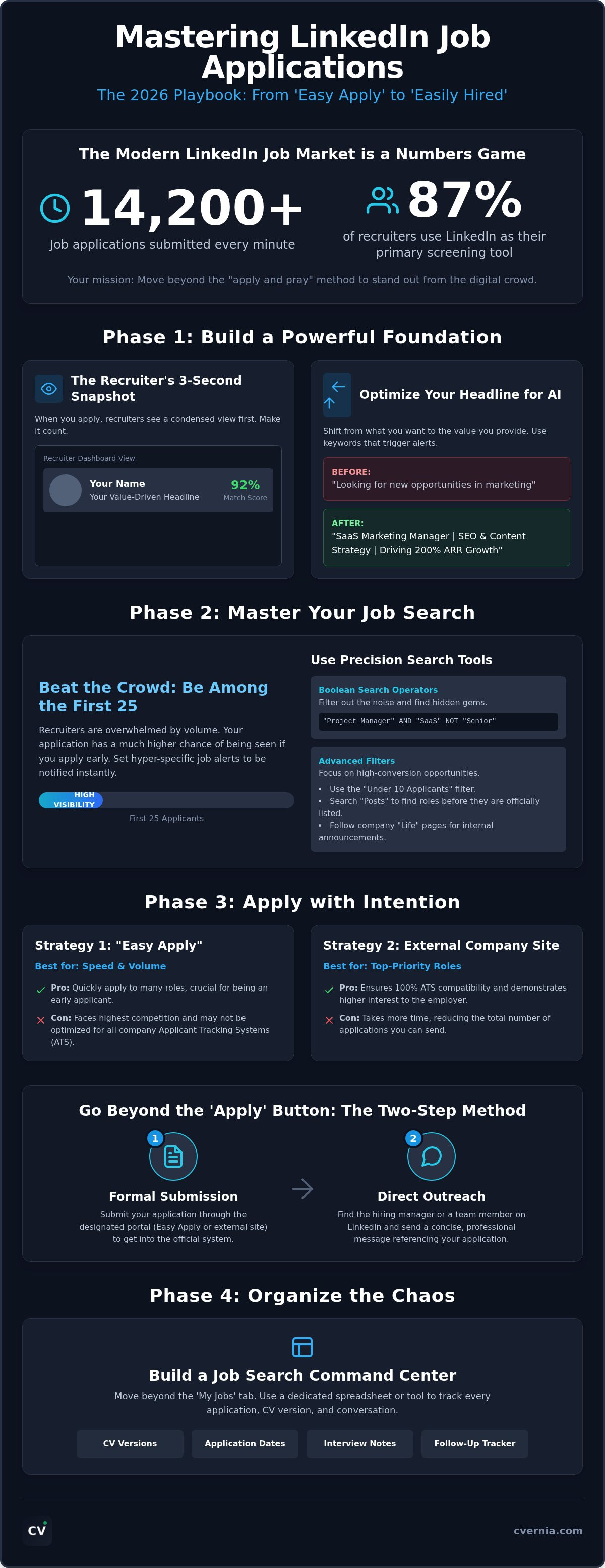
Over 14,200 job applications are submitted on LinkedIn every single minute as of 2026. It's easy to feel like just another digital ghost when your "Easy Apply" clicks disappear into a void of hundreds of other candidates. You've likely spent hours polishing your profile only to receive automated rejections or, worse, total silence. Learning how to apply for jobs on linkedin effectively is no longer about speed; it's about mastering a system that values precision over volume. We're here to help you bridge that gap with professional confidence and a clear roadmap.
We understand the frustration of being a high-quality professional stuck behind a wall of hiring technology. This guide will transform your approach from an exhausting numbers game into a strategic operation that turns "Easy Apply" into "Easy Hired." You'll gain a clear system for ensuring ATS compatibility and better visibility to the 87% of recruiters who use LinkedIn as their primary screening tool. We'll walk through a structured way to manage your follow-up process and leverage the latest AI-enhanced features to secure the role you deserve. It's time to move beyond the "apply and pray" method and start using a command center approach to your career.
Key Takeaways
- Learn why a passive profile is your biggest barrier and how to align your digital presence with your submitted documents for maximum impact.
- Discover how to use Boolean search operators and job alerts to ensure you are among the first 25 applicants for high-demand roles.
- Master how to apply for jobs on linkedin effectively by choosing between "Easy Apply" and external company links to maximize your ATS compatibility.
- Implement a two-step application process that combines a formal submission with direct, professional outreach to hiring managers.
- Move beyond the "My Jobs" tab by centralizing your search within a dedicated dashboard to track every CV version, interview note, and follow-up.
Optimizing Your Presence: The Foundation of Effective LinkedIn Applications
Your journey to a new role doesn't begin when you click the apply button. It begins weeks earlier with how you position yourself on this professional networking platform. Think of your LinkedIn presence as an integrated ecosystem. It's a two-part system composed of your public profile and your private application documents. If these two sides don't align, you create immediate friction for the hiring manager. A passive profile is the number one barrier to application success in 2026. If your profile looks like a static digital filing cabinet, you won't get noticed. Recruiters don't just look at your CV anymore; they look at the active professional behind it.
Mastering how to apply for jobs on linkedin effectively requires you to see yourself through the eyes of the hiring team. When you submit an application, recruiters don't see your full profile immediately. They see a condensed snapshot in their dashboard: your headshot, your name, and your headline. They also see a match score based on how well your skills align with the job description. If your snapshot doesn't grab their attention in three seconds, they might never click through to your full profile or your CV. You must prioritize the data points that trigger these algorithmic green lights to ensure you move to the next stage of the hiring process.
The Headline Strategy for AI Relevance
Your headline is your digital billboard. Forget phrases like "Looking for new opportunities" because this tells recruiters what you want, not what you can do. Shift to "Value-driven specialist" phrasing that highlights your specific impact and results. Use industry-standard keywords that trigger recruiter alerts and help you appear in more targeted searches. The "Headline-Job Match" is the precise algorithmic alignment between your stated expertise and the specific requirements of a job posting that determines your initial search ranking in the Recruiter dashboard.
Visual Proof and Endorsements
The "Featured" section is your portfolio's front window. Use it to validate every claim in your application. Uploading case studies, project links, or video testimonials provides immediate visual proof of your skills. Skill endorsements serve as social SEO. They tell the algorithm that other professionals vouch for your expertise, which boosts your credibility in search results. Reach out to three former colleagues or mentors before you start your active search. Ask for specific endorsements on your top five technical skills to build immediate credibility before a recruiter even opens your resume file.
The 2026 Strategy: Navigating Job Search Filters and Alerts
Speed defines the modern job market. If you want to understand how to apply for jobs on linkedin effectively, you have to beat the crowd. Recruiters often focus on the first 25 applicants before the sheer volume becomes unmanageable. By setting hyper-specific alerts, you ensure you're notified the second a role goes live. This isn't just about being fast; it's about being first in a pool that hasn't yet been saturated by thousands of competing profiles. You gain a massive advantage simply by showing up before the recruiter's inbox hits critical mass.
Boolean search operators are your secret weapon for finding uncrowded listings. Use terms like "Marketing Manager" AND "Remote" NOT "Contract" to strip away the noise. This precision allows you to find roles that basic keyword searches miss. You should also utilize the "Under 10 Applicants" filter. These roles represent high-conversion opportunities where your profile stands a much better chance of being seen by a human recruiter rather than just an AI sorter. To truly take advantage of the networking site, you must look where others aren't looking.
Bypassing the Crowded Job Board
The main job board is often the most competitive place to be. Instead, use the "Posts" filter to see what actual humans are saying. Hiring managers often announce roles on their personal feeds days before the official listing goes live. You can also follow company "Life" pages to get a feel for their culture and see internal hiring announcements. Be wary of "Ghost Jobs." These are listings that remain active for months without any hiring intent. If a job has been up for more than 30 days without a "Recently Posted" tag, proceed with caution and verify the role on the company's official career site.
Mastering the LinkedIn Search Engine
Refining your search by "In Your Network" creates a warm path to your next role. Seeing a first or second-degree connection at a company allows you to ask for a referral before you even hit submit. Use the "Salary" filter early to ensure the role aligns with your financial goals. Applying to jobs that don't meet your requirements is a waste of your valuable time. To keep this high-intensity search from becoming overwhelming, link your findings to a centralized Application Tracking Dashboard . Organizing your search this way ensures no opportunity falls through the cracks. If you're feeling overwhelmed by the volume of data, you can always explore tools that simplify your management process .
Easy Apply vs. External Links: Which Strategy Wins?
Choosing between the "Easy Apply" button and an external company link is a strategic decision that directly impacts your response rate. LinkedIn's native application tool is built for speed. It allows you to submit your credentials in seconds, which is a major advantage in a market where 14,200 applications are submitted every minute. However, this convenience comes with a cost. Because it's so easy, competition is often ten times higher than applications submitted through a company portal. Mastering how to apply for jobs on linkedin effectively requires knowing when to prioritize this speed and when to invest in a deeper, more manual process.
A hybrid approach often yields the best results. Use LinkedIn to discover roles and gauge initial interest, but follow the external link when applying for high-priority "dream" roles. When you apply on a company site, you bypass the generic LinkedIn sorter and enter the employer's specific hiring system directly. This gives you more control over how your data is parsed. It's the ideal moment to submit an ats compliant resume that is precision-engineered for that specific job description. Your ability to manage different CV versions for each path is the ultimate deciding factor in your success.
When to Use "Easy Apply" Effectively
Reserve "Easy Apply" for "Quick-Hire" roles or high-volume industries where being among the first 25 applicants is the primary goal. Don't fall into the trap of using the "Default Resume" stored in your profile settings. This generic file rarely aligns perfectly with every job. Always choose the option to upload a fresh document for every submission. Before you hit that button, ensure your profile is 100% aligned with the role. Recruiters using the LinkedIn native tool will see your profile data first, so any gaps there will lead to an immediate rejection regardless of your CV's quality.
The Power of the External Application
Complex or senior-level roles often require more nuance than a simple profile snapshot can provide. These positions usually demand a deeper explanation of your career trajectory, which is where a tailored cover letter generator becomes an essential tool. Navigating the transfer from LinkedIn to platforms like Greenhouse, Workday, or Lever can be tedious, but it allows you to answer company-specific screening questions that "Easy Apply" misses. Capture this application data immediately in your tracking system. This ensures you can manage the follow-up process with the same level of professional confidence you used during the submission.
Beyond the "Apply" Button: Networking and Direct Outreach Tactics
Don't stop at the submission confirmation screen. Realize that 87% of recruiters report LinkedIn is their most effective screening tool. To learn how to apply for jobs on linkedin effectively, you must master the "2-Step Application." This means following your formal submission with a strategic human touchpoint. Finding the hiring manager transforms you from a data point into a person. It signals initiative and genuine interest; these are traits no ATS can measure. By taking this extra step, you move your name from a database to the front of a recruiter's mind.
Identifying the Right Person to Contact
Navigate to the company page and select the "People" tab. Filter by job title or department to find your future peers or manager. Distinguish between Talent Acquisition professionals, who manage the process, and Hiring Managers, who own the final hiring decision. Reaching out to a Team Lead often yields a more meaningful conversation than messaging a generic recruiting alias. Always include the specific Role Title or Application ID in your message. This clarity saves them time and immediately connects your message to your pending application file.
Use your "Mutual Connections" as a high-speed lane to the top of the applicant pile. If you see a shared connection, ask for a brief introduction or a referral. Internal referrals are highly valued because 72% of recruiters state professionals hired through LinkedIn are of higher quality. A warm introduction is the most powerful way to bypass digital gatekeepers and secure an interview.
Templates for Professional Outreach
Crafting a connection request requires a balance of brevity and value. If you want to understand how to apply for jobs on linkedin effectively, you must avoid generic messages that feel like spam. Instead, use a "Curiosity" template to ask about team culture or a "Direct Value" template to highlight how your specific skills solve their current challenges. For example, mention a specific project from the job description and briefly explain your experience with a similar outcome. This approach feels collaborative rather than transactional.
Managing these multiple conversations is critical to avoid embarrassing mix-ups. Record every interaction in your Career Application Management Platform to maintain a clear history of who you've messaged and what was discussed. Use the "Interview Notes" feature to capture specific details about team culture or pain points mentioned during outreach. This structured preparation ensures you're ready when that message turns into a formal call. Follow up once after seven days if you haven't heard back, then move on. Respect their time while maintaining your professional momentum.
Organizing the Chaos: Centralizing Your LinkedIn Job Search
LinkedIn's "My Jobs" tab is a starting point, but it's not a command center. It lacks the depth needed for a high-intensity 2026 search where you might be juggling dozens of active leads. If you want to understand how to apply for jobs on linkedin effectively, you must look beyond the initial click. Relying solely on a basic list leads to missed follow-ups and forgotten details. A centralized Career Application Management Platform provides the structure you need to maintain professional momentum. It allows you to track multiple CV versions tailored for different LinkedIn job categories. You'll never have to guess which resume version a recruiter is looking at during a screening call.
Smart reapplication detection is another critical feature for the modern seeker. Large firms often post the same role across multiple boards or under slightly different titles. Double-applying by accident can make you look disorganized or desperate. By centralizing your data, you instantly identify if you've already engaged with a specific firm. This level of organization builds the self-assurance you need to navigate a complex market with ease. You aren't just applying; you're managing a professional pipeline.
The Workflow of a Successful Applicant
Winning the job search requires a repeatable process. Start by discovering roles on LinkedIn. Next, analyze the job description with ATS tools to ensure your alignment. Finally, log the entry in CVernia to begin your tracking journey. Always save a local copy of the job description immediately. Companies often delete listings once they hit an applicant cap. You don't want to land an interview and realize you can't remember the specific requirements. Set a weekly review of your application pipeline status. This habit ensures you stay proactive with follow-ups and keeps your search from feeling like a chaotic pile of tasks.
Turning LinkedIn Data into Interview Readiness
Your organization today is your interview performance tomorrow. Sync the insights you gathered from LinkedIn company pages directly with your interview preparation notes. Tracking recruiter names and contact dates allows for professional follow-ups that feel personal rather than automated. CVernia helps you visualize your progress from "Applied" to "Offer" through a clear, intuitive dashboard. You can see exactly where your bottlenecks are and adjust your strategy in real-time. This transition from uncertainty to readiness is what separates the casual browser from the hired professional.
Take Command of Your Professional Future
Success in the 2026 job market requires more than just a polished profile. It demands a shift from passive browsing to a high-intensity, organized strategy. You've learned that mastering how to apply for jobs on linkedin effectively involves precision timing, strategic networking, and a deep understanding of recruiter filters. By aligning your digital presence with tailored documents and engaging directly with hiring teams, you transform from a number in a database into a top-tier candidate.
Don't let your hard work get lost in the noise of a thousand other applications. You deserve a system that works as hard as you do. Master your LinkedIn search with the CVernia Application Tracker to centralize your entire journey. Our platform provides a centralized dashboard for all your applications, professional ATS compatibility analysis for every job description, and smart version management to keep your tailored CVs organized. You have the tools and the talent to succeed; now it's time to execute with confidence. Your next great role is waiting for you to claim it.
Frequently Asked Questions
Is LinkedIn Easy Apply actually effective for getting jobs?
Yes, but only when used with a strategic mindset. It is highly effective for high-volume roles where speed is prioritized, yet because it is so accessible, competition is extremely fierce. You must ensure your profile is fully optimized and that you upload a fresh, tailored resume for every submission. Never rely on the generic default file if you want to stand out to a human recruiter.
How many jobs should I apply to on LinkedIn per day?
Focus on quality over quantity by aiming for two to five high-quality applications daily. Applying to dozens of roles haphazardly often leads to burnout and a lower response rate. Spend your time identifying roles that align perfectly with your skills and customizing your documents for each. This methodical approach ensures your profile remains visible to the 87% of recruiters who actively screen on the platform.
Should I message the hiring manager after applying on LinkedIn?
Yes, sending a brief, professional message after applying is a powerful way to demonstrate initiative. This "2-Step Application" transforms you from a digital entry into a person with a story. Use a tailored template to highlight a specific skill match or ask a thoughtful question about the team culture. Keep it concise to respect their time while ensuring your name stays top of mind.
Why does LinkedIn say my application was viewed but I heard nothing?
A "viewed" status simply means a recruiter opened your submission; it doesn't guarantee an immediate response. Recruiters often batch their reviews or wait for a specific number of candidates before moving to the interview stage. If you haven't heard back within seven days, use this as a prompt to conduct a direct follow-up. This proactive step helps you manage the transition from uncertainty to readiness.
Can recruiters see if I apply to multiple jobs at the same company?
Yes, recruiters using LinkedIn Recruiter can see your full application history within their organization. While applying to two or three closely related roles is acceptable, applying to dozens of unrelated positions can signal a lack of focus. Use a centralized dashboard to track your history and ensure every application remains consistent with your overall career narrative. Consistency builds trust during the screening process.
How do I make my LinkedIn profile ATS-friendly for 2026?
Focus on keyword alignment and section completeness to ensure your profile passes modern algorithmic checks. Use industry-standard terminology in your headline and skills section to match the specific requirements of your target roles. Understanding how to apply for jobs on linkedin effectively requires treating your profile as a data source that must mirror the language found in job descriptions to trigger recruiter alerts.
What is the best time of day to apply for jobs on LinkedIn?
Aim to apply during business hours, ideally between 9:00 AM and 11:00 AM on Tuesday, Wednesday, or Thursday. Applying early in the day ensures your submission appears at the top of the recruiter's inbox when they begin their review. Avoid late Friday afternoons or weekends when your application is more likely to be buried under a mountain of Monday morning notifications.
Should I use a cover letter for LinkedIn Easy Apply applications?
Always include a cover letter if the option is available, even for "Easy Apply" roles. A brief, tailored note provides the nuance that a standard profile snapshot lacks. Use it to explain your specific interest in the company and how your background solves their current pain points. This extra effort often serves as the deciding factor that moves you from the "Applied" pile to the interview stage.


