

Wait about 5-10 business days after applying before sending a follow-up, unless the job posting gives a response timeline; wait until that timeframe has passed. Don’t contact the employer if the posting says not to. A follow-up email template after an application can help you ask about next steps while keeping your message concise and professional.
Waiting for a response can make it tempting to write before you know what to say. A thoughtful follow-up shows continued interest without pressuring the hiring team. This guide explains when to email, what to include, and how to adapt your message if your availability changes or you have a relevant update. Use the templates as a starting point, then tailor them to the role and your situation.
Key Takeaways
- Use the employer’s stated hiring timeline to decide when to follow up, and respect any request not to contact them.
- Keep your message brief and specific: identify the role, reaffirm your interest, and ask a clear question about next steps.
- Share a change in availability or relevant update promptly, with only the details the hiring team needs to know.
- Adapt a template to your situation and keep your application details organized so each message is accurate and professional.
Following up after a relevant update or availability change
Email is usually the clearest way to follow up after applying because it puts your role details in writing. If you applied through a recruiter or job board, reply to the recruiter or use the contact listed with the application rather than sending your message to a generic company address.
- Follow employer contact instructions. Read the job posting before sending anything. If it says not to contact the company or human resources directly, don’t follow up through another route. If the posting gives a hiring timeline, wait until that period has passed before asking about a response.
- Use the existing connection. Reply to the recruiter’s email or contact the person who referred you. Name the role and application date, then briefly restate your interest. For example: “I’m following up on my application for the analyst role submitted on May 6. I remain interested and would appreciate any update you can share.”
- Clarify a portal status. A status such as “submitted” or “in progress” may not explain the next step. Send a concise email to the recruiter or application contact, identify the job title, and ask whether there’s an expected hiring timeline. Don’t treat the portal label as a response from the hiring team.
- Share a relevant update. If your availability changes, contact the recruiter promptly with the new dates. If you’ve completed relevant training or gained experience since applying, explain the update in one sentence and connect it to the role. Avoid sending unrelated news just to prompt a response.
- Follow up after a referral or interview. Thank your referral contact for making the connection and mention any useful conversation. After an interview, send a brief thank-you within 24 to 48 hours; if you later need a hiring update, follow the timeline the interviewer shared.
- Choose the right channel. Email keeps your question and application details together. A phone call can sometimes get a faster response, but use it only when the employer invited calls or the recruiter has already contacted you by phone.
Writing a concise and professional follow-up email
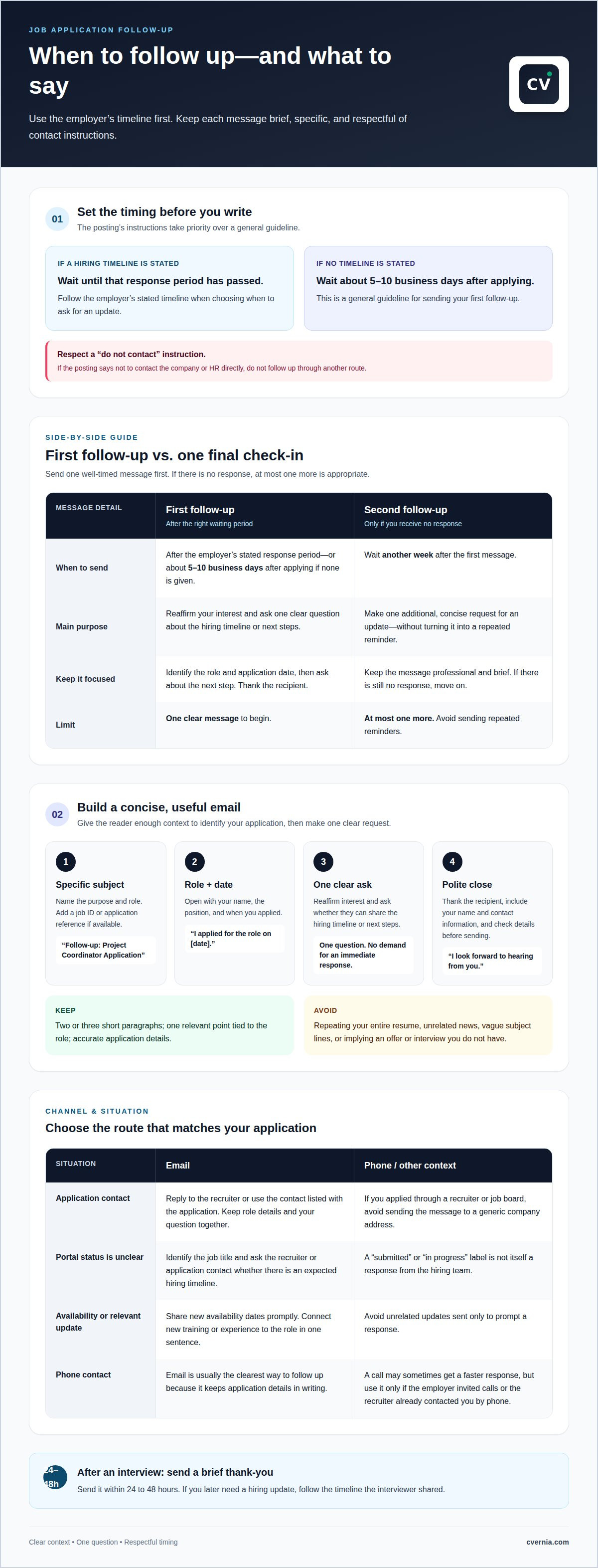
Send one well-timed follow-up, then at most one more if you receive no response. Wait another week before sending the second message, and respect any instruction not to contact the employer.
-
Set Follow-Up Timing and Frequency
Check the job posting for a hiring timeline before writing. Wait until the employer’s stated response period has passed; if none appears, a follow-up after about 5-10 business days is a common guideline. Send one clear message first. If you receive no response, you may send one additional follow-up after another week, then move on rather than sending repeated reminders.
Choose a considerate time, such as Tuesday through Thursday between 10 and 11 AM in the recipient’s time zone. Avoid a holiday or a period when the recruiter is known to be unavailable. A brief, well-timed note shows respect for their workload and keeps your continued interest professional.
-
Write a Professional Greeting and Introduction
Address the recruiter by name if you know it; otherwise, use “Dear Hiring Manager.” In your opening sentence, state your name, the position, and when you applied. For example: “I’m Jordan Lee, and I recently applied for the project coordinator role.” This context helps the reader connect your email with your resume and application.
Use a specific subject line, such as “Follow-up: Project Coordinator Application.” If you have an application reference or job ID, add it after the role title. A clear subject helps the recruiter understand your purpose without searching through a long message or guessing which position you mean.
-
Keep the Email Polite and Concise
State your interest, ask one direct question about the hiring timeline or next steps, and thank the recipient. Keep the email to two or three short paragraphs. Avoid demanding an immediate response, repeating your entire resume, or adding unrelated details that distract from your request.
Close with “I look forward to hearing from you” and include your name and contact information. Read the message once before sending to catch errors in the role title or application date. If your resume needs a clearer match to future roles, tailored CV and cover letter creation can help align your application materials with each opportunity.
When should I send a follow up email after I apply?
Let the employer’s stated timeline set your follow-up date. If the posting gives no timeframe, wait about 5-10 business days after applying.
- Choose a specific subject line. Make the purpose clear before the recruiter opens your message. Use “Follow-up: Marketing Analyst Application” or “Application Update Request: Marketing Analyst, Jordan Lee.” Add a job ID when available, such as “Marketing Analyst, Job ID 4821.” Avoid vague subjects like “Checking in” or “Hello,” which don’t identify the role.
- Keep the subject relevant to your request. For a timeline question, try “Next Steps for the Marketing Analyst Role.” For a new detail, use “Application Update: Marketing Analyst.” Match the subject to the email’s purpose, then make the body confirm the position and application date. Don’t imply you have an offer or interview if you don’t.
- Make the first two lines useful. Start with the role and your application date, then state why you’re writing. For example: “I applied for the Marketing Analyst position on April 8. I’m writing to ask whether you can share an update on the hiring timeline.” This gives the recruiter context and a clear question without requiring a long explanation.
- Use a template as a framework, not a script. Replace placeholders with accurate details, then add one relevant point, such as a skill tied to the posting. A brief line about experience with campaign reporting can reinforce fit; a broad claim like “I’m perfect for the job” adds little. Keep the message polite and focused on one request.
- Review the message before sending. Check the company name, role title, application date, and recipient. If the employer shared a response date, don’t send your request before it passes. A clear subject and accurate details help distinguish your email from other applications and make your question easier to answer.
Job application follow-up email templates
Use a template to shape your message, then personalize it with accurate details. A follow up email template after application submission gives you a starting point, not a script to send unchanged.
-
Select a Job Application Follow-Up Template
Choose a format that fits your reason for writing: requesting a status update, sharing relevant news, or explaining a change in availability. Replace every placeholder before sending and make sure the details match your application.
Status request: “Dear [Name], I applied for [Role] at [Company] on [Date]. I’m still very interested in the position. Could you please let me know whether there’s an update on the hiring process or its timeline? I appreciate your consideration and look forward to hearing from you. Best, [Name].”
-
Write When You Have Not Heard Back
Send one brief message after the employer’s stated response window has passed. Mention the role and application date, reaffirm your interest, and ask one clear question. Don’t imply the hiring team has overlooked you or demand a decision. A follow up email template after application can help keep your request focused and courteous.
Example: “Hello [Name], I’m following up on my application for [Role], sent on [Date]. I remain excited about the opportunity and would appreciate any update you can share about next steps. Please let me know if you need anything else from me. Thank you for your time, [Name].”
-
Adapt the Message to a Relevant Update
If your availability changes, state the new dates plainly: “My availability has changed, and I can now start on [Date].” If you’ve gained relevant experience, briefly explain how it relates to the position, such as completing training in a tool named in the job description. Keep the update factual, and invite the recruiter to add it to your application if useful.
- Keep a copy of each message with the role and sending date, so you can avoid duplicate follow-ups. To organize applications and follow-up notes, keep each opportunity’s details together.
CVernia
CVernia helps you organize application details and follow-up activity. Its career management platform combines application tracking, CV Compatibility & ATS Analysis, and Interview Preparation & Guidance in one job-search workflow. Keep role information and progress together, review how your CV aligns with a job description, and prepare for the next stage if an employer responds.
Use CVernia when you’re applying for several roles and want a clearer way to manage each application, its updates, and your next steps. The platform supports your process; it doesn’t replace a thoughtful, personalized follow-up email. Explore CVernia’s tools to manage your application journey.
Make Your Next Application Step Count
A follow-up is one part of a wider job search. Use a follow-up email template after your application as a starting point, then personalize it with details that fit the role and your situation. While waiting for a response, keep preparing for other opportunities.
CVernia supports your job search with its career management platform, tailored CV and cover letter creation, and CV Compatibility & ATS Analysis. These tools help you organize applications and align your materials with the roles you’re pursuing. They complement your own thoughtful communication with employers.
Choose one practical next step today: organize an application, refine your documents, or prepare for a possible interview. Get job search support from CVernia and keep moving forward with clarity and confidence.
Frequently Asked Questions
When should you follow up on your application?
Follow up after the employer’s stated response period has passed. If the posting gives no timeline, a common guideline is to wait about 5-10 business days after applying. Before writing, consider whether you’ve received an update or completed every requested step. If the employer has already given you a clear answer, another message may not be necessary.
How can I avoid sending follow ups to the wrong roles or using outdated details?
Keep a separate record for each opportunity, including the exact role title, company, application date, job ID, and recruiter contact. Before sending, check the recipient and subject against that record. Don’t reuse a draft for a different opening without updating the role name and reference details. Add notes if the recruiter changes the process or contact.
Is it okay to follow up if the application portal says “submitted” or “in progress”?
Yes, you can politely ask what a status means if the employer’s contact instructions allow it. Portal labels may indicate that an application was received or remains active without explaining what happens next. Write to the recruiter or application contact, identify the position, and ask whether they can clarify the process. Don’t treat a status label as a personalized hiring update.
When is the best time to follow up?
Choose a time that respects the recipient’s workday and the employer’s stated schedule. If you’re emailing someone in another time zone, use their local hours as a guide. Avoid sending during a holiday or a known busy period. A clear subject and concise request help the recruiter understand your message whenever they read it.
Why should you follow up?
A thoughtful follow-up lets you restate your interest, ask about next steps, or share a relevant change since applying. It also gives the recruiter a clear question to respond to. For instance, you might ask whether the interview stage has begun. Keep your purpose professional: a follow-up supports communication, but it can’t determine the employer’s decision.
When should you send a follow-up email after submitting a job application?
Use the response window in the job posting or confirmation email as your guide. If the employer says candidates will hear back after a particular date or stage, wait until it passes before following up. When no timeframe is provided, allow about 5-10 business days after submitting. First make sure your application was complete and no instructions asked applicants not to contact the employer.


