

One company does not mean one application record. To learn how to track applications for different roles at one company, create a separate entry for each role and note the exact company name, posted title, application date, and current status. Keep notes and follow-up dates tied to the relevant role so you can respond with the right details when a hiring team gets in touch.
Applying for several openings at the same organization can blur timelines and conversations, especially when each role calls for a different CV version or interview example. A clear tracker gives every application its own history and helps you avoid missed updates and duplicate follow-ups. You’ll learn what to record, how to set useful reminders, when a notes app or spreadsheet may be enough, and when a dedicated tracker can simplify the process. You’ll also see how to review outcomes and use application patterns to guide your next steps.
Key Takeaways
- Keep a separate record for each role, including its status and follow-up activity, so application histories don’t blur together.
- Capture role-specific notes and key dates as soon as you apply to make future conversations easier to prepare for.
- Choose a tracking method that matches the size and complexity of your search, then consider a dedicated tool as your records grow.
- Review outcomes for patterns that can help you refine your applications and focus your next steps.
Why should you track job applications at all?
Track each role separately to keep its status, documents, and recruiter messages clear. A simple record helps you avoid missed updates and duplicate follow-ups.
-
Log application status and follow-up activity
Create one entry for every role, including quick-apply submissions, which can still lead to a phone screen. Record the exact company name, posted title, application date, visible portal status, and each follow-up date and subject line.
Use clear status categories such as submitted, screening, interview, offer, rejected, or withdrawn. Update the status when the portal or recruiter shares new information, and log messages before sending another follow-up. A dated record helps you choose the right next action for that application instead of relying on memory.
-
Coordinate recruiter communication and follow-ups
Tell a recruiter or hiring manager you’ve applied for multiple roles when it’s relevant to the conversation. Name each position and briefly explain how your experience fits; don’t suggest the applications are interchangeable.
Follow any timeline stated in the job posting. If no timeline is given, wait 5-7 business days before an initial follow-up. Send one concise message with a clear question, then wait before considering another check-in. If you have a company contact, a brief, friendly follow-up after one to two weeks without a response is another reasonable option. Log the date and subject line to avoid sending duplicates.
- Choose a tracking method you’ll update consistently. A spreadsheet can work below about ten job applications, while a notes app can suit fewer than about 20. Once you manage more than 50 applications or many contacts, a dedicated tracker may make records easier to organize. Use the same fields in any template: role title, company, status, dates, contact, and next action.
- Tailor your CV and cover letter to each role’s description instead of reusing an unchanged version. Highlight the skills and examples relevant to that position, and save each version with a clear role-specific label. For example, distinguish “Product Analyst” materials from “Business Analyst” materials at the same company. Link each document to its application record so you can prepare quickly for recruiter conversations.
Recording notes and application timelines
Give every opening its own record, then update it as the hiring process moves forward. A spreadsheet can bring role details, contacts, interview notes, and next actions together in one view.
-
Record each role separately
Create a separate row for each position, even if one employer hosts both applications. Include the exact posted title and a link or saved copy of the job description. For example, keep “Product Analyst” separate from “Business Analyst” so a conversation about one role doesn’t overwrite details about the other.
Before submitting, search your tracker by employer and title. This helps you spot an existing entry and avoid submitting the same application twice. An employer’s applicant tracking system manages submissions through its configured workflow. Multiple roles may appear under one candidate profile while retaining separate application records.
-
Capture dates, contacts, and statuses
Set spreadsheet columns for company, exact role title, application date, status, contact, last contact date, and next action. Keep one application per row, then sort by next action or date to see which records need attention. Add the recruiter’s name and preferred contact details when available.
For example, record “interview scheduled” beside the role discussed, not every opening at that company. Keep follow-up dates in the relevant row so a reminder about one application doesn’t prompt a message about another.
-
Add notes and application timelines
Save concise notes on role-specific requirements, submitted materials, recruiter conversations, and interview topics. A copied job description or screenshot can help you recall the responsibilities after a posting closes. Record any timeline stated in the advertisement, such as when interviews are expected to begin.
If you interview for one position while waiting to hear about another, continue with the active process. Tell the recruiter you’re also being considered for a different role, and clarify which position interests you. Note the conversation and next steps in both relevant records.
-
Keep tracker records current
Add each application immediately after submitting it, while the title, materials, and date are easy to capture. Spend 10 minutes weekly reviewing entries, updating statuses, and checking upcoming actions. After five to six weeks without a response, you can mark an application closed while preserving its history.
Update your notes after every recruiter message or interview. Record what changed and when instead of replacing earlier details. This timeline helps you distinguish a new update from an old portal status and review outcomes more accurately.
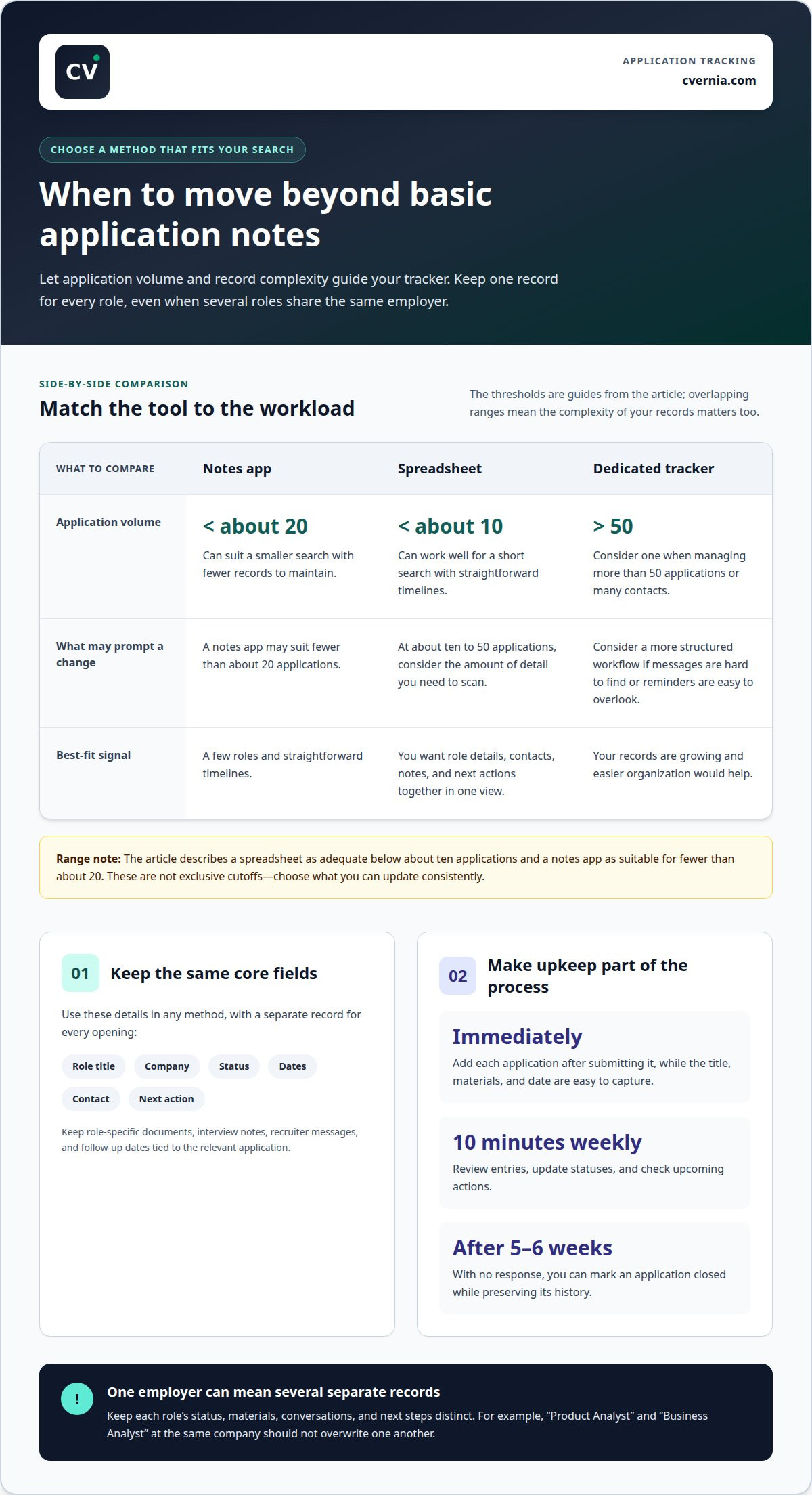
When a job search needs a dedicated tracker
Choose a tracking method based on application volume and the level of detail each record needs. The right fit keeps important next steps visible without adding unnecessary upkeep.
- Start with the simplest tool you can update consistently. A spreadsheet is adequate below about ten job applications, while a notes app can work for fewer than about 20. For a short search with a few roles and straightforward timelines, either option can keep essential details together.
- Move beyond basic notes when applications become harder to scan. Between about ten and 50 applications, consider how many contacts, role-specific documents, and interview notes you’re managing. If finding a recruiter message means searching several files, or reminders are easy to overlook, a structured tracker can bring those records into a clearer workflow.
- Consider a dedicated job application tracking tool once you have more than 50 applications or manage many contacts. At that scale, sorting by employer, role, status, or next action can help you focus on the right record. Separate entries also make it easier to distinguish two active applications at the same company.
- Test a tool against your actual routine before moving every record. Create entries for a few current applications, including one with an interview and one awaiting an update. Check whether you can quickly find the posting, submitted materials, latest contact, and next action. Keep using the system only if it makes those tasks clearer than your current method.
- Reassess the fit as your search changes. A spreadsheet may suit a focused search, while multiple roles, contacts, and changing timelines can call for a dedicated tracker. Choose a method that lets you update records promptly and retrieve the right application details without extra steps.
Reviewing application outcomes
- Review each application against its recorded stage, not just the final result. Most responses arrive within about five and a half weeks, so compare the outcome with the posting’s stated timeline. Separate submitted, interview, rejected, and closed applications to see where progress stopped. A rejection after an interview differs from no response after submission, and each points to a different next step.
- Follow the timeline in the posting, and avoid checking daily unless it explicitly asks you to. Send an initial follow-up, then wait before considering another check-in. Log any response, or continued silence, against that role. This keeps repeated messages from distorting your view of progress across several applications at one company.
- Look for early patterns after logging 20 or more applications. Compare which role types lead to screening calls, interviews, or no response. Note whether a particular CV version or skill emphasis appears across stronger outcomes. Treat the pattern as a prompt for review, not proof that one detail caused the result.
- Use 50 or more tracker rows to examine patterns across a larger set. Filter by role family, application stage, and outcome; then compare similar applications rather than mixing unrelated openings. For example, check whether analyst roles progress differently from project-management roles. Keep the job descriptions and submitted materials nearby when interpreting those differences.
- Make a focused strategy adjustment after two weeks of tracking data. If relevant applications aren’t reaching interviews, review how your experience matches the role requirements and refine the emphasis in future materials. If interviews happen but offers don’t follow, examine your interview notes for recurring questions or unclear examples. Change one approach at a time, then log later outcomes to see whether the pattern shifts.
CVernia: Application Tracking Dashboard
CVernia’s Application Tracking Dashboard helps you organize applications for different roles at one company. Use it when separate timelines, statuses, and records become difficult to manage in a spreadsheet or notes app. The centralized CVernia career management platform supports the full application journey in one place while keeping each role’s progress distinct.
Prepare role-specific materials as you apply. CV Compatibility & ATS Analysis helps you assess how your CV aligns with a job description and guide revisions for different openings. Pair organized records with focused preparation, then review progress as outcomes arrive. These tools support your job search but don’t promise interviews or offers.
Contact CVernia to explore how the Application Tracking Dashboard can support your application workflow.
Make your next application more intentional
Let each new opening inform your next move. A consistent method for how to track applications for different roles at one company can help you see which experience and examples best match each position. Use those insights to shape your next application, keeping your materials relevant to the role instead of relying on a one-size-fits-all version.
CVernia’s Tailored CV & Cover Letter Creation can help you prepare role-specific application materials, while its Career Application Management Platform brings application tasks into one workflow. Choose support that fits the step you’re working on, whether you’re refining documents or organizing your search. Start a conversation with CVernia about your job search needs, and take your next application forward with greater clarity.
Frequently Asked Questions
Spreadsheet vs a dedicated tracker, which is better?
Choose a spreadsheet when you mainly need sortable rows and simple reminders. A dedicated tracker can suit a search involving application documents, interview notes, and several ongoing conversations. Test both with a real task: find the latest update for one role and prepare for its next step. Choose the option that makes the process clearer and easier to maintain.
What should your tracker tell you after a few weeks?
As your search progresses, your tracker should show where applications move forward and where they tend to stall. Compare similar roles, such as two analyst openings, rather than combining unrelated positions. Note whether applications lead to screening, interviews, or no response, then review the relevant materials and requirements. Use those observations to choose one specific adjustment for upcoming applications.
What statuses should you use?
Use labels for clear stages: Draft, Applied, Interview, Offer, Rejected, and Withdrawn. These stages align with CVernia’s application tracking workflow. Record follow-up activity separately, since sending a message doesn’t necessarily change the application’s hiring stage. For example, keep a role marked “Applied” after a follow-up, and update its status when the employer provides a meaningful change.
Where should you keep your tracker?
Keep your master tracker somewhere accessible during application work and interviews. A spreadsheet, notes tool, or dedicated platform can work if you can retrieve it reliably. Avoid splitting essential details across files, inbox folders, and handwritten notes. If you use more than one device, choose a method that gives you access to the same current record on each.
How do I track multiple job applications at the same company?
The clearest way to learn how to track applications for different roles at one company is to create a separate record for each opening and connect them with a shared employer label. If the posting includes a requisition ID, save it too. For example, filter by company name to view related applications while keeping each role’s interview updates and hiring decisions distinct.
What information should I record for each role I apply to?
Alongside dates and status, save the posting’s requisition ID if available, where you found it, and the filename of the submitted CV version. Note distinctive requirements or keywords that shaped your application. These details help you identify the right documents when an interview invitation arrives and recall which experience you emphasized for that opening.


