

An applicant tracking system is more than a digital inbox: it brings applicant and job information together and helps hiring teams manage applications through each recruitment stage. Job application management software may also automate tasks such as résumé screening, interview scheduling, and candidate communication. The right choice depends on the hiring workflow it needs to support.
Choosing an ATS can feel complex when vendors offer different features, workflows, and reports. Start with the basics: understand what the system does, then compare how well each option fits your hiring needs.
This guide explains how recruitment analytics can inform hiring decisions and gives practical criteria for comparing ATS options and vendors. You’ll learn what to assess, from core application workflows to reporting, so you can make a more informed choice.
Key Takeaways
- Understand how an ATS organizes applications and supports candidate communication throughout hiring.
- Learn how recruitment reports can reveal patterns in the hiring process and inform decisions.
- Compare systems by how well their workflows, reporting, and candidate experience fit your needs.
- Use a decision guide to narrow vendor options and identify the right next step for your application process.
What is an applicant tracking system?
An applicant tracking system (ATS) organizes job openings, applications, and candidate information in a recruitment database. Its value becomes clearer when you look at how it handles communication, pipeline stages, and candidate relationships.
Candidate Communication and Application Experience
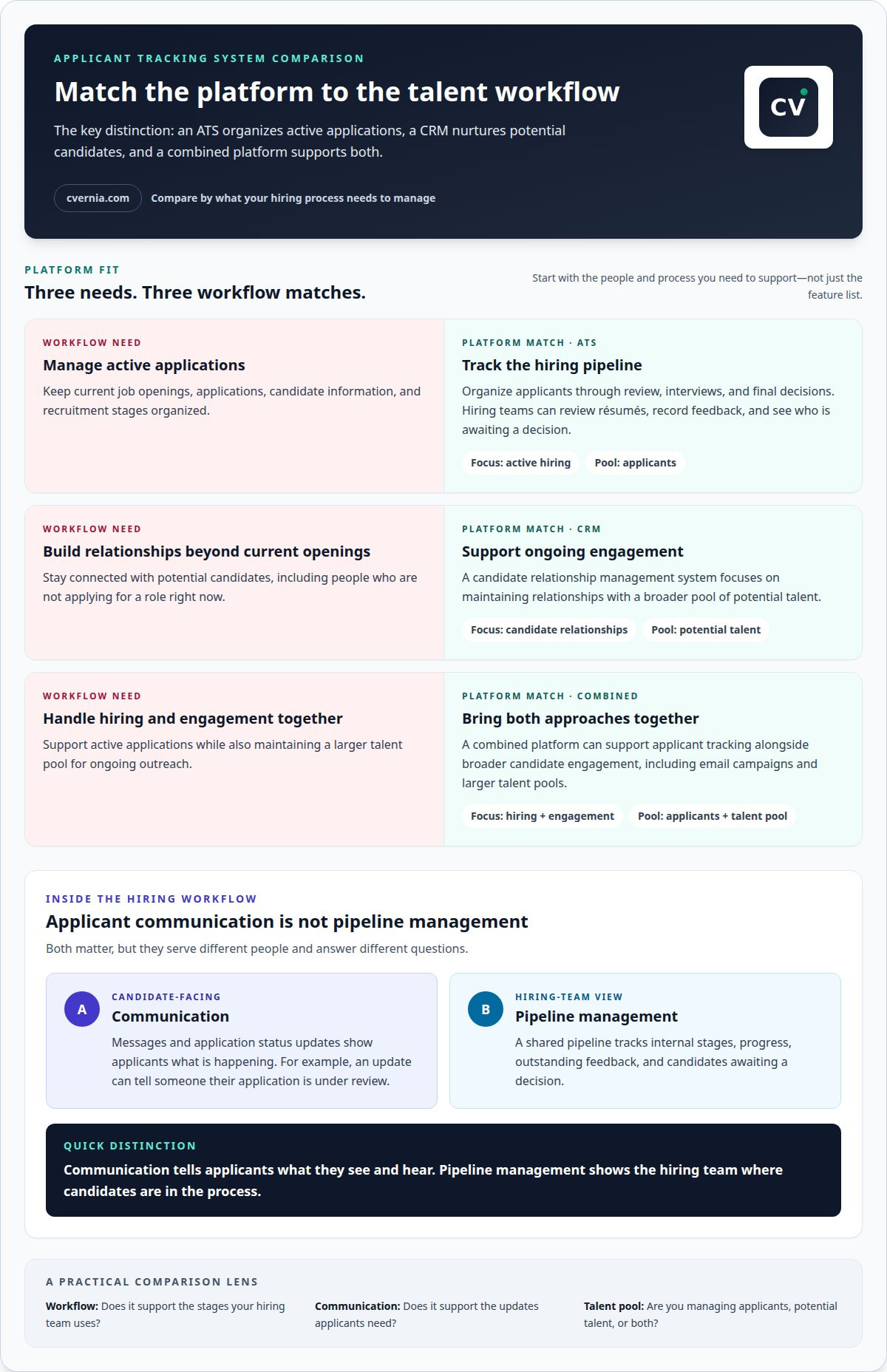
An ATS can manage messages and let applicants submit applications online or check their status. For example, a status update can tell a candidate that their application is under review, rather than leave them guessing. This differs from pipeline management: candidate communication focuses on what applicants see and hear, while pipeline management tracks internal hiring stages. Clear, timely messages also shape candidates’ impressions of an employer.
Candidate Pipeline Management
Pipeline management organizes candidates as they move through recruitment stages, such as application review, interviews, and final decisions. Recruiters can use configurable rules to move candidates between stages, while hiring managers review résumés and record feedback in the system. Unlike candidate communication, which updates applicants, a shared pipeline shows the hiring team progress, outstanding feedback, and candidates awaiting a decision.
ATS and Candidate Relationship Management
An ATS focuses on current job openings, applications, and recruitment workflows. Candidate relationship management (CRM), by contrast, builds and maintains relationships with potential candidates, including people who aren’t applying for a current role. This distinction matters when comparing systems: an ATS organizes active applications, while a CRM supports ongoing engagement with a broader talent pool. Platforms that combine both can support email campaigns and larger talent pools alongside applicant tracking.
Candidate Engagement, Search, and Filtering
Search and filtering help recruiters find candidates in an applicant pipeline based on relevant information, then focus reviews on people who match a role’s needs. Engagement tools, such as chatbots, can answer candidate questions and schedule interviews. These features go beyond basic application tracking by helping teams discover and interact with talent. Employer branding also matters: consistent job descriptions, useful updates, and a clear application process shape candidates’ impressions of the organization.
| Option | Communication | Primary focus | Candidate pool |
|---|---|---|---|
| ATS | Application updates | Active hiring pipeline | Applicants |
| CRM | Ongoing engagement | Candidate relationships | Potential talent |
| Combined platform | Both approaches | Hiring and engagement | Applicants and talent pool |
Choose a system based on whether your priority is managing active applications, building relationships, or supporting both workflows.
Recruitment analytics and reporting
Recruitment analytics turn applicant tracking records into a clearer view of the hiring process. An end-to-end recruiting platform can search internal and external applications in one database and generate reports. Recruiters can use those reports to spot where candidates pause, while hiring managers can review progress and feedback across open roles.
Start with a specific question. For example, a recruiter investigating delays can compare how long applications remain at résumé review and interview stages. A hiring manager can review feedback patterns to identify where decisions stall. These insights help teams find workflow bottlenecks, but they don’t replace judgment about a candidate’s skills or suitability.
Automation creates the records that make this analysis useful. An applicant tracking system can centralize job openings and applications, then automate tasks such as résumé screening, interview scheduling, and feedback collection. Job postings can also be sent to multiple job boards. Recording each action gives the recruiting team a more consistent basis for reviewing its process.
Before comparing analytics features, consider how information moves between systems. A career site may collect applications, emails may handle candidate updates, and calendars may support interview planning. Connecting these steps to applicant tracking gives teams a more complete view of the hiring journey. When steps are disconnected, reports may be harder to interpret because some activity is missing from the central record.
- Recruiter: Filter applications by role or stage, then identify where follow-up is needed.
- Hiring manager: Review candidate feedback and progress before a selection discussion.
- Applicant: Submit through the career site and use available status updates to understand the process.
For your own search, use the same habit of recording each application and its next step. An application tracking workspace can help keep that personal process organized.
Applicant tracking system comparisons
An applicant tracking system organizes applications and supports steps from job posting to interview scheduling. Compare systems by how well they fit your workflow, support screening, and handle applicant information.
Application Storage and Processing Rules
In the United States, requirements for storing and processing job applications can depend on the information collected and the jurisdictions involved. Review how a system manages access, retention, and application records. GDPR is one example of data-protection legislation an ATS may help organizations address, but it does not replace understanding applicable U.S. requirements. Focus this comparison on data handling, not recruiting features.
Automated Screening Risks and Limitations
Automated screening can sort applications against selected criteria, but those criteria may miss relevant experience described in different terms. A résumé parser, for instance, might overlook a qualified candidate if a skill appears under an unfamiliar heading. Compare how each system lets hiring teams review screening results, adjust criteria, and record feedback. Automation can support consistent review, but human assessment remains important for judging context and ability.
Core ATS benefits include organizing applications, supporting job posting, and coordinating scheduling. A shared record helps recruiters track candidates while hiring managers review applications and interview feedback. Compare these capabilities with your actual hiring steps: a team dealing with scattered résumés may prioritize centralized records, while one facing interview delays may value scheduling tools.
Common comparison question: Does an ATS make hiring decisions? It can sort or flag applications using configured criteria, but the system’s role and level of automation vary. Another common question is whether an ATS suits every employer. The right fit depends on application volume, workflow complexity, and how much coordination recruiters and hiring managers need.
ATS software comparisons and vendor recommendations
Compare vendors by workflow fit, not by the length of their feature lists. Assess résumé screening, hiring manager feedback, candidate responses, reporting, and analytics against the steps your team actually uses.
For small businesses, a cloud-based system can support core applicant tracking without an enterprise-scale rollout. Larger companies may need configurable workflows, broader reporting, and support for recruiting across teams. The practical difference is complexity: choose the simplest system that handles your hiring volume and required processes.
The final structure depends on the vendor’s pricing model and the users or features included. Compare like with like by matching the quoted plan to your intended users and workflows.
| Option | Best fit | Compare | Trade-off |
|---|---|---|---|
| Basic cloud ATS | Small teams with straightforward hiring | Application tracking, screening, reports | May offer fewer workflow controls |
| Configurable ATS | Organizations with varied hiring processes | Permissions, analytics, workflow flexibility | Setup can take more planning |
| ATS with CRM functions | Teams building ongoing talent relationships | Applicant workflow and candidate engagement | More functions require clear ownership |
Use a focused evaluation process. First, map a real vacancy from posting through interview feedback. Next, test how each system handles a résumé, screening decision, hiring manager response, and report. Finally, check whether its analytics answer practical questions, such as which stage holds applications longest.
Deployment needs vary: simple ATS tools may take weeks to launch, while complex enterprise deployments may take months. A small team with one workflow may prefer a cloud-based option; an organization coordinating varied hiring processes may prioritize configurable controls and analytics. Choose a system that fits the work, then compare vendors using the same vacancy and evaluation criteria.
CVernia: Career Application Management Platform
CVernia brings key parts of your job search together in its career management platform. Use the Application Tracking Dashboard to organize applications and see each opportunity’s status, instead of relying on scattered notes or spreadsheets.
When tailoring an application, CV Compatibility & ATS Analysis helps you assess how your CV aligns with a job description. As interviews approach, Interview Preparation & Guidance helps you prepare for the next stage. These tools support your application process, but they don’t replace an employer’s hiring system or promise an interview or job offer.
Use CVernia to manage applications, review how your CV aligns with a job description, and prepare for interviews. Explore the platform and choose the tools that fit your job-search workflow.
Make your next application more intentional
Turn comparison into a consistent personal workflow by deciding what you want to improve first: tailoring materials for a specific role, understanding how your CV aligns with a job description, or keeping applications organized. Then build a routine around that priority for each opportunity.
CVernia brings these steps together through its career management platform, Tailored CV & Cover Letter Creation, and CV Compatibility & ATS Analysis. Use the tools to prepare role-specific materials and keep your search organized. The right job application management software should support your process, not make decisions or promise outcomes for you.
Ready to take a focused next step? Contact CVernia about your application needs and explore how its tools can support your career search. Each thoughtful application is an opportunity to present your experience with purpose. Keep moving forward with confidence.
Frequently Asked Questions
When should you upgrade your ATS software?
Reassess your current system when it repeatedly gets in the way of essential hiring tasks. For example, if recruiters must copy candidate details between tools or hiring managers can’t provide feedback in the system, compare alternatives against those specific gaps. Also review your needs when hiring changes, such as a shift from occasional vacancies to mass recruiting. Prioritize the limitation causing the greatest disruption rather than adding features without a clear purpose.
Why do you need applicant management software?
Applicant management software gives hiring teams a shared record of candidates and recruitment activity. This can reduce duplicate data entry when several people handle the same vacancy. For example, a recruiter can record an applicant’s progress, then a hiring manager can review the same file before an interview. It’s most useful when applications, decisions, and follow-ups would otherwise be spread across spreadsheets, inboxes, or personal notes.
How does AI help in recruitment?
Recruitment AI can analyze résumés and social media profiles to identify candidates whose skills and experience match role requirements. Some tools can also remove personal details, such as names, gender, age, and ethnicity, from résumés to support bias reduction. These functions can assist with discovery and screening, but they don’t establish a person’s full ability or suitability. Hiring teams still need to assess the context behind an application.
What are the benefits of ATS software?
ATS software can help organizations handle large applicant volumes by supporting candidate attraction, screening, and hiring in one process. It can also help identify current employees for advancement, giving hiring teams another source of potential candidates. For example, an internal search may surface an employee whose experience aligns with an open role. These uses go beyond organizing incoming applications and can support a broader recruiting strategy.
What are the capabilities of an end-to-end recruiting platform that includes ATS and CRM?
A combined platform can manage active applications while supporting longer-term candidate engagement. Recruiters can, for example, search internal and external applications in a shared database, review recruitment reports, and use CRM functions for email campaigns with a wider talent pool. This connects immediate vacancies with future hiring needs and helps teams keep potential candidates engaged when no suitable opening is available.
What is job application management software and how does it work?
Job application management software helps employers organize applications and recruitment activity around open roles. It can collect candidate details, support résumé review, and record progress as hiring teams assess applicants. For example, a recruiter can find applications for a specific vacancy and share them with a hiring manager for review. The system structures the process, while the employer sets role criteria and makes hiring decisions.


