

A report that only counts applications misses the work that moves a search forward. A useful job search progress report template tracks each application from submission to decision, alongside contacts, interview dates, completed tasks, work in progress, and next goals. Keep completed work separate from open tasks so it’s clear what has moved forward and what still needs attention.
A job search can feel scattered when applications, follow-ups, and interview notes are stored in different places. A clear report brings those details together and helps you see progress without confusing activity with results.
Learn which fields to include, how to record completed work and tasks still underway, and how to tailor the report for a personal review, an accountability partner, or another audience. You’ll also learn how to choose a reporting period and set useful next steps, so your tracker stays practical as your search evolves.
Key Takeaways
- Set clear job-search goals and track progress against them so your next steps stay focused.
- Separate finished tasks from work still underway, and record status changes promptly.
- Tailor tracker fields to your needs, from employer and role details to interview notes and follow-ups.
- Choose a reporting period and level of detail that suit your audience, whether you’re reviewing your own progress or sharing an update.
What Should Job Hunt Progress Tracker Templates Include?
A job search progress report template summarizes your overall activity, progress, obstacles, and next steps. An application tracker focuses on individual roles and their status, from submission to final decision. Use the report to interpret patterns across applications, rather than simply listing each one.
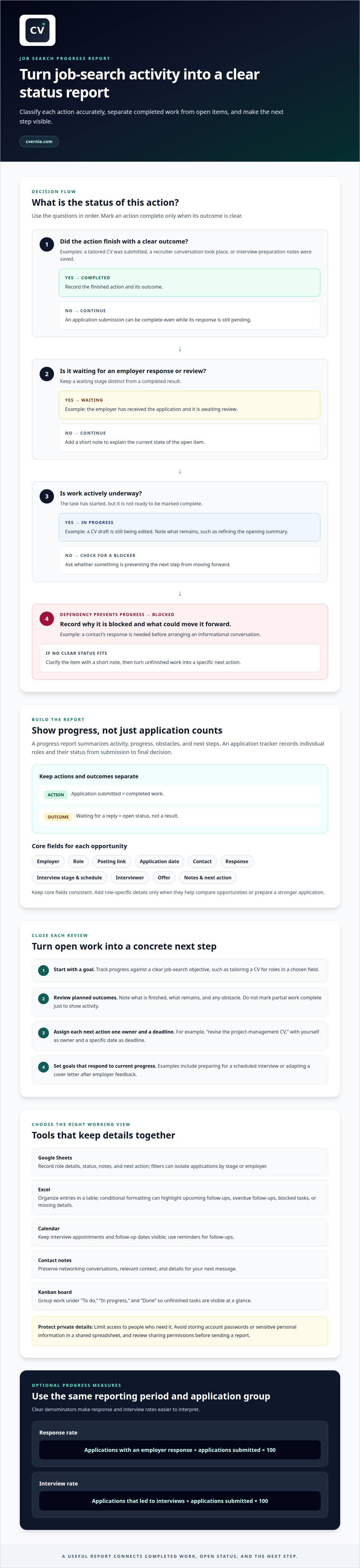
Start with a goal and a clear measure of progress. For example, set a goal to tailor your CV for roles in a chosen field, then record completed revisions, applications sent, and responses received. Keep actions and outcomes distinct: submitting an application is completed work; waiting for a reply is an open status, not a result. This organized view shows whether your actions align with your objectives and where your approach may need adjustment.
Make the final part of each report forward-looking. List the next actions, assign one owner to each, and set a deadline. For example, you might record “revise the project-management CV” as an action, with yourself as its owner and a specific date as its deadline. A contact, calendar, or task list can help you keep those commitments visible. End with goals that respond to current progress, such as preparing for a scheduled interview or adapting a cover letter after employer feedback.
Yes, you can build a simple tracker in Google Sheets or Excel. Use Google Sheets to record application details and notes, or Excel to organize entries and apply conditional formatting to highlight important information. A spreadsheet isn’t the only option: a calendar works well for interview dates and follow-ups, while contact notes preserve networking details and conversation context.
Track applications, interviews, networking, and follow-ups in one organized workflow. Add the employer, role, application date, contact, current stage, interview schedule, and next action. Update the entry after each application or status change. Record interview feedback and networking conversations in your notes, then use calendar reminders for follow-ups.
Protect the details you record. A tracker may contain contact information, interview notes, and private job-search plans, so limit access to people who need it. Avoid storing account passwords or sensitive personal information in a shared spreadsheet, and review sharing permissions before sending a report.
Completed work and work in progress
Separate completed actions from open tasks so your report reflects what changed, not just what you intended to do. Mark an action complete only when its outcome is clear: a tailored CV was submitted, a recruiter conversation took place, or interview preparation notes were saved. Keep waiting stages separate. An application awaiting review is still active, even though submitting it is completed work.
Use consistent status labels across your spreadsheet or task board, such as “completed,” “in progress,” “waiting,” and “blocked.” Add a short note beside each open item explaining its current state. “Waiting” could mean an employer has received the application; “blocked” could mean you need a contact’s response before arranging an informational conversation. This distinction makes the next action easier to identify.
For each reporting period, review tasks against their planned outcomes. A CV revision might be complete once you’ve aligned its experience details with a target role. If the draft is still being edited, record what remains, such as refining the opening summary or checking role-specific terminology. Don’t mark partial work complete just to show activity. A precise status helps you judge whether the task is ready to support an application.
Choose a tool that makes status changes easy to see. In Excel or Google Sheets, use a status column and notes field; conditional formatting can highlight overdue follow-ups or blocked tasks. A simple Kanban board can group cards under “To do,” “In progress,” and “Done,” making unfinished work visible at a glance. Use the same labels in your report and working tracker.
Close the review by turning unfinished work into specific next actions. If an interview is scheduled but preparation remains open, write down the next step, such as researching the employer’s products or drafting questions for the interviewer. If a task is blocked, record the reason and what could move it forward. This keeps the report honest, useful, and focused on progress.
Customizable tracking fields
Customize fields to match the roles you’re pursuing and the decisions you need to make. A marketing applicant might track campaign experience requested; a software candidate could note programming languages named in each posting. Keep core fields consistent, then add optional details only when they help compare roles or prepare a stronger application.
Start with the details that identify each opportunity: employer, role, posting link, application date, contact, response, interview stage, schedule, interviewer, and offer. Add a notes field for interview feedback or networking context. For example, record a recruiter’s preferred follow-up method beside the contact entry, then note a useful question after the interview.
- Google Sheets: Use editable columns for role details, status, notes, and next action. Filters can help isolate applications by stage or employer.
- Excel: Organize entries in a table and use conditional formatting to highlight upcoming follow-ups or missing details.
- Calendar: Keep interview appointments and follow-up dates visible alongside other commitments.
- Contact notes: Preserve relevant networking conversations and the context for your next message.
Track response and interview rates with clear denominators. Calculate the response rate by dividing applications that received an employer response by applications submitted, then multiplying by one hundred to get a percentage. Calculate the interview rate by dividing applications that led to interviews by applications submitted, then multiplying by one hundred. Use the same reporting period and application group for both measures.
Interpret those rates carefully. Recent applications may still be awaiting replies, so compare groups with similar submission dates and statuses. If you tailor a CV or cover letter for a specific role, add a field showing which version you used. Update fields as your search changes, but remove columns that no longer guide a decision. A focused spreadsheet is easier to maintain than one filled with details you never review.
Reporting periods and audiences
Choose a reporting period that matches how often you review your search or share updates. A weekly report should show its start and end dates, so readers can distinguish this week’s activity from earlier work. Use the same dates throughout the report, including its application summary, interview schedule, and next-step list. For a monthly review, compare the current period with the previous one to spot changes in focus or progress.
Shape each report around its reader. A personal review can include detailed notes about role fit, application versions, and interview feedback. An accountability partner may need a brief summary of completed actions, open tasks, and priorities. A career counselor may find goals, job-search activities, challenges, and questions for discussion most useful.
For a career counselor or unemployment program, organize the report around the information they request. Include the reporting dates, relevant job-search activities, application status, interviews, and planned next steps. Keep entries factual and retain supporting details, such as an employer name or interview date, when relevant.
Use a spreadsheet for sortable application records, a calendar for scheduled events, and a document for a concise narrative summary. A timeline can show how applications move through stages, while a simple graph can make changes across reporting periods easier to see. Add visuals only when they clarify the update; give each chart a clear label and make sure it matches the dates covered.
Before sharing, review the report from the recipient’s perspective. Put the most relevant summary first, then group supporting details under clear labels. Remove unrelated personal notes and highlight any decision or assistance you need. For example, ask a counselor to discuss how your target roles align with your current application activity.
Build a more organized record of applications and interviews with a centralized job-search platform.
CVernia: Career Application Management Platform
CVernia brings key parts of your job search together in its career management platform. Use the Application Tracking Dashboard to organize applications and review their progress alongside your other job-search work.
Turn to CVernia when tracking roles across separate documents makes it harder to see each application’s status or prepare for an interview. CV Compatibility & ATS Analysis helps you assess how your CV aligns with a job description, while Interview Preparation & Guidance helps you prepare for upcoming conversations. Together, these tools connect application tracking with practical preparation, helping you manage the process with greater clarity.
Explore CVernia’s platform to see how it can support your application workflow.
Make your next step intentional
Use your report as a decision tool, not just a record of past activity. Let it show which roles deserve more attention, what your application materials should emphasize, and where your next effort can make the biggest difference. A well-maintained job search progress report template helps turn that reflection into a focused plan, while leaving room to adjust as opportunities change.
If your next step is strengthening your application materials, CVernia offers tailored CV and cover letter creation, along with CV Compatibility & ATS Analysis to assess alignment with job descriptions. Its career management platform helps you organize your application journey in one place.
Contact CVernia for career support and explore a practical way to keep moving forward. Every thoughtful update can bring your search into sharper focus.
Frequently Asked Questions
What should a job search progress report include?
Include the reporting dates, your current job-search objective, completed actions, open tasks, obstacles, and upcoming milestones. Add a short note explaining what the activity tells you, such as whether your applications are reaching roles that match your experience. For a review meeting, finish with a decision or question you want to discuss, rather than unrelated personal details.
What columns should a job application tracker include?
Useful columns include employer, role, posting source, application date, current stage, contact, and next follow-up. Add a priority field to distinguish roles you’re especially interested in, and a document-version field to identify the CV or cover letter you used. A last-updated column can help you spot stale entries and decide which applications need attention first.
How often should you update a job search progress report?
Update the tracker after submitting an application and whenever its status changes, so follow-ups reflect the latest information. Then create a weekly report using consistent start and end dates. For example, add an interview invitation as soon as it arrives, then include it in the weekly snapshot with the next preparation step.
What weekly job search goals and metrics should you track?
Choose goals based on actions you control, such as researching suitable roles, adapting application materials, contacting professional connections, and preparing for interviews. Track completed actions alongside outcomes, including employer responses, interview invitations, and follow-ups sent. Compare this week’s activity with your stated goals, then use any gap to choose a realistic next priority instead of judging progress by application volume alone.
Is there a free job search progress report template in Excel or Google Sheets?
You can build a simple job search tracker in Google Sheets or Excel, with editable columns for applications, status, notes, and next actions. The article does not state whether a downloadable template is free.


