

What if the hardest part of a job search isn’t applying, but remembering what happened after you clicked submit? Tracking job applications in one place replaces scattered browser tabs, email threads, and notes with a clearer view of each opportunity. It helps you remember which CV you sent, when to follow up, and what to prepare next.
Application details build up quickly, and a status label alone won’t tell you what action to take or why a role caught your interest. A useful system connects each decision to its next step, so you can return to an application without piecing together its history.
This guide explains how to organize applications, deadlines, document versions, and interview context in a practical workflow. You’ll learn what to record, how to review your progress, and how to use each stage to refine your approach. CVernia’s application dashboard brings tracking together with tailored CV and cover letter tools, ATS compatibility analysis, interview notes, and document management, helping you spend less time reconstructing your search and more time preparing for what comes next.
Key Takeaways
- Separate saved vacancies from active applications so your tracker reflects real progress and decisions.
- Choose a spreadsheet, template, or platform based on how much flexibility and upkeep your search requires.
- Make tracking job applications in one place easier by using consistent status labels and recording a clear next action for each role.
- Use a repeatable workflow to capture applications submitted on job boards or company websites, then keep each record current.
- Connect role details with tailored documents, interview notes, and attachments to preserve useful context as your search progresses.
Why track job applications in one place instead of across scattered notes?
A job search can send you between job boards, company career pages, your inbox, and personal notes just to answer one question: what happened with that role? A vacancy saved on a job board is only a possibility. Once you apply, you need a record of the specific role, the materials you submitted, and what you plan to do next. Keeping those details together makes it easier to resume where you left off.
A job application tracker is a single record of the roles you’ve applied for, each application’s status, and the next action to take. The goal isn’t to document every job-search activity. It’s to keep active applications visible, so you can find the information that matters without retracing your steps.
Job hunting can involve different strategies and stages, as outlined in Job hunting strategies. A focused tracker connects those efforts to real opportunities, turning saved links and messages into a working record you can review and update.
What belongs in a job application tracker?
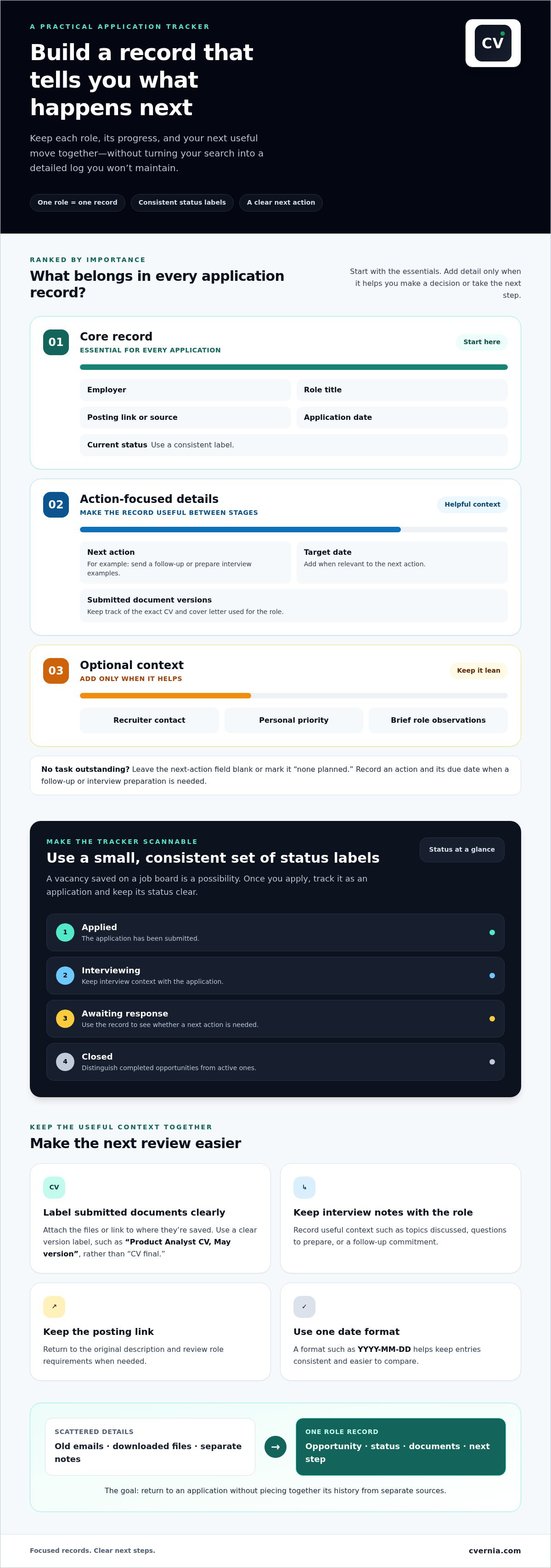
Start with details that identify an application and show where it stands. Add a next-action field, such as “send follow-up” or “prepare interview examples,” so the record remains useful between stages. Recruiter contact details and personal priority can provide context, but they’re optional. Keep the essentials consistent across roles and add fields only when they help you make a decision.
- Essential: Employer, role title, posting source, application date, and status.
- Action-focused: Next step and, when relevant, its target date.
- Optional context: Recruiter contact, personal priority, or a brief note about the role.
How does one record reduce job-search friction?
Before a follow-up or interview, role-specific context can save you from searching old emails and downloaded files. Keep a link to the posting, the CV and cover letter version submitted, and relevant notes with the application record. You can quickly review the role’s requirements and why you applied instead of piecing that information together from separate sources.
Consistent status labels make the search easier to scan. Use clear stages such as “applied,” “interviewing,” “awaiting response,” or “closed” to distinguish active opportunities from completed ones and see where a next action is needed. You don’t need to log every browsing session or job alert to make the tracker useful.
For a broader view of how to organize goals, routines, and application activity, explore this job search management system guide. Keep your tracker focused on what helps you understand an opportunity, its current status, and the next useful step. A smaller, current record is more valuable than a detailed log you don’t maintain.
Build a job application tracker that keeps every role’s context together
A useful tracker is structured enough to compare applications but simple enough to update after each one. Give every role its own record, then decide what belongs in the core entry and what can remain optional. The aim isn’t to collect details for their own sake. It’s to make the role, its progress, and your next move easy to understand at a glance.
The minimum useful application record is the role, employer, application date, current status, and next action. Add the posting source or link so you can return to the original description and review its requirements when needed.
Which fields are essential for every application?
Keep the core fields consistent across every entry. Use one date format, such as YYYY-MM-DD, and a short set of status labels, such as “applied,” “interviewing,” “awaiting response,” and “closed.” Consistent entries are easier to scan and compare than records with different labels for the same stage.
| Record type | Fields to include | Why they help |
|---|---|---|
| Must-have | Employer, role title, posting link or source, application date, current status | Identifies the opportunity and shows where it stands. |
| Helpful context | Next action, due date if relevant, CV and cover letter version | Connects progress to a specific follow-up or task. |
| Optional notes | Recruiter contact, personal priority, brief role observations | Adds useful context without cluttering every record. |
If there’s no task outstanding, leave the next-action field blank or mark it “none planned.” When you need to follow up or prepare for an interview, record the action and its due date. That turns the tracker from a history of what you’ve done into a practical reference for what comes next.
How should you store documents and interview context?
Identify the exact CV and cover letter submitted for each position. Use clear filenames or version labels, and attach the files or link to their saved location from the role’s record. “Product Analyst CV, May version” is more useful than “CV final,” especially when different applications call for different, truthful emphasis.
Keep interview notes and role-specific details with the same application where possible. Record useful context, such as topics discussed, questions to prepare, or a follow-up commitment. This saves you from searching through disconnected files before the next conversation. For more detailed interview-stage organization, use this job interview tracker guide.
Keep the tracker focused and protect your privacy. Don’t add sensitive personal information or details that have no practical role in managing the application. CVernia’s application tracking tools connect application records with document and interview context. Explore CVernia’s application tracking tools.
Spreadsheet, template, or platform: which job application tracker fits?
The best tracker is the one that fits your search and stays current. A spreadsheet gives you control, a template provides a ready-made structure, and a dedicated platform can connect application records with related documents and notes. Compare them by setup time, flexibility, and the effort needed to keep information up to date.
- Spreadsheet: Quick to start and easy to customize, but you manage the fields, updates, and attachment links yourself.
- Template: Offers a pre-built structure you can adjust, though you may need to maintain it across your preferred tools.
- Dedicated platform: Can bring application stages, documents, and notes together, reducing reliance on separate files and lists.
Tracking job applications in one place doesn’t require a complicated system. Start with the simplest option you’ll update consistently. If maintaining the records begins to take more effort than your search, consider a setup that connects more of the information you use.
When is a spreadsheet enough?
A spreadsheet can work well for a manageable search with straightforward stages. Add columns for the employer, role, application date, status, and next action, then sort or filter the list as needed. The trade-off is hands-on upkeep: you enter each application, keep labels consistent, and organize document links or attachments yourself. It’s a practical choice when those steps are easy to maintain.
What does a customizable template add?
A template gives you a starting structure without locking you into a fixed workflow. Adapt its fields to reflect how you search, such as adding a column for a referral or a reminder to review the job description before an interview. It suits people who want more guidance than a blank spreadsheet but still prefer to manage their own records. Update the template each time an application changes stage.
When might a dedicated platform be more practical?
As your search grows, updating a tracker, document folders, and interview notes separately can make it harder to keep information aligned. A dedicated platform can connect those records, making it easier to find the relevant CV version, cover letter, and role-specific context together. CVernia combines application tracking with tailored CV and cover letter tools, ATS compatibility analysis, and interview notes and attachment management.
Document fit is one part of tailoring an application. An ATS compatibility check can help you compare your CV with a job description. Learn more in this ATS resume checker guide. Keep your application accurate to your real skills and experience, whichever system you use.
Choose based on the work you want your tracker to handle. If a spreadsheet is clear and easy to maintain, keep using it. If connecting application records and materials would simplify your routine, explore CVernia’s application tracking tools.
Set up a one-place job application workflow you can maintain
A tracker only helps if you keep it current. Build a short routine around moments that already happen in your search: finding a role, submitting an application, receiving a response, or preparing for an interview. That makes tracking job applications in one place a repeatable habit rather than another large task.
What should you do when you find a promising role?
Capture enough information to recognize and revisit an opportunity, even if you haven’t applied yet. Add the employer, role title, posting source or link, and closing date if stated. Note whether the role is saved, in progress, or submitted. Before moving on, choose a clear next action, such as reviewing the requirements or tailoring your CV.
- Capture the role. Save the employer, title, source, original posting link, and any stated closing date. Record whether you found it on a company site, job board, or through another source.
- Complete the record. After deciding to apply, add the application date and identify the CV and cover letter version you used. Include a brief note if it will help you recall why the role fits your experience.
- Update the status. Change the record when something meaningful happens, such as submitting the application, receiving an interview invitation, or learning the position has closed. If you apply outside your tracker, enter the application afterward and mark it submitted. The tracker records your action; it doesn’t submit the application for you.
- Schedule the next action. Add a task and due date when needed, such as preparing interview examples or following up. If there’s no action to take yet, don’t create a reminder without a purpose.
How often should you review and update the tracker?
Make brief updates after meaningful events instead of relying on memory at the end of the week. A response, interview booking, or submitted application is a natural prompt to adjust the record. Then choose a regular review time that fits your routine. Use it to check upcoming tasks, interview dates, unanswered questions, and applications whose status hasn’t changed.
Keep the review focused. For each active opportunity, ask: Is the status accurate? Is there a next action? Is a date attached if timing matters? If an application has no pending task, you don’t need to invent one. The aim is a trustworthy tracker, not activity for its own sake.
When a role is filled, withdrawn, or no longer relevant, mark it closed and move it to a separate historical view if your system allows. Retain useful details, including the documents submitted and any relevant outcome notes. That history can help you avoid repeating work and make informed decisions about similar roles, while keeping active applications easy to scan.
Choose a workflow you can repeat with minimal effort. CVernia’s application tracking tools connect application records with documents and interview context.
Use CVernia to connect application tracking with tailored documents
An application record is more useful when it stays connected to the materials and context for that role. CVernia brings application tracking together with tailored CV and cover letter tools, ATS compatibility analysis, interview notes, and attachment management. Keep the application journey organized around the opportunity, rather than treating every document as a separate task.
How does connected tracking support a more prepared application?
For each role, keep the application stage alongside the CV and cover letter prepared for that position. Add relevant attachments and interview notes to preserve context, such as the experience you highlighted or topics discussed during a conversation. Version management helps distinguish documents tailored for different roles, so you can refer to the materials actually submitted instead of relying on memory.
CVernia’s ATS compatibility analysis compares a CV with a job description to support a closer review of how the document aligns with the role. Use the analysis to assess and refine your materials, not to predict an employer’s decision. No compatibility check can guarantee an interview. Tailoring still means presenting your real skills and experience clearly and accurately.
How can you keep reapplications accurate and intentional?
Reapplication detection can prompt you to revisit an earlier application when a similar opportunity appears. Review your previous record before taking action: check the role requirements, application history, and document versions. Then decide whether the opportunity is a fit and whether your materials need updating. A prior application is useful context, not a reason to resubmit unchanged documents automatically.
Keep every revision truthful. Adjust the emphasis to reflect relevant, genuine experience, and don’t add qualifications or skills you don’t have. Record which version you use so your application history remains clear and you can prepare consistently if the employer responds. This connection between role, documents, and notes makes tracking job applications in one place more than a status list. It gives you a practical record to work from at each stage.
Bring your application records, tailored documents, and interview context into a connected workflow with CVernia’s application management platform.
Make your next job-search step easier to see
A well-kept application record gives you more than a place to store information. It helps you decide which opportunity deserves attention, what you learned from a conversation, and how to prepare for the next one. Start with a system that feels manageable, then refine it as your search changes. The most effective approach to tracking job applications in one place supports your decisions without becoming another source of pressure.
As you build that routine, keep your materials aligned with each role and true to your experience. CVernia connects application tracking with interview notes and attachments, tailored CV and cover letter tools, ATS compatibility analysis, reapplication detection, and document version management. These tools help keep the details of your search connected while you remain in control of each application and its next step.
Explore CVernia’s application management platform to create a clearer home for your job-search process. Take it one opportunity at a time, with a system that makes the next step easier to see.
Frequently Asked Questions
Can I track job applications from different job boards in one place?
Yes. Add applications from each job board, company website, or referral to the same tracker, and record where each opportunity came from. For example, note “company careers page” as the source even if you first found the role elsewhere. Don’t assume a tracker automatically collects applications from every site. Confirm each submission is recorded, especially if you applied in a separate browser or account.
What should I do if a job posting disappears after I apply?
Use the information you saved before applying to retain a record of the opportunity. Keep the employer, role title, application date, and any reference number shown in the posting or confirmation email. If the listing disappears, search your inbox for the application receipt and save it with your record. Avoid guessing at missing requirements; use your saved copy or confirmation details as your reference.
Should I keep rejected applications in my job tracker?
Yes, keep a brief record of rejected applications if it helps you understand your search over time. Note the date and outcome, then add a short, factual observation only when you have useful feedback, such as a specific skill requirement mentioned by the employer. Don’t treat one rejection as proof that your materials or experience are unsuitable for every similar role. Use the record as context, not a verdict.
How can I avoid applying to the same job twice?
Before submitting, search your tracker by employer and role title, then compare the location or job reference number if available. Similar titles can refer to different teams, so check the original posting details rather than relying on the title alone. CVernia’s smart reapplication detection can help flag a prior application for review. Check the history before proceeding, particularly if a role has been reposted.
Can a job application tracker help me prepare for a recruiter call?
Yes. Before the call, use the record to refresh your memory about where you found the role, what interested you, and which experience you highlighted in your application. Add a few questions you want to ask, such as how the team is structured or what the next stage involves. Afterward, note key details and any agreed follow-up so you can act on them accurately.
What happens if I forget to update my application tracker?
You can bring it up to date without reconstructing every detail. Check recent confirmation emails, calendar invitations, and recruiter messages, then record the latest event you can verify. If you’re unsure whether a follow-up was sent, mark that as unknown rather than assuming. Reviewing recent messages can restore an accurate picture and help you identify the next step without starting over.


