

What if the best way to make your resume ats-friendly is also the best way to help a recruiter understand it? Clear structure and precise language can support both, without turning your experience into a list of keywords.
If you’ve found conflicting advice about templates, formatting, or what an applicant tracking system can read, you’re not alone. It’s reasonable to worry that important experience could get lost, or that tailoring your resume means copying phrases from a job description. The goal isn’t to guess how every system works or stuff your document with keywords. It’s to present your real qualifications clearly and connect them to the role.
This guide shows you how to build a clean, parsable resume, choose a format that’s easy for people to scan, and reflect job-description language accurately. You’ll also learn how to review relevant achievements and interpret a compatibility check. It can flag areas to examine, but it can’t guarantee how an employer’s system will handle your application. Use these steps to make your resume clearer, more focused, and ready for human review.
Key Takeaways
- An ats-friendly resume uses recognizable sections and straightforward formatting to make your experience easier to process and scan.
- Resume parsing can vary by document construction and hiring system, so follow the employer’s application instructions first.
- Use job-description language to highlight relevant experience, but keep every skill and achievement accurate to your background.
- A compatibility check can point to possible gaps for review. Compare its feedback with the role before making changes.
- A repeatable final review can help you catch structure, content, and readability issues before submitting each tailored application.
What Does ATS-Friendly Mean for Your Resume?
It makes sense to care whether an applicant tracking system can read your resume. But no format guarantees that you’ll be selected, reach a recruiter, or get an interview. An ats-friendly resume presents your experience in a clear, predictable structure, with text recruiting software can process reliably. Think of compatibility as making information accessible, not as a shortcut to a hiring decision.
That distinction matters. An employer’s ATS may help collect and organize applications, while the employer’s recruiting process determines how candidates are reviewed. A resume checker is different again: it compares your document with a job description and can flag potential areas to review. It doesn’t reproduce every employer’s system or know how a recruiter will assess your qualifications.
The Applicant Tracking System (ATS) reference explains the broad purpose of this employer software. For a closer look at the application workflow and compatibility, read this guide to how applicant tracking systems work.
What does an applicant tracking system do with a resume?
Employers use ATS software to collect and organize applications. Depending on the system and its configuration, software may extract text from a submitted resume and organize details, such as contact information, employment history, or skills, into searchable fields. Recruiters can then review applications using the employer’s chosen workflow.
Parsing isn’t identical everywhere. The document’s construction can affect how clearly information is extracted, and different systems may handle the same file differently. The practical goal is to make your content easy to identify, not to assume every ATS follows one universal rule.
Does ATS-friendly mean a resume must look plain?
No. Readability and clear organization matter more than stripping away all design. You can use considered spacing, consistent headings, and restrained visual choices, as long as they don’t obscure essential details or make your career history difficult to follow.
Be especially careful with contact details and key experience. If decorative elements make your name, email, job titles, dates, or achievements harder to find, simplify them. A resume should work in two ways: its structure should help software interpret the content, and its presentation should help a person quickly understand your strengths. Keep the design purposeful, then review the document as both a text file and a recruiter-facing summary.
How ATS Software Reads Resume Structure and Content
A resume doesn’t move directly from upload to a hiring decision. In broad terms, an employer’s system receives the application, extracts text from the submitted document, and may organize details into fields for recruiters to review. What happens at each step can vary with the software, its setup, and the way the document is constructed.
Resume parsing is the process of extracting text from a resume and organizing information so it can be stored or reviewed. That’s a useful general description, not a promise that every system identifies every field in the same way. A section label or date that one system handles clearly may be less straightforward for another.
Which resume elements can make information harder to parse?
Complex columns, text boxes, graphics, and unusual reading order can make it less clear how separate pieces of information relate. For example, a job title and date placed in different boxes might look aligned to you but appear out of sequence when text is extracted. These elements aren’t guaranteed to cause problems, but they’re worth checking.
Try copying your resume into a plain-text document. Does your name appear first? Do roles, employers, dates, and achievements stay together in a sensible order? If key details become separated or disappear, simplify the layout. Restrained formatting can still establish hierarchy with clear spacing, consistent headings, and emphasis that doesn’t hide essential content. MIT's guide to ATS-friendly resumes offers additional formatting guidance to consider alongside the employer’s own application instructions.
How should headings, dates, and contact details be organized?
Use familiar labels such as “Experience,” “Education,” and “Skills” so readers can quickly identify each section. Keep your name and contact information in the main readable content of the document rather than relying on decorative elements to convey them.
For each role, present the job title, employer, and dates consistently. You don’t need to assume there’s one required date format. Clarity and consistency are the practical priorities. For instance, if you put dates beside job titles in one entry, keep that relationship clear throughout your work history.
Review the extracted text as a quality check, not a simulation of every employer’s ATS. If you want to compare your resume with a specific job description, CV compatibility and ATS analysis can help flag areas to review, while leaving the final judgment to the employer.
ATS-Friendly Resume vs. Common Myths: What Actually Helps?
ATS advice can sound absolute: use one “perfect” template, repeat every keyword, or assume a particular file type will be rejected. A more reliable approach is to make your qualifications clear and relevant while following the employer’s instructions. Optimizing for software shouldn’t erase your real strengths. Your resume still needs to show a recruiter what you’ve done and why it matters.
| Common claim | More useful guidance |
|---|---|
| “There’s one template every ATS can read.” | No single layout guarantees the same result in every system. Use a clear structure and check that your information stays understandable. |
| “More keywords always improve your chances.” | Use role-specific terms only when they accurately describe your skills or experience. Support them with relevant evidence. |
| “A PDF is always rejected.” | File handling can vary. Follow the employer’s requested format whenever one is specified. |
| “A high checker score guarantees an interview.” | A score can highlight possible alignment issues, but it can’t predict an employer’s decision or a recruiter’s judgment. |
Does adding more keywords improve ATS compatibility?
Not by itself. Start with the job description, then identify terms that genuinely match your background. If a role asks for project planning and you’ve done that work, use the relevant phrase and show it in context: describe the project, your contribution, and the result. A skill listed without supporting experience may tell a recruiter less than a clear example.
Repeating the same phrase to increase its count can make a resume harder to read and weaken your story. Hidden text is no substitute for relevant qualifications. Keep every claim truthful, and use the language of the posting where it naturally fits.
Are PDF resumes always rejected by ATS software?
No universal yes-or-no rule applies. Employers may specify a format, and systems can differ in how they handle documents. If the application requests a particular file type, use it. If it doesn’t, choose a format the application accepts and review the submitted document for readability.
A checker is a review aid, not a hiring decision. For help assessing what these tools can and can’t tell you, see this ATS resume checker guide. No template, file type, checker score, or keyword count guarantees an interview. The goal is a focused resume that communicates your actual fit clearly to both software and people.
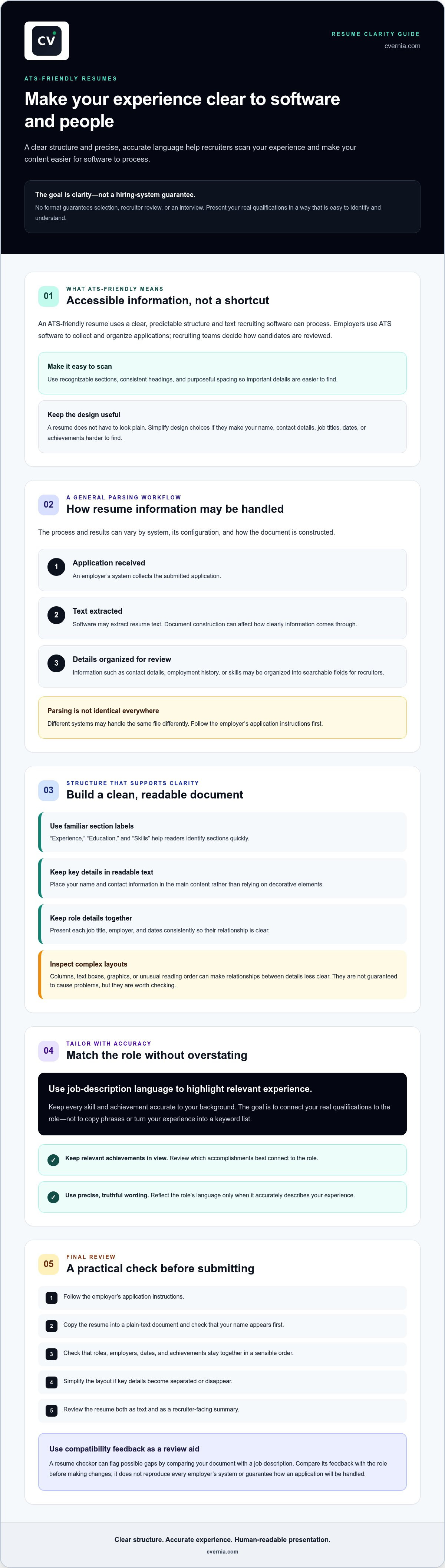
How to Make Your Resume More ATS-Friendly: A Practical Checklist
Use this repeatable review for each targeted application. Compatibility improves through clear structure and relevant, truthful evidence. Keep the employer’s instructions at the center, then check that your resume communicates your fit clearly to both software and people.
- Read the application instructions first. Note the requested file type and any specific submission requirements before editing or exporting your resume.
- Check the structure. Confirm that your name and contact details are easy to find, section headings are recognizable, and your roles, employers, and dates appear in a consistent order.
- Tailor the content to the role. Identify the skills and terminology in the job description that accurately reflect your experience. Prioritize relevant accomplishments over a broad list of duties.
- Review the text in plain-text form. Copy the resume into a plain-text document and check that sections stay in a logical reading order and essential details remain visible.
- Inspect the exported file. Open the exact document you plan to submit. Check for missing text, misplaced details, awkward spacing, or formatting changes.
- Read it as a recruiter would. Make sure the resume is concise, specific, accurate, and easy to scan. Remove repetition that adds no meaning.
How should you tailor resume keywords to a job description?
Start with the role’s requirements and mark the terms that match skills, tools, or responsibilities you can substantiate. Use natural wording in the summary, skills, or experience sections where it fits. For example, if the posting asks for budget tracking and you’ve handled that responsibility, describe the work in a relevant experience bullet rather than repeating the phrase in multiple sections.
Don’t add qualifications or experience just to raise a compatibility score. A checker can suggest terms to review, but your application should only claim what your background supports.
What should you check before submitting the file?
Confirm that contact details, headings, dates, and key achievements remain readable after export. Follow the employer’s requested file type, and upload the corresponding document, not an earlier draft. Then give the resume one final scan for accuracy and clarity. Small inconsistencies, such as a date or job title that differs from your records, can distract from an otherwise strong application.
Use CV compatibility and ATS analysis to review how your resume aligns with a job description, then decide which feedback reflects a genuine, supportable improvement.
Use ATS Analysis to Review Your Resume and Move Forward
A resume checker can help you spot possible gaps between your CV and a specific job description. Treat its feedback as a prompt to investigate, not a prediction of whether an employer will shortlist you. A suggestion may point to a skill or phrase worth reviewing, but it can’t confirm that a hiring system will interpret your document the same way or determine how a recruiter will weigh your experience.
How should you interpret an ATS compatibility score?
Use the score as a diagnostic signal, not a universal ranking or pass threshold. Different tools may assess resumes using different criteria, so comparing their scores as if they were measuring the same thing can mislead you. Focus on the suggestions and the evidence behind them.
For each suggested change, check the job description and your own experience. If the posting requests a skill you have, make sure your relevant experience explains how you used it. If you haven’t done that work, don’t add it to improve a score. The aim is to make genuine alignment easier to see, not to reshape your background to match every line of a posting.
How can a consistent application workflow reduce repeat work?
Keep each application connected to the version of your resume you actually submitted. A simple record can include the employer, role, application date, document version, and any follow-up details you want to remember. This helps prevent confusion when you tailor documents for several opportunities.
As an application progresses, keep relevant interview notes and attachments with its record. That way, your preparation and documents stay organized alongside application status instead of scattered across separate files. For more context on the technology behind document review, learn how ATS resume scanning works.
CVernia brings tailored CV and cover letter creation, CV compatibility and ATS analysis, application tracking, and document version management into one job-search workflow. Use analysis to review your materials, make only accurate changes, then keep the final version and application details organized. If you’d like support with those steps, explore CVernia’s tools for tailoring applications and tracking your progress.
Make Your Next Application Clear and Confident
An ats-friendly resume isn’t about finding a magic template or trying to outguess every hiring system. It’s about presenting your real qualifications in a clear structure, then tailoring relevant details to the role. Follow the employer’s instructions, use job-description language only when it accurately reflects your experience, and check that your final document is easy to read.
Use compatibility analysis as a review tool, not a verdict. A score or suggestion can help you spot areas to examine, but your judgment matters: make changes only when they’re supported by your background. Keep each tailored version organized with its application details so you can move through your job search with greater clarity.
CVernia supports tailored CVs and cover letters using truthful candidate information, alongside compatibility analysis, application tracking, and version management. Explore CVernia’s tools for tailored applications and organized job searching.
Build your next application one thoughtful step at a time. Your experience deserves to be presented clearly and confidently.
Frequently Asked Questions
What does ATS-friendly mean?
An ats-friendly resume uses clear structure and readable text that recruiting software can process reliably. It typically organizes information under recognizable headings, such as “Experience” and “Education,” and makes your contact details, roles, and dates easy to identify. Compatibility doesn’t guarantee a high ranking, selection, or interview. Employers use different systems and workflows, and recruiters still assess whether your experience fits the role.
How do I make my resume ATS-friendly?
Start by following the employer’s application instructions. Use clear section headings, keep your name and contact information in readable text, and present roles, employers, and dates consistently. Tailor your summary or experience to the position by highlighting relevant skills and achievements you genuinely have. Before submitting, check the exported document and copy its text into a plain-text file to see whether essential information remains in a logical order.
Are tables and columns bad for ATS?
Tables and columns aren’t guaranteed to cause a problem, but they can make information harder for some systems to interpret, especially if text appears in an unexpected order. A single, straightforward reading flow is a safer choice when you’re unsure how a document will be processed. If you use a more designed layout, test the extracted text and confirm that job titles, employers, dates, and achievements still make sense.
Should I submit my resume as a PDF or DOCX?
Use the file type specified in the employer’s application instructions. There isn’t one format that’s right for every application, because accepted files and system behavior can differ. If no format is requested, choose an option the application accepts and review the actual file before uploading it. Check that text remains readable, contact details are present, and the document’s layout hasn’t shifted during export.
Can an ATS reject my resume because of formatting?
Formatting can make resume information harder to extract or interpret, but it’s not accurate to assume every ATS automatically rejects documents with a particular layout. Employers configure their systems and review applications in different ways. Use clear, consistent formatting to reduce avoidable reading problems, and follow the employer’s instructions. A formatting review can improve clarity, but it can’t confirm how a specific employer will handle your application.
Do ATS resume checkers guarantee an interview?
No. A resume checker can compare your document with a job description and flag possible alignment issues, but it can’t predict an employer’s decision or guarantee an interview. Treat its score as a diagnostic signal, not a pass threshold. Review the suggestions, verify them against your experience, and make only accurate changes. A higher score alone doesn’t establish that your resume is stronger or more suitable for the role.
Should I use keywords from the job description in my resume?
Yes, use relevant job-description terms when they accurately describe your skills, experience, or qualifications. Place them naturally in your summary, skills, or work history, and support them with specific evidence. For example, if you’ve managed project schedules, describe that work in a relevant achievement rather than repeating “project management” throughout the document. Don’t add skills you lack or stuff the resume with phrases just to influence a checker.


