
Recruiters are already using sophisticated AI to analyze your performance in real time. Your best defense is a structured system to track them right back. It's incredibly stressful to maintain natural eye contact while trying to scribble down culture cues or specific role requirements. You've likely felt that sinking feeling when a second-round interviewer asks about a detail mentioned weeks ago that you simply didn't record. It's a common hurdle that makes even the most qualified candidates feel unprepared during a high-stakes career transition.
You don't have to rely on fading memory or messy legal pads anymore. This guide helps you discover the most effective tools and strategies to capture interview insights that turn conversations into job offers. By choosing the right tool for taking interview notes, you can stay fully present while building a digital memory of your entire job search. We'll preview the best 2026 options, including bot-free audio capture like Granola and the integrated application tracking within CVernia. You'll learn how to centralize your feedback, prepare for follow-up rounds with precision, and maintain a professional edge throughout every stage of the hiring process.
Key Takeaways
- Defeat the "forgetting curve" by capturing qualitative data immediately, preventing the loss of 50% of critical interview details within the first hour.
- Select a specialized tool for taking interview notes that integrates with your application tracker to maintain a centralized, searchable record of every conversation.
- Implement the "Permission Play" at the start of your meeting to reframe note-taking as a sign of high engagement and professional preparation.
- Transition from scattered documents to a structured dashboard that links specific interview insights directly to your application history and role requirements.
- Use your recorded insights to fuel smarter reapplications and more personalized follow-up messages for high-stakes second-round interviews.
Beyond Memory: Why a Tool for Taking Interview Notes is Crucial
Most candidates enter an interview focused entirely on their own answers. They overlook the fact that an interview is a critical data-gathering mission. To secure the best offer, you must develop "Interviewee Intelligence." This involves using a professional tool for taking interview notes to collect qualitative data about a potential employer's internal struggles and cultural nuances. It turns a simple Q&A session into a strategic consultation.
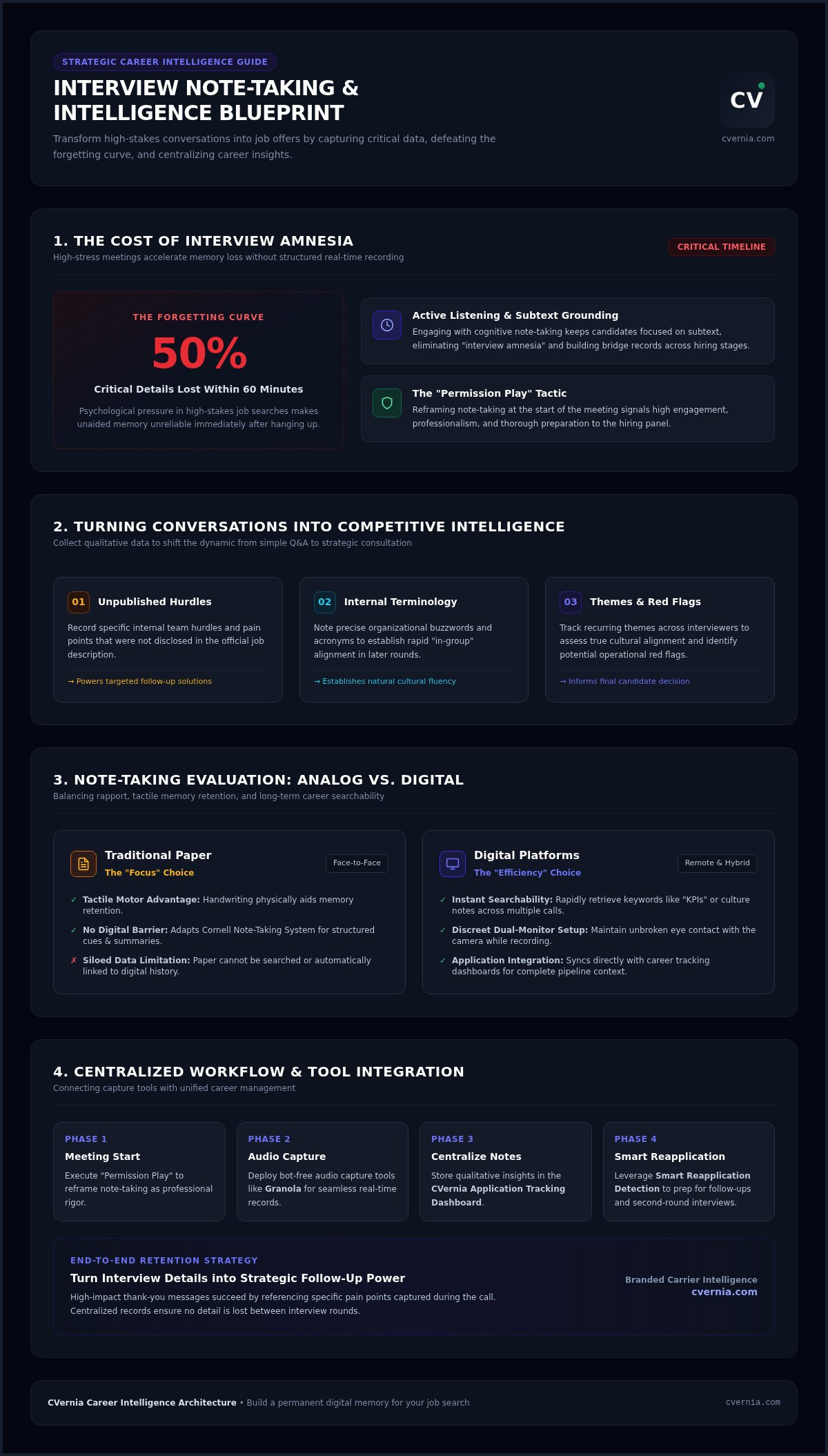
The psychological pressure of a job search makes your memory unreliable. Science shows the "forgetting curve" is particularly steep in high-stress situations; you'll likely lose 50% of the conversation's details within sixty minutes of hanging up. If you don't record those insights immediately, you lose your competitive edge. You need a reliable way to capture the small details that make a big difference in final deliberations.
The Psychology of Note-Taking in High-Stakes Meetings
Writing helps you stay grounded. Engaging with the cognitive processes of note-taking improves your active listening and keeps you focused on the interviewer's subtext. It creates a physical record that bridges the gap between different interview stages. This structured approach eliminates "interview amnesia," allowing you to recall specific names and anecdotes during second-round conversations. It shows the hiring team that you're organized and deeply invested in the role. You aren't just listening; you're processing.
Turning Conversations into Competitive Intelligence
Your notes are the secret weapon for your follow-up strategy. High-impact thank-you emails succeed because they reference specific pain points mentioned during the call. This level of detail proves you're already thinking about solutions. Use your tool for taking interview notes to identify:
- Current team hurdles that weren't mentioned in the job post.
- Internal terminology that signals you're already part of the "in-group."
- Recurring themes that suggest cultural alignment or potential red flags.
Tracking these details helps you decide if the company is actually a fit for you. By centralizing these insights in the CVernia Application Tracking Dashboard, you build a repository of intelligence that powers your entire career journey. This data doesn't just help today. It informs your strategy for future applications through Smart Reapplication Detection, ensuring you never walk into a meeting unprepared.
Evaluating Your Options: Digital vs. Analog Note-Taking Tools
Choosing between a legal pad and a laptop isn't just about personal preference. It's about balancing rapport with retention. Your choice of a tool for taking interview notes directly impacts how an interviewer perceives your level of engagement. You must decide whether you need the tactile focus of analog or the searchable power of digital.
Traditional Paper: The "Focus" Choice
In face-to-face settings, physical paper remains a powerful signal of respect. It shows you're fully present without a digital barrier between you and the hiring manager. Physical writing also offers a distinct tactile advantage. The motor skills involved in handwriting are proven to aid memory retention. To make this method more effective, many candidates adapt the Cornell Note-Taking System. This framework uses a structured layout for cues and summaries that helps you stay organized in real time. However, paper has a major drawback. It creates "siloed data." If those insights aren't digitized, they can't help you in future application stages or help you track long-term trends.
Digital Platforms: The "Efficiency" Choice
Digital tools offer unmatched efficiency for the modern job seeker. The primary benefit is searchability. You can instantly find every mention of "KPIs" or "company culture" across five different interviews. For remote calls, a dual-monitor setup allows you to take discreet notes without breaking eye contact with the camera. These platforms integrate directly with your application tracker to provide a unified view of your career progress. If you want to centralize these insights effortlessly, you can manage your interview notes within a dedicated career dashboard. This ensures your data is always accessible and actionable.
As you move toward digital solutions, consider the security of your sensitive career data. Cloud-based storage allows for cross-device access, while local storage offers more control over privacy. We're also seeing a rise in AI-assisted tools that prioritize synthesis over simple transcription. Instead of a raw transcript, these tools provide high-level summaries of key decisions and action items. This allows you to focus on the conversation while the technology handles the administrative burden. Select a tool that offers both accessibility and robust protection for your personal information.
Top Interview Note-Taking Tools for Job Seekers in 2026
The hiring landscape has shifted. While recruiters use automated systems to screen you, successful candidates now use specialized software to level the playing field. Mastering a modern tool for taking interview notes isn't just about recording data; it's about building a digital memory bank that grows with your career. In 2026, the best options move beyond simple text editors and offer deep integration with your entire application history.
Specialized Career Management Tools
General-purpose notepads often fail because they lack context. A centralized platform like CVernia provides a significant advantage by linking your interview insights directly to specific CV versions and job descriptions. When you use an integrated tool for taking interview notes, you aren't just writing; you're organizing your strategy. You can manage interview guides and attachments within a single dashboard, ensuring you never lose track of a recruiter's specific feedback across multiple application stages. This structure helps you identify patterns in your performance and refine your approach for second-round panels. It's an efficient way to turn scattered conversations into a structured path toward a job offer.
General Productivity and AI Assistants
Many "architect" job seekers prefer the customization of general productivity tools. Notion remains a popular choice, especially with its Business tier integration at $20 per member/month, which bundles AI features like Notion Agent to summarize meeting notes. If you prefer automated transcription, Otter.ai offers a Basic plan with 300 minutes per month, though it caps individual conversations at 30 minutes. These AI "Copilots" are excellent for synthesizing long discussions into actionable bullet points, allowing you to focus on the human connection during the call.
You must consider the legal and ethical landscape of recording. 11 to 13 U.S. states, including California and Florida, legally require explicit consent from all parties before you record or transcribe a conversation. Beyond legalities, unannounced bots can unsettle interviewers. To maintain rapport, always ask for permission at the start of the call. If you prefer a more discreet approach, look for "bot-free" capture tools like Granola, which record system audio without an external participant joining the meeting bridge. This keeps the focus on you while ensuring you don't miss a single detail.
How to Take Notes Effectively Without Being Distracting
Note-taking is a double-edged sword. If you do it well, you come across as organized and deeply engaged. If you do it poorly, you appear distracted or uninterested. The goal is to use your tool for taking interview notes as a bridge to better conversation, not a barrier. Success depends on how you signal your intent and how you manage your focus during the call.
The Etiquette of Interview Note-Taking
Always start with the "Permission Play." This simple gesture reframes the act of looking away from the camera as a sign of respect rather than a lack of focus. Try phrasing the request naturally. You might say, "I’d love to take a few notes to ensure I capture your insights; is that alright?" This brief pause builds immediate rapport and sets a professional tone. Once you have the green light, position your equipment strategically. Keep your notepad or screen slightly out of your direct line of sight to the camera. This allows you to maintain "camera contact" while you write. Use active listening cues like nodding or verbal affirmations while your hands are busy. These small signals reassure the interviewer that you're still processing every word.
What to Actually Write Down: A Framework
Don't try to transcribe the entire conversation. Verbatim recording is for machines; synthesis is for candidates. Use the "Key-Word Method" to capture triggers that will spark your memory later. Organize your thoughts using a "Three-Bucket" system:
- Role Requirements: Specific KPIs, team structures, or immediate challenges the manager mentions.
- Culture Cues: Observations about team dynamics, work-life balance, or company values.
- Questions for Later: Thoughts that arise during the talk that you want to revisit during the Q&A.
Capture personal anecdotes or specific titles mentioned by the interviewer. These details are gold for building rapport in follow-up emails. Always flag "Action Items" given during the call. If they ask for a portfolio link or a specific reference by Friday, write it down in bold. To keep these insights organized and ready for your next round, you should centralize your interview feedback within a professional dashboard. This ensures you never lose the "unspoken" requirements that aren't in the job description.
The most critical part of the process happens in the ten minutes after the call ends. This is the "Post-Interview Debrief." While the details are still fresh, spend a few moments expanding your shorthand into full thoughts. Review your notes to identify any red flags or cultural misalignments you might have missed in the heat of the moment. This immediate reflection is what turns a simple conversation into a strategic advantage for your second-round preparation.
Centralizing Your Career: Linking Notes to Your Application Dashboard
Treating your interview insights as temporary data is a missed opportunity for long-term growth. Most job seekers discard their notes once the hiring process ends, but these records are actually the foundation of your professional memory. By using a specialized tool for taking interview notes, you create a searchable archive that stays with you across different companies and years. This centralization turns every conversation into a building block for your future success. You aren't just preparing for one job; you're building a Career Knowledge Base.
Your past experiences must inform your future attempts. When you link your insights to Smart Reapplication Detection, you gain an immediate strategic advantage. If you re-engage with a firm six months later, you'll know exactly what challenges the team faced and which of your skills resonated most with the hiring manager. Even notes from a failed interview provide the qualitative data needed to improve your score on an ATS resume checker for the next role. Choosing the right tool for taking interview notes ensures that these hard-earned insights are ready when you need them most.
Strategic Advantage Through Data Centralization
Centralizing your data allows you to see the bigger picture of your professional journey. You can connect direct interviewer feedback to your CV Compatibility & ATS Analysis to see if your resume accurately reflects the skills managers are actually requesting. This process helps you identify recurring gaps in your performance or alignment. CVernia organizes this entire journey from the first click to the final offer, ensuring your insights are never siloed in a random document. It acts as the "memory" of your job search, keeping you organized and efficient.
Preparing for the Next Step
The insights you've recorded today are the secret ingredients for tomorrow's success. Use your interview notes to generate a tailored cover letter that addresses specific company pain points with surgical precision. If you're unsure how to decode a recruiter’s feedback, the CVernia Career Academy provides resources to help you interpret your notes and adjust your strategy. It's time to stop losing valuable data and start building a smarter, more resilient search. Organize your interview notes and track your applications with CVernia today.
Transform Your Interview Insights into Career Success
You’ve learned that relying on memory during high-stakes meetings is a risk you don’t need to take. Transitioning from scattered scribbles to a structured digital repository allows you to build "Interviewee Intelligence" that lasts a lifetime. By mastering the etiquette of the "Permission Play" and focusing on key-word synthesis, you stay present while capturing the qualitative data that standard recruiters often miss. Selecting a dedicated tool for taking interview notes isn’t just about the current call; it’s about building a searchable archive for every future opportunity.
CVernia provides the Integrated Interview Notes and Attachment Management you need to stay organized. Our Smart Reapplication Detection technology ensures that every insight you record today helps you navigate complex ATS environments tomorrow. We're proud to be the trusted partner for professionals who refuse to leave their career growth to chance. You deserve a system that works as hard as you do.
Master your interview notes and track every application with CVernia. Your next great role is waiting, and now you have the tools to secure it with absolute confidence.
Frequently Asked Questions
Is it okay to take notes during a job interview?
Yes, taking notes is highly encouraged and signals that you're a serious, organized candidate. It demonstrates active listening and ensures you capture qualitative data about the company's pain points. By using a professional tool for taking interview notes, you show the hiring manager that you're already treating the conversation as a strategic consultation. This approach helps you stand out from candidates who rely solely on their memory or intuition.
Should I use a laptop or a notebook for interview notes?
Your choice depends on the interview format and your personal comfort. Traditional notebooks signal deep focus and respect during face-to-face meetings, while laptops offer superior speed and searchability for remote calls. If you use a digital device, ensure it doesn't create a physical or psychological barrier between you and the interviewer. Many modern job seekers prefer digital platforms because they allow for immediate integration into a centralized application dashboard like CVernia.
How do I ask for permission to take notes in an interview?
Use the "Permission Play" at the very start of the conversation to set a professional tone. Simply say, "I’d like to take a few notes to ensure I capture our discussion accurately; is that alright with you?" Most interviewers will appreciate your thoroughness and transparency. This brief request reframes your downward glances or typing as a sign of high engagement rather than a distraction or a lack of eye contact during the meeting.
What are the most important things to write down during an interview?
Focus on capturing insights that aren't available in the job description. Prioritize role-specific KPIs, team challenges, and cultural nuances that the interviewer mentions. You should also record any specific "Action Items" or follow-up requests, such as sending a portfolio link by a certain deadline. Writing down the names and titles of everyone you meet is also essential for personalizing your thank-you notes and building long-term professional rapport throughout your entire career journey.
Can I record a job interview for my own notes?
You must exercise extreme caution when recording interviews due to legal and ethical considerations. In 11 to 13 U.S. states, including California and Washington, recording without explicit consent from all parties is illegal. Even where it's legal, unannounced recording bots can unsettle hiring managers. Always ask for permission before using any AI tool for taking interview notes. If you want a discreet option, consider bot-free system audio capture tools that don't require an external participant.
How should I organize my notes after the interview is over?
Perform a "Post-Interview Debrief" within ten minutes of the call ending while the details are still fresh. Expand your shorthand into clear, actionable thoughts and identify any potential red flags or cultural misalignments. For maximum efficiency, link these notes directly to your application in a centralized dashboard like CVernia. This ensures your insights are searchable and organized by role, helping you prepare for second-round panels or future follow-up opportunities with precise, data-driven answers.
What is the best free tool for taking interview notes as a candidate?
Several free options exist, including Otter.ai's basic plan, which provides 300 minutes of transcription per month. Notion is another powerful free choice for job seekers who want to build custom templates for their interview debriefs. However, the most effective approach is using a centralized platform like CVernia. It allows you to manage interview notes and attachments as part of your broader application journey without losing critical data across scattered documents or separate, unlinked files.
How do interview notes help with future job applications?
Your notes serve as the "memory" of your job search, providing a strategic advantage for future roles. By using Smart Reapplication Detection, you can leverage past insights to optimize your approach when a similar position opens up. Notes from a previous interview help you identify recurring skill gaps or cultural themes that you can address in a tailored cover letter. This structured data turns every conversation into a long-term asset for your personal career growth.


