
Did you know the average corporate job posting now attracts over 240 applications? That is a 111% increase since 2022, meaning your professional story has exactly six seconds to grab a recruiter's attention. You already know that a generic resume won't win in this high-volume environment. It's stressful to juggle dozens of files and fear that you've sent the wrong version to your dream company. Many job seekers feel overwhelmed when trying to figure out how to manage different versions of my resume while keeping their data consistent for applicant tracking systems.
This strategic guide will show you how to organize, tailor, and track every document without losing your mind. You'll learn to build a master repository that acts as your single source of truth and implement a file naming system that keeps you organized. We'll also cover how to use modern tools to maintain ATS compatibility and ensure you never miss a job opportunity due to a clerical error. It's time to replace your messy desktop folders with a streamlined system that builds your confidence and gets you hired.
Key Takeaways
- Align your professional experience to specific job descriptions to overcome the high-volume filtering of modern ATS platforms.
- Build a Master Resume as your central repository to ensure every tailored version remains grounded in your actual achievements.
- Adopt a professional naming convention to simplify how to manage different versions of my resume while keeping your digital files organized.
- Maintain data consistency across all resume versions and your LinkedIn profile to build trust and avoid red flags during background checks.
- Leverage a centralized application dashboard to track your history and manage tailored documents without manual folder chaos.
The Strategic Importance of Resume Versioning in 2026
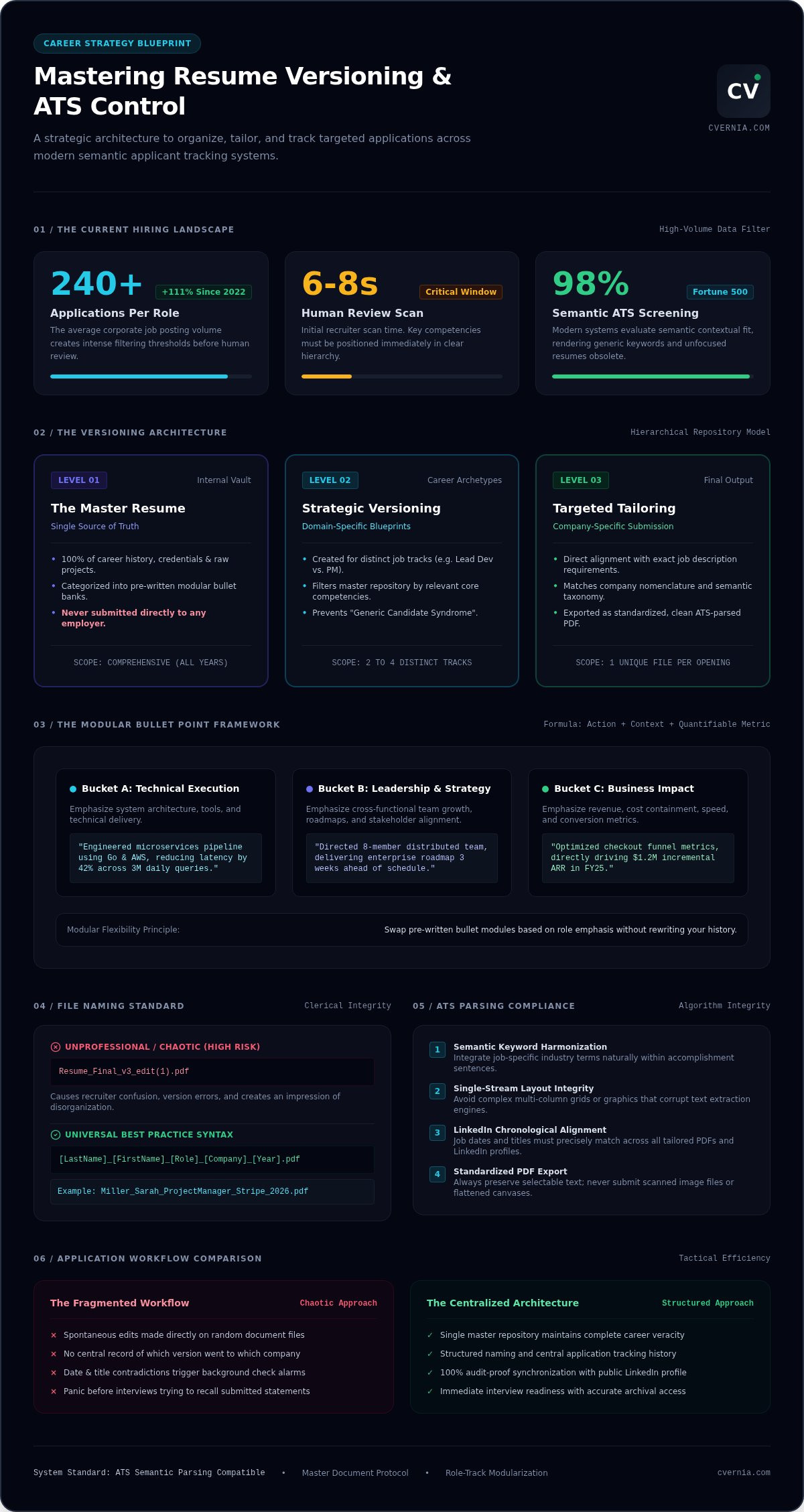
Mastering your career narrative starts with precision. Resume versioning is the strategic process of aligning your specific professional experiences with varying job descriptions to ensure a perfect match. In a market where the average corporate posting attracts over 240 candidates, a single, generic document acts as a barrier rather than a bridge. Understanding how to manage different versions of my resume allows you to present your most relevant achievements as the primary solution to an employer's specific problems. This approach moves beyond simple keyword stuffing. It focuses on strategic alignment, where you emphasize the skills that matter most for a particular career path while keeping your professional truth intact.
Modern hiring relies heavily on technology. Over 98% of Fortune 500 companies utilize applicant tracking systems to parse, categorize, and rank candidates before a human ever sees a file. By 2026, these systems have evolved to use semantic matching rather than simple word counts. If your resume attempts to cover every possible skill you possess, it dilutes your authority in the eyes of the algorithm. Organization also provides a massive psychological edge. When you have a clear system, you eliminate the frantic search for "which file I sent where" and replace it with the calm confidence of being fully prepared for any interview invitation.
Why One Resume is No Longer Enough
Recruiters typically spend only six to eight seconds on an initial scan. If your most relevant qualifications are buried under unrelated experience, you'll likely face immediate rejection. The rise of hyper-specialized roles means that "Generic Candidate Syndrome" is a significant risk. For example, a marketing professional might need one version focused on data analytics and another centered on brand storytelling. Versioning ensures that the most impactful data points are always front and center, respecting the recruiter's time and proving your fitness for the role instantly.
Versioning vs. Tailoring: Understanding the Difference
It helps to view your documents in two distinct layers. Versioning involves creating broad templates for different career paths or industries, such as a "Project Manager" template versus a "Product Owner" template. Tailoring is the final step where you fine-tune one of those versions for a single, unique job posting by mirroring the specific language of the company. Strategic versioning serves as the essential foundation of a successful job search management system. By maintaining these templates, you can apply to diverse roles with high precision without starting from scratch every time. This dual-layered strategy ensures your applications are both scalable and deeply personalized.
Creating Your Master Resume: The Foundation of Every Version
Every successful application strategy begins with a Master Resume. This document is your ultimate "Source of Truth," containing every role, certification, and project you have ever completed. It acts as an internal repository that you never send to employers directly. Instead, it provides the raw material for every tailored application you submit. Learning how to manage different versions of my resume becomes significantly easier when you have one centralized place to store your professional history. This approach ensures you never forget a key achievement from years ago.
A master document must prioritize truthful representation above all else. It should be a factual history of your career that allows you to see the full scope of your growth. When you align your experience with specific job announcements, you aren't inventing skills. You are simply choosing which parts of your real history are most relevant. For instance, following official USAJOBS resume guidelines highlights the importance of including required qualifications while deprioritizing unrelated tasks. Your master file makes this selection process seamless.
The Modular Bullet Point Method
To make your master document functional, use modular bullet points. Write multiple bullets for each role, each targeting a different competency. Group these into "Skill Buckets" like Leadership, Technical, or Creative. If you managed a team and also coded a new feature, write separate, achievement-based bullets for both. Every bullet must include a quantifiable result. Did you increase revenue by 15%? Did you cut processing time in half? Having these pre-written blocks allows you to swap them in and out of different versions in seconds.
Maintaining Your Master Document
Your master resume is a living document that requires regular attention. Schedule a quarterly "Career Audit" to add new wins and certifications while they are fresh in your mind. You should also include "Interview Notes" within this master file. If an interviewer praised a specific project, make a note of it. This helps you refine your future versions based on real-world feedback. Recording these details ensures your story remains consistent and powerful across every conversation.
Relying on a local Word document often leads to version confusion and lost data. A centralized system is much more effective for long-term career growth. Using a career application management platform allows you to keep your master data organized and accessible from anywhere. It transforms your resume from a static file into a dynamic tool for professional advancement.
How to Organize and Name Your Resume Versions
Your file naming strategy is the first impression you make on a hiring manager. When you submit a document, the title is often the first piece of data a recruiter sees in their downloads folder. Avoid unprofessional labels like "Resume_v2_Final" or "Latest_CV." These names force the recruiter to rename your file manually to find it later, which creates unnecessary friction. Instead, adopt a naming convention that serves both your internal needs and the recruiter's workflow. A clear name signals that you are organized and detail-oriented before they even read your first bullet point.
Shift your focus from chronological organization to functional categorization. Organizing your documents by date is a common mistake. It tells you when you applied, but it doesn't help you understand the strategic angle you used. Group your versions by industry or job function instead. This makes it much easier to reuse successful templates for similar roles. Following MIT's guide on building a master resume ensures that your tailored versions always stem from a solid, organized foundation. This structural clarity is the secret to understanding how to manage different versions of my resume without creating a digital mess.
The 2026 Naming Syntax for Success
Consistency is your best friend when labeling files. Use the format FirstName_LastName_JobTitle_Company.pdf for every submission. Always use the PDF format to lock your layout. Word documents can shift or appear broken depending on the version of the software the recruiter uses. For your own internal tracking, you can add a subtle version ID in the document's metadata or a tiny footer. This "secret code" allows you to map the file back to your master document without cluttering the public file name or looking unprofessional to an outsider.
Folder Structures vs. Digital Dashboards
While Google Drive or Dropbox might work for a few applications, they quickly become a graveyard of forgotten PDFs once you cross the 20-application mark. You need a way to link your resume, cover letter, and portfolio to the specific job description and interview stage. A dedicated job interview tracker provides this vital connection. It centralizes your attachments, ensuring you always open the right version during a live interview. This level of organization prevents the nightmare of accidentally referencing a tailored "Project Manager" resume while you're interviewing for a "Product Owner" role.
Optimizing Different Versions for ATS Compatibility
Modern Applicant Tracking Systems (ATS) have evolved beyond simple keyword matching. Today's enterprise platforms use semantic analysis to understand the relationship between your skills and the job requirements. When you master how to manage different versions of my resume, you ensure that every file is optimized for these sophisticated algorithms. This process doesn't mean changing your history. It means highlighting the specific achievements that prove you can solve an employer's unique problems. You must balance "Bot-Friendly" formatting with "Human-Friendly" readability to succeed. Use standard headings and single-column layouts so the parser captures your data correctly while keeping the document inviting for a recruiter's quick scan.
Maintaining a "Consistency Check" is vital for your professional reputation. Recruiters often cross-reference your submitted resume with your LinkedIn profile or previous applications. If your dates, job titles, or core responsibilities vary wildly across versions, it triggers immediate red flags. You can use an ats compliant resume guide to validate that each version remains technically sound. This ensures your professional brand stays cohesive even as you emphasize different skill sets for different roles.
Keyword Alignment without the Fluff
Identify the "Hard Skills" and "Soft Skills" within each job description to guide your tailoring. Hard skills like "Data Visualization" or "Agile Methodology" are essential for passing technical filters. Soft skills like "Cross-functional Leadership" provide the context that human recruiters value. Place these terms strategically in your skills section and within your work experience bullets. Avoid the temptation of keyword stuffing. Modern parsers and human recruiters both reject unnatural phrasing that lacks substance. Focus on clusters of related skills to show true expertise rather than just repeating a single word.
Handling Multiple Applications to One Company
Applying for two different roles at the same organization requires a high level of coordination. 2026 updates to platforms like Greenhouse and Workday allow recruiters to see every resume you have ever submitted to their company through a unified profile. If one version portrays you as a "Sales Specialist" and another as a "Data Analyst," you risk appearing unfocused or desperate. Use a centralized platform to detect your previous submissions and ensure your versions show a logical progression of your career. This transparency allows you to pivot between related roles without damaging your credibility. Ready to optimize your application strategy? Analyze your resume compatibility now to ensure you are ready for the 2026 hiring landscape.
Mastering Version Control with CVernia
Manual folder structures and complex spreadsheets eventually fail as your application volume grows. You need a more robust system to handle the complexity of the 2026 hiring market. CVernia serves as the ultimate Career Application Management Platform, designed to solve the specific problem of how to manage different versions of my resume. It replaces chaotic desktop icons with a streamlined, digital dashboard that tracks every file and every interaction. By centralizing your workflow, you eliminate the risk of sending the wrong document or losing track of a successful template. This organization creates a sense of readiness that manual systems simply can't match.
Smart Reapplication Detection is a standout feature that provides a significant strategic advantage. If you decide to reapply for a role after gaining new certifications or experience, the platform identifies your previous history with that company. It allows you to build on your past narrative rather than starting from zero. You can see exactly which resume version you used previously and how the recruiter responded. This level of insight ensures that your new application shows clear professional growth and logical progression. It transforms a simple reapplication into a targeted career move that shows you're constantly evolving.
Centralized Version Management
Store your Master Resume securely within the platform to create a permanent "Source of Truth" for your career. From this foundation, you can generate tailored versions for specific roles with just a few clicks. CVernia automatically links every resume, cover letter, and portfolio attachment to the corresponding job posting. You can also manage interview notes and follow-up tasks in the same secure location. This integrated approach ensures you never lose a successful resume version again, keeping you prepared for every stage of the recruitment process. This system protects your professional history from accidental deletions or disorganized cloud storage.
Smart Reapplication and Progress Tracking
Visualizing your application journey helps you identify what's working and where you need to pivot. The CVernia dashboard provides a clear overview of your progress across multiple industries and job functions. It tracks response rates and interview stages, giving you the data needed to refine your strategy. When you reapply for roles with updated experience, you do so with the confidence that your documentation is perfectly aligned with your current professional status. This data-driven approach removes the guesswork from your job search. Start managing your resume versions professionally with CVernia today.
Take Control of Your Career Narrative
Success in the 2026 job market requires more than just hard work. It demands a sophisticated system for your professional documents. You've learned that a Master Resume provides the essential foundation for every application, while strategic naming and ATS-focused tailoring ensure your story reaches the right people. Understanding how to manage different versions of my resume is no longer just a filing task. It is a competitive advantage that keeps your professional brand consistent and powerful across every application you submit. By prioritizing organization today, you eliminate the stress of tomorrow's deadlines.
Stop struggling with messy folders and confusing spreadsheets. You deserve a solution that grows with your career. Join CVernia to centralize your resume version management today and leverage powerful tools like Smart Reapplication Detection and ATS Compatibility Analysis. Our Centralized Application Dashboard keeps every attachment organized and every milestone tracked in one secure location. You have the skills and the experience to land your next great role. Now, you have the technology to make it happen with total confidence. Your professional journey is evolving, and you're ready to lead the way.
Frequently Asked Questions
How many different versions of my resume should I have?
You should typically maintain two to three core versions of your resume based on your primary career paths. For example; a marketing professional might have one version for digital strategy and another for brand management. From these core documents, you will create highly specific tailored versions for individual job postings. This strategy makes it easier to understand how to manage different versions of my resume while ensuring you remain a precise match for every role.
Is it okay if my resume versions look completely different for different industries?
It is acceptable for your resume versions to emphasize different skills or use industry-specific language, but your core history must remain consistent. A project manager applying to healthcare will highlight compliance and regulation, while the tech version focuses on software lifecycles. Ensure that dates and job titles don't contradict each other across versions. This consistency prevents recruiters from feeling confused if they view multiple applications or cross-reference your LinkedIn profile during the screening process.
Will an ATS reject me if I have multiple resumes on file with one company?
Modern applicant tracking systems won't automatically reject you for having multiple resumes, but they do centralize your candidate profile. Recruiters at large companies can see every version you've submitted. If your resumes show wildly different personas, you risk appearing unfocused. Use a centralized platform to track your history and ensure your versions show a logical progression of your career. This transparency allows you to apply for related roles without damaging your professional credibility.
Should I include the version number in the file name I send to recruiters?
Never include internal version numbers like "v2" or "final" in the file name you send to recruiters. These labels suggest that the document is a work in progress rather than a polished submission. Instead, use a professional naming convention such as FirstName_LastName_JobTitle_Company.pdf. This format makes it easy for hiring managers to identify your file in a crowded downloads folder. It also demonstrates your attention to detail and professional organization from the very first interaction.
How do I manage my LinkedIn profile if I have multiple resume versions?
Your LinkedIn profile should serve as a comprehensive "Source of Truth" that aligns with your master resume. While your resumes are tailored to specific roles, your LinkedIn profile remains broad enough to support all your career paths. Ensure that the core facts, such as dates and job titles, match every resume version you send out. This alignment builds trust with recruiters who cross-reference your documents to verify the accuracy of your professional history and achievements.
What is the best way to track which resume version I used for a specific job?
The most efficient way to track your documents is through a centralized application dashboard rather than manual folders or spreadsheets. A dedicated platform automatically links every resume and cover letter version to the specific job description and company. This system allows you to open the exact version used for an application when you receive an interview invite. It eliminates the stress of searching through your hard drive and ensures you are always prepared.
Can I use AI to help manage and tailor my resume versions?
You can certainly use AI tools to analyze job descriptions and optimize your resume versions for ATS compatibility. Technology helps you identify which skills to emphasize based on the employer's specific requirements. However, you must ensure that any generated content remains a truthful representation of your actual experience. Using a tool like CVernia allows you to master how to manage different versions of my resume by focusing on factual tailoring rather than inventing synthetic credentials.
How often should I update my master resume document?
Update your master resume at least once every quarter or immediately after completing a major project. Capturing your achievements while they are fresh ensures that you don't miss quantifiable results or key metrics. This regular career audit provides you with a rich repository of data to draw from when creating new tailored versions. Keeping your master document current reduces the time spent on future applications and ensures you are always ready for unexpected opportunities.


