
Imagine opening an invitation for a dream interview only to realize you sent the recruiter a resume tailored for a completely different role. With the average job posting in 2026 receiving 242 applications, a single clerical error like this can end your candidacy before it even begins. You've likely spent hours re-editing the same bullet points or searching through your "Downloads" folder for the specific file that finally got a response. It’s exhausting to manage a dozen different versions of your professional story while also tracking resume performance across multiple platforms.
We understand that the modern job search feels more like managing a complex database than a simple career move. This guide will empower you to take control of your application history and master the art of version management. You'll learn how to map tailored CVs to specific opportunities without losing your sanity or your data. We’ll walk through creating a centralized dashboard, establishing a streamlined naming convention, and organizing your files to maximize ATS compatibility. Stop wasting time on repetitive edits and start applying with the confidence of a candidate who has everything exactly where it belongs.
Key Takeaways
- Adopt a professional taxonomy to eliminate naming confusion and ensure you never send the wrong document version to a recruiter.
- Build a comprehensive Master CV to serve as your career database, allowing you to tailor specific versions for different roles in minutes.
- Transition from fragmented desktop folders to a centralized dashboard for tracking resume performance and application status in real time.
- Utilize smart reapplication detection to visualize how your professional narrative has evolved during multiple interactions with the same employer.
- Link your tailored resumes directly to interview notes and cover letters to maintain a consistent brand across every stage of the hiring journey.
The Chaos of Version Control: Why Traditional Folder Systems Fail
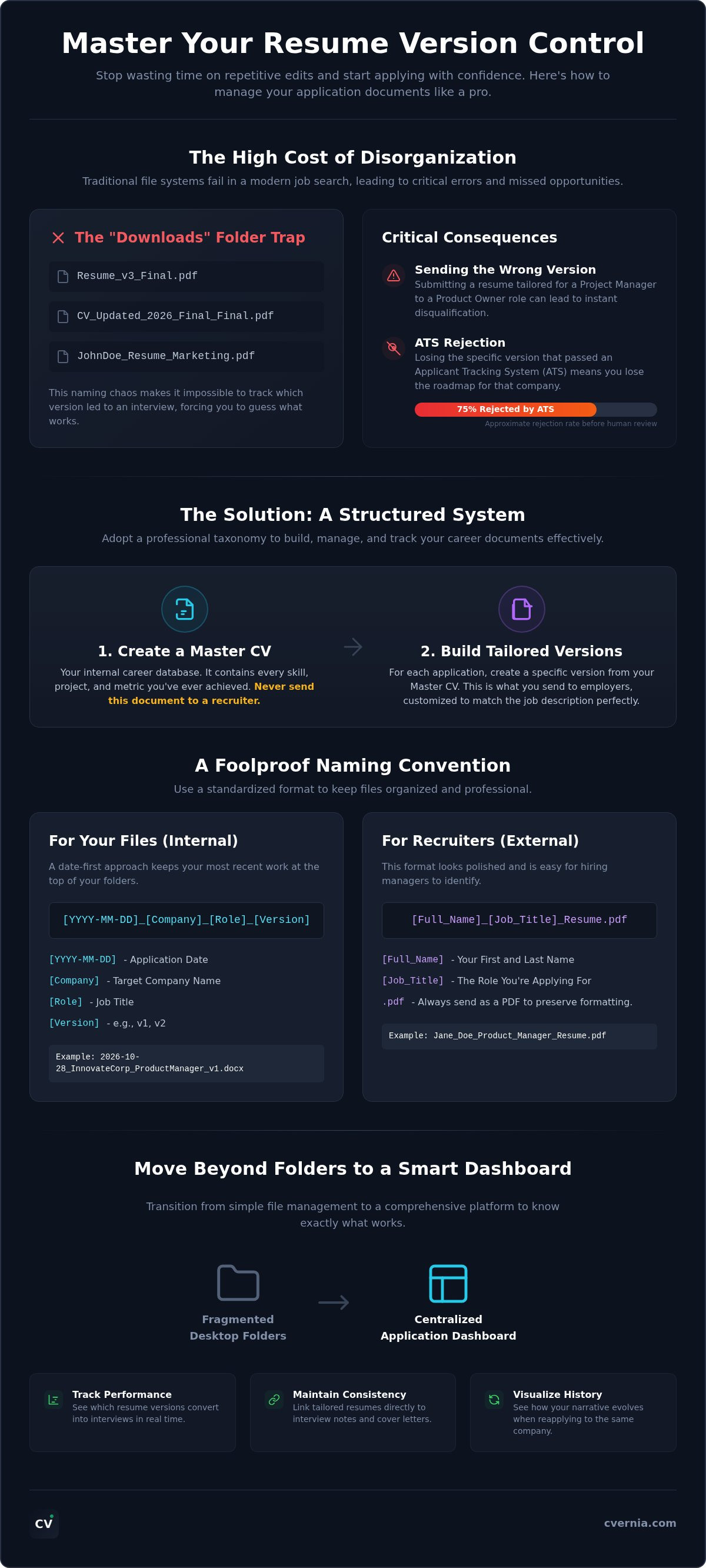
Stop relying on your "Downloads" folder as a professional strategy. It is a recipe for disaster. When you are managing dozens of applications, traditional file systems quickly crumble under the weight of multiple versions. You eventually end up with a digital graveyard of documents like "Resume_v3_Final_Updated.pdf." This naming chaos makes tracking resume performance nearly impossible. You simply cannot remember which specific tweaks led to which interview invitation. Software developers solved this problem decades ago using version control systems; it is time you applied that same level of rigor to your career documents.
Sending the wrong version is more than a minor hiccup. It is a critical error. If you accidentally send a resume tailored for a Project Manager role to a Product Owner posting, you have essentially disqualified yourself. Research shows that approximately 75% of resumes are rejected by Applicant Tracking Systems (ATS) before a human ever sees them. If you lose the specific version that successfully triggered an ATS match, you lose your roadmap for the interview. You won't know which keywords worked or which achievements resonated with the hiring algorithm, leaving you unprepared when the recruiter calls.
The Hidden Costs of Disorganized Documents
Searching for a specific bullet point you wrote months ago should not take twenty minutes. That is valuable time you could spend researching company culture or preparing for technical questions. Beyond the clock, the psychological weight of disorganization is heavy. That nagging doubt after clicking "Submit" drains the energy you need to stay motivated during a long search. You also miss out on smart reapplication opportunities. Without a clear history, you cannot see how your CV has evolved for a specific company over time, making it harder to show professional growth in future attempts.
The Disconnect Between Files and Context
A filename like "Resume_Marketing_2026.pdf" lacks sufficient context for a modern job search. It tells you nothing about the job description it was designed to match or the specific company needs it addressed. High-volume searching requires a direct link between the document and the job posting. Transitioning from simple file management to a comprehensive Career Application Management Platform ensures your context is never lost. By tracking resume performance within a centralized dashboard like CVernia, you move from guessing what works to knowing exactly which version converts into an interview.
Building a Professional Taxonomy: Naming and Categorizing Your CVs
Organization is not just about storage. It is about retrieval. When you are managing a high-volume job search in 2026, you need a system that allows you to identify the right document in seconds. A professional taxonomy prevents the "Final_Final" naming trap and ensures your files remain organized across all your devices. This level of organization is the foundation for tracking resume performance, as it allows you to attribute specific interview invites to the exact version you submitted. Without a clear naming rule, you are simply guessing which strategy worked.
Start by distinguishing between your Master CV and your Tailored Versions. Your Master CV is an internal career database. It contains every project, certification, and metric you have ever achieved. You should never send this document to a recruiter. Instead, use it as a source to build tailored versions. Ensure these versions remain a truthful representation of your experience. Honesty is non-negotiable in a modern job market that prioritizes skills-based hiring. Create a clear distinction between what you see in your folders and what the hiring manager sees in their inbox.
A Foolproof Naming Convention Template
Use a standardized format for your internal files to prevent accidental overwrites. A date-first approach keeps your most recent work at the top of your folder. Adopt these two formats to maintain clarity:
- Internal Format: [YYYY-MM-DD]_[Company]_[Role]_[Version]. This tells you exactly when and where the document went.
- External Format: [Full_Name]_[Job_Title]_Resume.pdf. This looks polished and professional to a recruiter.
Always export your final version as a PDF. This format preserves your layout and ensures that Applicant Tracking Systems can parse your data accurately. You can manage these documents and your application history through CVernia to keep your professional brand consistent and accessible.
Categorizing by Industry and Seniority
Efficiency comes from preparation. Develop "Skeleton" resumes for the different career paths you are pursuing. If you are applying for both "Technical Lead" and "Engineering Manager" roles, your skeletons will emphasize different skill clusters. When applying for specialized positions, such as those following federal resume guidelines, having a pre-organized skeleton allows you to meet strict formatting requirements without starting from scratch. By tracking resume performance for each skeleton, you can quickly identify which career narrative is generating the most interest from employers.
Mapping Versions to Intent: Organizing by Industry, Role, and Seniority
Intentionality is the bridge between a generic application and a signed offer. In a job market where the average role attracts over 240 applicants, you cannot afford to submit a document that only partially aligns with the hiring manager's needs. Mapping your resume versions to specific job intents allows you to speak directly to an employer's pain points. This strategic alignment is essential for tracking resume performance effectively. If you know exactly which version of your professional story you are telling, you can measure which narrative generates the highest response rate.
The Master Resume Strategy
Success begins with a comprehensive Master Resume. Think of this as your personal career database rather than a document for submission. It should be a living record that captures every project, certification, and metric you have earned throughout your career. High-quality resume targeting strategies often rely on having this deep well of information to draw from. You should never send this Master CV to an employer. Its purpose is to provide a truthful, centralized repository of data that you can filter and refine for every new opportunity. This ensures you never forget a key achievement when a dream role suddenly opens up.
Tailoring for Success: The Delta Method
You don't need to rewrite your entire resume for every application. Focus on the "Delta" instead. This represents the 20% of your content that drives 80% of the impact. Spend your energy refining the Professional Summary, the Key Skills section, and the bullet points for your two most recent roles. If you are navigating a professional shift, utilizing specific career change resume techniques will help you reframe existing skills for a new industry. Organize these content snippets in your management platform so you can swap them in and out with ease. This modular approach keeps your tailoring fast and accurate.
Maintain a golden thread of consistency across your various documents and your LinkedIn profile. While your resume versions will emphasize different strengths, the core facts must remain identical. Recruiters often cross-reference applications with social profiles; any major discrepancy in dates or titles can trigger suspicion. Ensure every version you create follows ats compliant resume standards to guarantee your tailored content actually reaches human eyes. By tracking resume performance across these different versions, you'll gain clarity on which skill clusters are your strongest assets in the current market.
Centralized Application Management: Moving Beyond Desktop Folders
Relying on local folders and static spreadsheets creates a bottleneck in your professional growth. While a spreadsheet might record a date and a company name, it fails to capture the multi-stage complexity of a modern hiring journey. You need a system that links your specific resume version, the corresponding cover letter, and your interview notes into a single, cohesive view. This integrated approach is the core of a modern job search management system. It transforms your application data from a flat list into a dynamic, searchable professional history.
A centralized platform provides one source of truth for your entire career. Instead of digging through "Sent" folders to find what you told a recruiter three weeks ago, you can access the full context of the interaction instantly. This level of organization is the only way to scale your search effectively without making clerical errors that cost you opportunities. It allows you to move with the speed and precision that the 2026 job market demands.
Cloud Storage vs. Career Platforms
Google Drive and Dropbox are excellent for general storage, but they lack the professional context required for high-volume applications. These tools are simply digital boxes. They don't know if a file was for a first-round interview or a final offer. A dedicated career platform uses relational databases to link every file directly to a specific job status. Accessibility is also a major factor. Having your resumes ready on any device allows for instant updates when a recruiter calls you unexpectedly. You can manage your application pipeline with CVernia to ensure you're always prepared, regardless of where you are.
Visualizing Your Application Pipeline
A centralized dashboard does more than store files; it provides strategic clarity. By tracking resume performance through a visual pipeline, you can see which versions are landing interviews and which are being ignored. This data-driven perspective allows you to optimize your tailoring strategy in real time. If one specific CV version has a higher response rate than others, you can analyze its success and apply those elements to other roles. High-volume searching requires this level of analytical rigor to stay competitive.
Managing attachments is equally important. Recruiters often look for portfolios, certifications, and writing samples alongside your CV. A centralized platform keeps these attachments linked to the specific versions they support. This prevents the embarrassment of sending an outdated portfolio with a modern resume. By tracking resume performance alongside these supporting documents, you build a comprehensive map of your professional success. You move from reactive searching to proactive career management.
Leveraging CVernia for Effortless Version Management and Tracking
CVernia acts as your intelligent digital mentor. It replaces the anxiety of manual filing with an automated, high-performance dashboard designed for the modern professional. By tracking resume performance through our centralized system, you gain an objective view of your professional narrative. You'll see which versions open doors and which need further alignment. This approach moves you from a state of uncertainty to one of total readiness, ensuring you're always prepared when a dream opportunity arises.
Managing multiple versions doesn't have to be a full-time job. Our platform streamlines the mechanics of recruitment, allowing you to focus on your personal branding. It provides a strategic advantage by organizing your data in a way that mirrors your actual workflow. You can stop worrying about the "Final_Final" trap and start applying with professional confidence.
Smart Versioning and Reapplication
Never let an old or incorrect version haunt your future applications. CVernia’s Smart Reapplication Detection allows you to see your complete history with any specific employer at a single glance. This is vital because nearly 70% of employers now prioritize skills-based hiring. You can analyze how your CV has evolved and improved over multiple interactions with the same company. Understanding how applicant tracking systems work is only half the battle. You must also track your own progress against those bots to ensure your truth-focused tailoring actually lands on a human's desk.
The CVernia Workflow: From Master to Tailored
Transform your Master CV into a tailored masterpiece in minutes. Our platform facilitates truthful tailoring by highlighting where your real-world experience aligns best with specific job requirements. We never suggest inventing experience; we focus on clarity and alignment. Once you've sent your document, link it directly to our job interview tracker to maintain a seamless thread of information. You can store interview notes, recruiter feedback, and portfolio attachments in one secure, searchable location.
Efficiency is the ultimate competitive advantage in 2026. By tracking resume performance and managing your versions with precision, you position yourself as an organized, high-value candidate. Stop fighting your file system and start focusing on your career growth. Start organizing your career with CVernia today and experience the confidence that comes with being perfectly prepared for every opportunity.
Take Control of Your Career Narrative Today
Mastering your document organization is the final step in moving from application chaos to professional readiness. You've learned how a standardized taxonomy prevents critical errors and why mapping your CV versions to specific job intents is vital for success. By moving beyond fragmented desktop folders, you gain the clarity needed for tracking resume performance across every role you pursue. This data-driven approach ensures that your most effective professional story is always the one that reaches the recruiter.
CVernia stands as your strategic ally in this journey. Our platform offers smart reapplication detection and a centralized dashboard for all your attachments. You can rely on our ATS compatibility scoring to verify your alignment with modern hiring standards before you hit submit. It's time to replace the stress of file management with the confidence of a perfectly organized search.
Master your application journey with CVernia’s version management tools and turn your career history into your greatest competitive advantage. You have the talent; we'll help you organize it for the world to see.
Frequently Asked Questions
How many versions of my resume should I actually have?
Keep one comprehensive Master CV as your career database and two to four "skeleton" versions for different job categories. For example, if you're a marketer, have one version for Content Strategy and another for Growth Marketing. You don't need hundreds of files; just a solid foundation you can tweak for specific applications. This approach makes tracking resume performance manageable while ensuring your narrative remains focused and professional.
Should I rename my resume for every single job application?
Rename your file for every external submission to maintain a professional image. Use a clean format like "[Full Name] [Job Title] Resume.pdf" for the recruiter's benefit. Internally, you should use a more detailed naming convention that includes the company name and date. This dual-naming strategy prevents you from accidentally sending the wrong version and helps you stay organized across multiple application portals without losing your data.
Is it okay to have different skills listed on different resume versions?
It's perfectly acceptable to emphasize different skill sets depending on the specific job requirements. If a role prioritizes project management, lead with those abilities. If another role focuses on technical execution, highlight your hard skills. Always ensure every skill listed is a truthful representation of your experience. CVernia focuses on truthful tailoring, so avoid inventing qualifications just to match a description. Alignment is about emphasis, not fabrication.
How do I track which resume version I sent to which recruiter?
Use a centralized dashboard rather than a complex spreadsheet to manage your history. A dedicated platform links your specific file version directly to the job status and recruiter contact info. This creates a single source of truth for your entire search. You'll never have to guess which bullet points a recruiter is looking at during a phone screen. It's the most efficient way of tracking resume performance and response rates over time.
Can I use the same resume for two different job titles in the same industry?
Only use the same resume if the job descriptions are nearly identical in their required competencies. Even within the same industry, a Marketing Manager role often differs significantly from a Brand Strategist role. Tailoring the top 20% of your resume ensures you address the specific intent of the hiring manager. Small adjustments to your professional summary and key skills can make a massive difference in your interview success rate.
What is the best way to save my resume versions: PDF or Word?
Always submit your final version as a PDF to preserve your formatting and ensure ATS compatibility. Word documents can shift or look different depending on the recruiter's software version. Keep your Master CV in a Word or cloud-based format for easy editing, but export a clean PDF for every application. This professional standard ensures that your carefully tailored layout remains intact once it reaches the hiring team's screen for review.
How does version management help with Applicant Tracking Systems (ATS)?
Version management allows you to improve your compatibility score by aligning your truthful experience with specific ATS keywords. By tracking which versions pass the initial filters, you can refine your tailoring strategy for future roles. Modern systems look for precise matches between your skills and the job description. Organizing your versions helps you identify the specific phrasing and formatting that successfully triggers a match without compromising your professional integrity or honesty.
What happens if a recruiter finds two different versions of my resume online?
Recruiters understand that candidates tailor their resumes for different roles. As long as your work history, dates, and core titles are consistent across all versions, you won't trigger suspicion. Problems only arise if you claim different degrees or conflicting job responsibilities. Ensure your LinkedIn profile acts as your primary anchor, and use your tailored versions to highlight the specific strengths most relevant to the role you're currently discussing with them.


